
SMS Control Center - X 64-bit Download
Popular x64 Tags
- skype x64 download
- voip x64 download
- softphone x64 download
- call x64 download
- software x64 download
- record x64 download
- tapi x64 download
- answering machine x64 download
- download x64 download
- recorder x64 download
- voip phone system x64 download
- phone x64 download
- outlook x64 download
- call recording x64 download
- caller id x64 download
- sms x64 download
- mobile x64 download
- modem x64 download
- soft phone x64 download
- voice x64 download
- telephone x64 download
- voicemail x64 download
- contacts x64 download
- speech x64 download
- reverse x64 download
- pabx x64 download
- dll x64 download
- cid x64 download
- lookup x64 download
- callerid x64 download
SMS Control Center 4.0
Sponsored links:

Kellner Data

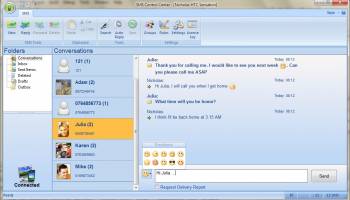
SMS Control Center allows you to create, send and receive SMS from PC via mobile phone connected to Windows Mobile Device Center (or ActiveSync) to all national or International Mobile Networks.
Send SMS
Easily create and send SMS to any number of receivers from your desktop. Choose contacts from device, Outlook, favorites, groups or latest used contacts. Latest version also supports spell checking (MS Word is required).
Receive SMS
Receive all your incoming SMS to the desktop just as an e-mail message. If you like you can easily create an answer or forward the message. Right-click on the SMS item to create an appointment or a note.
Syncronized Folders
Manage all your SMS from the desktop. You can delete or move messages between folders. All synchronizations runs in background. You will also able to see all your conversations in a special folder.
Rules
You can set up different rules for incoming SMS. Choose between automatic answer, forward, e-mail, show message in fullscreen, move message to a folder, execute an application with parameters or play a sound.
Search & Print
Search for text in your messages. You can search in current or all folders. Print and print preview the current message.
Export & Import
Export and import your SMS to a XML-file. You can save a backup of all your SMS and restore them at any time, and any device connected to SMS Control Center.
Phone Profiles
If you have more than one phone SMS Control Center automatically switches between different profiles when the phone is connected to Windows Mobile Device Center (ActiveSync).
Notifications
When an SMS arrives you will get a fade-in/fade-out notification window at the lower right with the message text.
Send SMS
Easily create and send SMS to any number of receivers from your desktop. Choose contacts from device, Outlook, favorites, groups or latest used contacts. Latest version also supports spell checking (MS Word is required).
Receive SMS
Receive all your incoming SMS to the desktop just as an e-mail message. If you like you can easily create an answer or forward the message. Right-click on the SMS item to create an appointment or a note.
Syncronized Folders
Manage all your SMS from the desktop. You can delete or move messages between folders. All synchronizations runs in background. You will also able to see all your conversations in a special folder.
Rules
You can set up different rules for incoming SMS. Choose between automatic answer, forward, e-mail, show message in fullscreen, move message to a folder, execute an application with parameters or play a sound.
Search & Print
Search for text in your messages. You can search in current or all folders. Print and print preview the current message.
Export & Import
Export and import your SMS to a XML-file. You can save a backup of all your SMS and restore them at any time, and any device connected to SMS Control Center.
Phone Profiles
If you have more than one phone SMS Control Center automatically switches between different profiles when the phone is connected to Windows Mobile Device Center (ActiveSync).
Notifications
When an SMS arrives you will get a fade-in/fade-out notification window at the lower right with the message text.
OS: Windows XP, Windows Vista, Windows Vista x64, Windows 7, Windows 7 x64, Windows Mobile 2003, Windows Mobile 2005, Windows Mobile 6, Pocket PC, Handheld/Mobile Other
Add Your Review or 64-bit Compatibility Report
Top Telephony 64-bit downloads


MOBILedit Forensic Express 7.4.1.21502
All-in-one tool with an extremely easy to use interface
Demo | $1 500.00


Samsung Kies 3 3.2.16084_2
Connects your PC to your phone, making it easier for you to synchronise data
Freeware

Mobile Master 9.0.2
The mobile phone and sync tool for your mobile/cell phone, handset
Shareware | $27.99
tags: mobile, cell phone, sync, contacts, addresses, smartphone, iPhone, phone, numbers, calendar, outlook, express, palm desktop, lotus notes, mozilla, thunderbird, windows address book, SMS, PIM, Siemens, Sony Ericsson, Nokia, Samsung
Members area
Top 64-bit Downloads
-
MOBILedit Forensic
Express 7.4.1.21502
x64 demo download -
Miranda IM (x64 bit) 0.10.80.0
x64 open source download -
Linphone 5.0.8
x64 freeware download -
MAPIViewer 64-bit 3.4
x64 freeware download -
Funambol x64 10.0.3
x64 open source download -
Tweetings x64 1.4.5.0
x64 freeware download -
Betterbird 115.10.0-bb27
x64 freeware download -
Netcam Studio x64 1.9.5.0
x64 freeware download -
Xeoma x64 23.12.7
x64 freeware download -
Wirecast 16.2
x64 shareware download
Top Downloads
-
Skype 8.118.0.205
open source download -
WhatsApp for PC 2.2417.4.0
freeware download -
Camfrog Video Chat 7.9.2 B40860
freeware download -
MOBILedit Forensic
Express 7.4.1.21502
demo download -
DroidCam 6.5.2
freeware download -
Squiggle LAN Messenger 3.4
open source download -
Telegram Desktop 5.0.1
open source download -
Microsoft Outlook 2010 14.0.4760.1000
trialware download -
Nokia PC Suite 7.1.180.94
freeware download -
Vysor 2.3.2
demo download -
MicroSIP 3.21.3
open source download -
Trillian 6.5.0.38
freeware download -
Miranda IM (x64 bit) 0.10.80.0
open source download -
SMS Modem Gateway 9.2.1.0
shareware download -
Bulk SMS GSM Mobile 9.2.1.0
shareware download