
AutoClose - X 64-bit Download
Popular x64 Tags
- menu x64 download
- control x64 download
- run x64 download
- start x64 download
- hotkey x64 download
- security x64 download
- taskbar x64 download
- windows x64 download
- launch x64 download
- task manager x64 download
- desktop x64 download
- launcher x64 download
- shortcut x64 download
- application x64 download
- fast x64 download
- program x64 download
- tray x64 download
- startup x64 download
- manager x64 download
- utility x64 download
- process x64 download
- performance x64 download
- antivirus x64 download
- macro x64 download
- 2000 x64 download
- spyware x64 download
- anti spyware x64 download
- virus x64 download
- trojan remover x64 download
- trojan x64 download
AutoClose 3.4.5
Sponsored links:
license: Demo
downloads: 75
size: 1.90 MB
updated: 2024-10-08
tags: software, download AutoClose, automation, scheduling, automate, productivity, application scheduler, schedule, app scheduler, program scheduler, AutoClose free download, AutoClose, scheduler, task management
Add to Basket

AutoClose

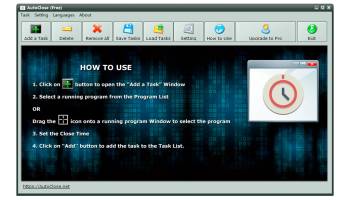
AutoClose is an innovative software solution designed to streamline your computer's workflow by automating the process of closing applications. Developed by the team at AutoClose, this tool is perfect for users who want to enhance their productivity and maintain a clutter-free digital workspace effortlessly.
At its core, AutoClose offers a straightforward yet powerful functionality: it allows users to schedule the automatic closure of applications at specified times. This feature is particularly beneficial for those who often leave programs running unintentionally, which can lead to unnecessary resource consumption and potential security risks. By setting up a schedule, users can ensure that their system remains optimized and secure without manual intervention.
The interface of AutoClose is user-friendly and intuitive, making it accessible to both tech-savvy individuals and those less familiar with automation tools. The software provides a clear, organized layout where users can easily add applications to their closure list, set timers, or specify conditions under which programs should be terminated. This simplicity does not come at the expense of functionality, as AutoClose supports a wide range of customization options to cater to diverse user needs.
One of the standout features of AutoClose is its ability to handle multiple tasks simultaneously. Users can create complex schedules involving different applications, each with unique closure criteria. This flexibility is ideal for professionals who rely on various software tools throughout their workday and need a tailored approach to managing them efficiently.
Moreover, AutoClose is designed with resource efficiency in mind. It operates with minimal system impact, ensuring that your computer's performance remains unaffected while the software runs in the background. This lightweight nature makes it suitable for both high-performance machines and older systems that require careful resource management.
Security is another critical aspect where AutoClose excels. By automatically closing applications that are no longer in use, the software helps reduce potential vulnerabilities that could be exploited by malicious actors. This proactive approach to security is a valuable addition for users who prioritize data protection and system integrity.
In addition to its core functionalities, AutoClose offers a range of supplementary features that enhance its utility. These include options for setting up alerts before applications are closed, allowing users to save their work or adjust settings as needed. The software also supports batch processing, enabling users to apply the same closure rules to multiple applications simultaneously.
In summary, AutoClose is a versatile and efficient tool for anyone looking to automate the management of their computer applications. Its combination of ease of use, robust scheduling capabilities, and focus on security and performance make it a standout choice in the realm of automation software. Whether you're a busy professional seeking to optimize your workflow or a casual user aiming to keep your system tidy, AutoClose provides a reliable solution tailored to your needs.
At its core, AutoClose offers a straightforward yet powerful functionality: it allows users to schedule the automatic closure of applications at specified times. This feature is particularly beneficial for those who often leave programs running unintentionally, which can lead to unnecessary resource consumption and potential security risks. By setting up a schedule, users can ensure that their system remains optimized and secure without manual intervention.
The interface of AutoClose is user-friendly and intuitive, making it accessible to both tech-savvy individuals and those less familiar with automation tools. The software provides a clear, organized layout where users can easily add applications to their closure list, set timers, or specify conditions under which programs should be terminated. This simplicity does not come at the expense of functionality, as AutoClose supports a wide range of customization options to cater to diverse user needs.
One of the standout features of AutoClose is its ability to handle multiple tasks simultaneously. Users can create complex schedules involving different applications, each with unique closure criteria. This flexibility is ideal for professionals who rely on various software tools throughout their workday and need a tailored approach to managing them efficiently.
Moreover, AutoClose is designed with resource efficiency in mind. It operates with minimal system impact, ensuring that your computer's performance remains unaffected while the software runs in the background. This lightweight nature makes it suitable for both high-performance machines and older systems that require careful resource management.
Security is another critical aspect where AutoClose excels. By automatically closing applications that are no longer in use, the software helps reduce potential vulnerabilities that could be exploited by malicious actors. This proactive approach to security is a valuable addition for users who prioritize data protection and system integrity.
In addition to its core functionalities, AutoClose offers a range of supplementary features that enhance its utility. These include options for setting up alerts before applications are closed, allowing users to save their work or adjust settings as needed. The software also supports batch processing, enabling users to apply the same closure rules to multiple applications simultaneously.
In summary, AutoClose is a versatile and efficient tool for anyone looking to automate the management of their computer applications. Its combination of ease of use, robust scheduling capabilities, and focus on security and performance make it a standout choice in the realm of automation software. Whether you're a busy professional seeking to optimize your workflow or a casual user aiming to keep your system tidy, AutoClose provides a reliable solution tailored to your needs.
OS: Windows 11, Windows Server 2016, Windows 10 32/64 bit, Windows Server 2012, Windows 8 32/64 bit, Windows 7 32/64 bit, Windows Vista, Windows XP 32/64 bit
Add Your Review or 64-bit Compatibility Report
Top Launchers & Task Managers 64-bit downloads


StartGen 4.0
Create innovative personal start menus, generate mobile start page & collaborate
Freeware


Advanced Recent Access 13.0
Advanced Recent Access is designed to see more details of recent used resources
Shareware | $19.99

SD QuickExec 3.0
The fastest and easiest way to run all of your favorite programs!
Shareware | $14.95
tags: System tool, Launcher, SoftDigi, System Utilities, QuickExec, application, exec, program, execute


Members area
Top 64-bit Downloads
-
XtraTools Professional
x64 26.2.1
x64 shareware download -
O&O DiskRecovery x64 14.0.17
x64 demo download -
Windows 7 x64
x64 trialware download -
EasyTune6 B24.0119.1
x64 freeware download -
O&O Defrag Free
Edition x64 14.1 B431
x64 freeware download -
PKZIP 64-bit 14.40.0028
x64 trialware download -
PhotoRenamer 4.1
x64 freeware download -
Laplink DiskImage
Professional x64 10.0.71
x64 trialware download -
XnShell x64 4.1.10
x64 freeware download -
JPEG Recovery LAB 4.43
x64 commercial download
Top Downloads
-
AutoHideMouseCursor 6.16
freeware download -
ClipClip 2.3.4704
freeware download -
Convert EML extension to
PDF 5.1.1
shareware download -
Import MBOX files into
Outlook 2.0.1
shareware download -
Converting Zimbra Email
to PDF 3.5.4
shareware download -
Convert Zimbra to PST 6.1
shareware download -
Convert EML emails to
PDF 7.5
shareware download -
Birdie Windows Live Mail
to PDF Converter 3.0.4
shareware download -
Move Windows Live Mail
to PDF 3.0
shareware download -
Fast Email Search
Program 1.3
shareware download -
EML in PDF 6.9.4
shareware download -
Convert PST to PDF Adobe 7,0
shareware download -
Convert Email File to
PDF 3.0
shareware download -
FixVare TGZ to PST
Converter 2.0
shareware download -
DVDInfo 1.0.1r5
freeware download