
Code::Blocks for Windows - X 64-bit Download
Popular x64 Tags
- compile x64 download
- compiler x64 download
- pascal x64 download
- web site x64 download
- web site management x64 download
- sitemaps generator x64 download
- ide x64 download
- python debugger x64 download
- visual studio x64 download
- python x64 download
- programming x64 download
- debug x64 download
- software x64 download
- create application x64 download
- development x64 download
- python ide x64 download
- wingware x64 download
- language x64 download
- browser x64 download
- vb net x64 download
- debugger x64 download
- audio processing x64 download
- free controls x64 download
- improve x64 download
- java ide x64 download
- development environment x64 download
- javascript x64 download
- parser x64 download
- dll x64 download
- code optimization x64 download
Code::Blocks for Windows 20.03 Build Apr 3 20
Sponsored links:
license: Open Source
downloads: 136
size: 145.00 MB
updated: 2024-07-31
tags: editor, Code::Blocks, C++ compiler, programming, Code::Blocks free download, build, IDE, C++ IDE, cross-platform, Yiannis, Fortran IDE, open-source, compiler, download Code::Blocks
Add to Basket

Yiannis

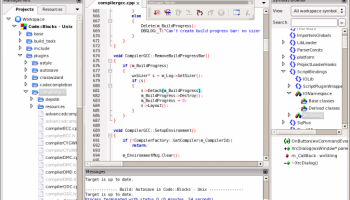
Code::Blocks, developed by Yiannis, is a versatile and robust Integrated Development Environment (IDE) that caters to the needs of both novice and experienced programmers. Designed with flexibility and user-friendliness in mind, Code::Blocks stands out as a powerful tool for C, C++, and Fortran development.
One of the most compelling features of Code::Blocks is its modular architecture, which allows users to extend its capabilities through plugins. This means that the IDE can be customized to fit the specific needs of any project, making it a highly adaptable tool in a programmer's arsenal. The plugin system is intuitive, enabling seamless integration of additional functionalities without disrupting the core performance of the IDE.
The user interface of Code::Blocks is clean and well-organized, providing an efficient workspace that minimizes distractions. The IDE supports multiple compilers, including GCC, Clang, and Visual C++, ensuring compatibility with various development environments. This multi-compiler support is particularly beneficial for developers working on cross-platform projects, as it simplifies the process of testing and deploying code across different systems.
Code::Blocks also excels in its debugging capabilities. The built-in debugger is powerful and easy to use, offering features such as breakpoints, watch variables, and call stack navigation. These tools are essential for identifying and resolving issues in the code, making the debugging process more efficient and less time-consuming.
Another notable feature is the Code::Blocks' project management system. It allows developers to organize their code files, resources, and dependencies in a coherent structure, facilitating better project management and collaboration. The IDE also supports version control systems, which is crucial for team-based development and maintaining code integrity over time.
Performance-wise, Code::Blocks is lightweight and fast, even when handling large projects. It is designed to be responsive and stable, ensuring that developers can work without interruptions or delays. The IDE's performance is complemented by its comprehensive set of editing tools, including syntax highlighting, code folding, and auto-completion, which enhance productivity and reduce the likelihood of errors.
Code::Blocks is also an open-source project, which means it benefits from continuous improvements and contributions from a global community of developers. This collaborative approach ensures that the IDE remains up-to-date with the latest programming standards and practices.
In summary, Code::Blocks by Yiannis is a highly efficient and customizable IDE that offers a rich set of features for C, C++, and Fortran development. Its modular design, multi-compiler support, powerful debugging tools, and excellent project management capabilities make it an ideal choice for developers seeking a reliable and versatile development environment. Whether you are a beginner or a seasoned programmer, Code::Blocks provides the tools you need to write, debug, and manage your code effectively.
One of the most compelling features of Code::Blocks is its modular architecture, which allows users to extend its capabilities through plugins. This means that the IDE can be customized to fit the specific needs of any project, making it a highly adaptable tool in a programmer's arsenal. The plugin system is intuitive, enabling seamless integration of additional functionalities without disrupting the core performance of the IDE.
The user interface of Code::Blocks is clean and well-organized, providing an efficient workspace that minimizes distractions. The IDE supports multiple compilers, including GCC, Clang, and Visual C++, ensuring compatibility with various development environments. This multi-compiler support is particularly beneficial for developers working on cross-platform projects, as it simplifies the process of testing and deploying code across different systems.
Code::Blocks also excels in its debugging capabilities. The built-in debugger is powerful and easy to use, offering features such as breakpoints, watch variables, and call stack navigation. These tools are essential for identifying and resolving issues in the code, making the debugging process more efficient and less time-consuming.
Another notable feature is the Code::Blocks' project management system. It allows developers to organize their code files, resources, and dependencies in a coherent structure, facilitating better project management and collaboration. The IDE also supports version control systems, which is crucial for team-based development and maintaining code integrity over time.
Performance-wise, Code::Blocks is lightweight and fast, even when handling large projects. It is designed to be responsive and stable, ensuring that developers can work without interruptions or delays. The IDE's performance is complemented by its comprehensive set of editing tools, including syntax highlighting, code folding, and auto-completion, which enhance productivity and reduce the likelihood of errors.
Code::Blocks is also an open-source project, which means it benefits from continuous improvements and contributions from a global community of developers. This collaborative approach ensures that the IDE remains up-to-date with the latest programming standards and practices.
In summary, Code::Blocks by Yiannis is a highly efficient and customizable IDE that offers a rich set of features for C, C++, and Fortran development. Its modular design, multi-compiler support, powerful debugging tools, and excellent project management capabilities make it an ideal choice for developers seeking a reliable and versatile development environment. Whether you are a beginner or a seasoned programmer, Code::Blocks provides the tools you need to write, debug, and manage your code effectively.
OS: Windows 11, Windows 10 64 bit, Windows 8 64 bit, Windows 7 64 bit
Add Your Review or 64-bit Compatibility Report
Top Compilers & Interpreters 64-bit downloads


Python 3.14.3
Python: Versatile, high-level programming language for web, data, and automation.
Open Source

Intel Visual Fortran Composer XE 2015.2.179
A comprehensive set of software development tools
Trialware | $299.00

Portable Sikuli X 1.0 RC3
A visual technology to automate and test graphical user interfaces
Freeware

RAD Studio 13 Version 37.0
Rapidly create high-performance applications for multiple platforms with RAD Studio.
Trialware | $2 804.00

Understand 7.2 Build 1244
Understand: Advanced static analysis tool for code comprehension and quality.
Demo

OpenWire Studio 8.0
Graphical and data flow codeless programming development environment
Shareware | $99.00

Members area
Top 64-bit Downloads
-
Android NDK x64 Revision 26d
x64 freeware download -
PilotEdit Pro x64 20.6.0
x64 shareware download -
Scanner Pro SDK ActiveX
x64 1.0
x64 shareware download -
install4j x64 10.0.6
x64 trialware download -
dirtyJOE x64 1.7 (c529)
x64 freeware download -
MADARA for Windows x64
bit 3.0.0
x64 open source download -
Racket 64bit 8.13
x64 freeware download -
psutil for Windows Vista
(x64 bit) 5.6.5
x64 open source download -
Java Service Wrapper
Professional Edition x64 3.5.25
x64 shareware download -
OraBone x64 8.5.0
x64 freeware download
Top Downloads
-
NASM 2.16.01
open source download -
VMProtect Ultimate 2.13.2
demo download -
Devart UniDAC 11.0.0
shareware download -
Precision Language Suite 2.5
freeware download -
Android Studio 2025.3.1 Panda 1
freeware download -
Zlib 1.3.1
freeware download -
OllyDbg 2.01
freeware download -
Android NDK x64 Revision 26d
freeware download -
PyScripter Portable 4.3.4
open source download -
PHP 8.5.3
open source download -
Devart ODAC 14.0.0
shareware download -
TMS FNC UI Pack 1.0.0.0
shareware download -
.NET FTP Library 8.05
shareware download -
Help+Manual 10.1.0
shareware download -
JProfiler 15.0.4
trialware download