
DesktopClock3D - X 64-bit Download
Popular x64 Tags
- countdown x64 download
- alarm x64 download
- alarm clock x64 download
- tray x64 download
- free x64 download
- software x64 download
- desktop x64 download
- clock x64 download
- tray clock x64 download
- analog x64 download
- windows x64 download
- timer x64 download
- date x64 download
- time x64 download
- taskbar clock x64 download
- reminder x64 download
- freeware x64 download
- stopwatch x64 download
- mp3 x64 download
- calendar x64 download
- download x64 download
- schedule x64 download
- count x64 download
- kitchen x64 download
- watch x64 download
- taskbar x64 download
- assembly x64 download
- scheduler x64 download
- synchronization x64 download
- sinner x64 download
DesktopClock3D 2.44
Sponsored links:
license: Freeware
downloads: 49
size: 164 kB
updated: 2026-02-19
tags: DesktopClock3D, download DesktopClock3D, DesktopClock3D free download, Desktop Clock, 3D Clock, View Clock, Clock, Watch, Time, Desktop
Add to Basket

Nenad Hrg

**DesktopClock3D by Nenad Hrg: A Fresh Take on Timekeeping**
DesktopClock3D, developed by the innovative Nenad Hrg, is a visually captivating and highly functional software that redefines the traditional desktop clock. This free utility brings a new dimension to timekeeping, blending aesthetics with practicality in a seamless manner.
**Stunning 3D Visuals**
One of the standout features of DesktopClock3D is its impressive 3D graphics. The clock is not just a static display; it boasts dynamic, real-time rendering that adds a touch of sophistication to any desktop environment. The 3D effect is smooth and realistic, making it a pleasure to glance at your screen. Whether you're working on a project or simply browsing the web, the clock's elegant design is a constant reminder of the time without being intrusive.
**Customization at Its Best**
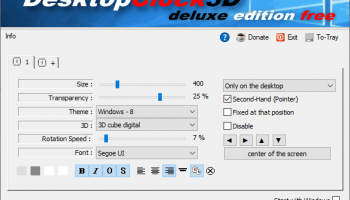
DesktopClock3D offers a plethora of customization options, allowing users to tailor the clock to their personal preferences. You can choose from various clock faces, hands, and backgrounds, ensuring that the clock complements your desktop theme perfectly. The software also provides options to adjust the size and position of the clock, making it versatile enough to fit any screen setup.
**User-Friendly Interface**
Nenad Hrg has designed DesktopClock3D with user experience in mind. The interface is intuitive and straightforward, allowing even novice users to navigate and customize the clock with ease. The settings menu is well-organized, providing quick access to all customization options and features. This user-friendly approach ensures that you can set up and start using the clock in no time.
**Performance and Efficiency**
Despite its advanced graphics, DesktopClock3D is remarkably light on system resources. It runs smoothly without causing any noticeable lag or slowdown, even on older machines. This efficiency makes it an ideal choice for users who want a visually appealing clock without compromising their system's performance.
**Practical Features**
Beyond its aesthetic appeal, DesktopClock3D includes several practical features that enhance its functionality. The clock can display the current date and day of the week, providing all the essential time-related information at a glance. Additionally, it supports multiple time zones, making it a valuable tool for users who need to keep track of time in different parts of the world.
**Regular Updates and Support**
Nenad Hrg is known for his commitment to improving his software, and DesktopClock3D is no exception. The software receives regular updates that introduce new features, enhancements, and bug fixes. This ongoing support ensures that the clock remains reliable and up-to-date with the latest advancements in technology.
**Conclusion**
In summary, DesktopClock3D by Nenad Hrg is a remarkable piece of software that combines stunning 3D visuals with practical timekeeping features. Its high level of customization, user-friendly interface, and efficient performance make it a standout choice for anyone looking to enhance their desktop experience. Whether you need a simple clock or a sophisticated timekeeping tool, DesktopClock3D delivers on all fronts, making it a must-have utility for your desktop.
DesktopClock3D, developed by the innovative Nenad Hrg, is a visually captivating and highly functional software that redefines the traditional desktop clock. This free utility brings a new dimension to timekeeping, blending aesthetics with practicality in a seamless manner.
**Stunning 3D Visuals**
One of the standout features of DesktopClock3D is its impressive 3D graphics. The clock is not just a static display; it boasts dynamic, real-time rendering that adds a touch of sophistication to any desktop environment. The 3D effect is smooth and realistic, making it a pleasure to glance at your screen. Whether you're working on a project or simply browsing the web, the clock's elegant design is a constant reminder of the time without being intrusive.
**Customization at Its Best**
DesktopClock3D offers a plethora of customization options, allowing users to tailor the clock to their personal preferences. You can choose from various clock faces, hands, and backgrounds, ensuring that the clock complements your desktop theme perfectly. The software also provides options to adjust the size and position of the clock, making it versatile enough to fit any screen setup.
**User-Friendly Interface**
Nenad Hrg has designed DesktopClock3D with user experience in mind. The interface is intuitive and straightforward, allowing even novice users to navigate and customize the clock with ease. The settings menu is well-organized, providing quick access to all customization options and features. This user-friendly approach ensures that you can set up and start using the clock in no time.
**Performance and Efficiency**
Despite its advanced graphics, DesktopClock3D is remarkably light on system resources. It runs smoothly without causing any noticeable lag or slowdown, even on older machines. This efficiency makes it an ideal choice for users who want a visually appealing clock without compromising their system's performance.
**Practical Features**
Beyond its aesthetic appeal, DesktopClock3D includes several practical features that enhance its functionality. The clock can display the current date and day of the week, providing all the essential time-related information at a glance. Additionally, it supports multiple time zones, making it a valuable tool for users who need to keep track of time in different parts of the world.
**Regular Updates and Support**
Nenad Hrg is known for his commitment to improving his software, and DesktopClock3D is no exception. The software receives regular updates that introduce new features, enhancements, and bug fixes. This ongoing support ensures that the clock remains reliable and up-to-date with the latest advancements in technology.
**Conclusion**
In summary, DesktopClock3D by Nenad Hrg is a remarkable piece of software that combines stunning 3D visuals with practical timekeeping features. Its high level of customization, user-friendly interface, and efficient performance make it a standout choice for anyone looking to enhance their desktop experience. Whether you need a simple clock or a sophisticated timekeeping tool, DesktopClock3D delivers on all fronts, making it a must-have utility for your desktop.
OS: Windows Server 2025, Windows 11, Windows Server 2022, Windows Server 2019, Windows Server 2016, Windows 10 32/64 bit, Windows Server 2012, Windows 8 32/64 bit, Windows 7 32/64 bit
Add Your Review or 64-bit Compatibility Report
Top Clocks & Alarms 64-bit downloads


EarthTime 6.32.1
Visualize time zones and world clocks with stunning maps and features.
Trialware | $20.00
tags: EarthTime, download EarthTime, EarthTime free download, time zone, earth time, city time, earth, time, zone, city


AtomicClock 3.5.9.0
Accurate timekeeping app with customizable features and sleek design.
Adware | $5.99

DesktopCal 3.16.203.6639
Effortlessly organize your schedule with this intuitive desktop calendar tool.
Freeware

Hot Alarm Clock 6.4.4.1
Versatile alarm clock software with customizable features and soothing sounds.
Trialware | $29.95

Toggl Track for Chrome 4.11.10
Toggl Track for Chrome: Effortless time tracking and productivity boost.
Trialware | $9.00

DesktopDigitalClock 6.23
DesktopDigitalClock: A customizable, lightweight digital clock for your desktop.
Freeware

magayo World Time Weather (64-bit) 1.0.2.1
Delightful desktop world time clock with local weather and time converter
Freeware

Time Boss 3.38.013

Time Boss: Comprehensive parental control software for managing screen time.
Trialware | $34.95
Members area
Top 64-bit Downloads
-
Persclock 2.0
x64 freeware download -
bbLean (x64bit) 1.17.1
x64 freeware download -
Pixelscope 8
x64 freeware download -
Save.me x64 2.4.0
x64 freeware download -
TrayCD x64 1.2
x64 open source download -
KillKeys x64 1.2
x64 open source download -
VSLogonScreenCustomizer
64-bit 1.15.3.297
x64 freeware download -
magayo World Time
Weather (64-bit) 1.0.2.1
x64 freeware download -
Vanga Rengi Mangaro 1.2.7.875
x64 trialware download -
WMP12 - BLUE Theme X64
x64 freeware download
Top Downloads
-
Bonzi Buddy 1.7.0
freeware download -
Cloks and Time 2.0
demo download -
CoordiPoint 1.0
freeware download -
Limages 2.0
shareware download -
MouseScribe 1.4
trialware download -
uWidgets 0.6.0 Beta
open source download -
IconPackager 10.03
trialware download -
Persclock 2.0
freeware download -
f.lux 4.104
freeware download -
EarthTime 6.32.1
trialware download -
CamDesk 1.2.1
open source download -
Sim Aquarium FREE! 3.7.55
freeware download -
PictureRiver 1.7.4.2
shareware download -
Don't Panic Portable 3.1.0
freeware download -
iPadian 10.1
freeware download