
Florencesoft DiffEngineX - X 64-bit Download
Popular x64 Tags
- office x64 download
- microsoft x64 download
- importing x64 download
- exporting x64 download
- acrobat x64 download
- xls x64 download
- printer x64 download
- pdf x64 download
- pdf converter x64 download
- software x64 download
- word x64 download
- outlook x64 download
- excel x64 download
- powerpoint x64 download
- tool x64 download
- ppt x64 download
- adobe x64 download
- convert x64 download
- spreadsheet x64 download
- text x64 download
- create x64 download
- doc x64 download
- printing x64 download
- files x64 download
- add in x64 download
- open x64 download
- document x64 download
- data x64 download
- export x64 download
- saving x64 download
Florencesoft DiffEngineX 3.18.0.0
Sponsored links:

DiffEngineX LLC.

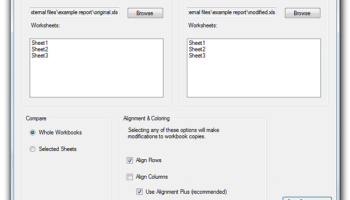
DiffEngineX is a useful utility that gives you a complete statistic on the differences between two Microsoft Excel workbooks. DiffEngineX is a utility that reports on the differences between the formulae and constants contained in either two whole Excel workbooks or selected worksheets. As Excel workbooks get modified over time new rows and columns can be inserted in between existing rows and columns.
This can confuse a straightforward difference analysis where identical cells are only recognized as such if they have the same row and column numbers in both of the sheets being compared. DiffEngineX can align both similar rows and columns between the worksheets being compared by the insertion of blank rows and columns. As such this problem is avoided.
Conventional reports listing each cell difference are difficult to understand given the lack of context. This is why there is an option to automatically create copies of the workbooks being compared and then modify them such that the differences are highlighted in color. Different colors are used to flag deletions, modifications and additions.
The options available allow users a choice between comparing formulae directly or by their calculated values. For example if two cells containing =2*6 and =3*4 are compared directly they will reported as different. If they are compared by their calculated values they will be reported as identical. It is common in workbooks modeling certain financial scenarios to have blocks of tens to hundreds of equivalent formulae that only differ from their neighbors in terms of their inputs.
The absolute coordinates of these inputs change from one cell to the next, but the relative coordinates do not. If a later version of such a workbook is compared to an earlier one, hundreds of changes can potentially be reported.
This makes a difference report tedious to inspect. DiffEngineX has a powerful feature to group equivalent changes made to contiguous cells into just one reported change made to a range of cells. It can be used from its user interface or the command prompt.
Features:
· Compare formulae & constants between workbooks or selected sheets
· Alignment of rows and/or columns with similar content between sheets (minimizes spurious differences)
· Difference report created in a new workbook
· Powerful option to highlight precisely the parts of formulae and text constants that differ on the report (=A1+Costs+6 and =A1+NewCosts+4)
· Color highlighting of differences, at the whole cell level, made to copies of your workbooks (separate colors for additions, deletions & modifications)
· Optional removal of existing workbook color before highlighting added (unconditional fill colour only)
· Choice of comparing formulae or their calculated values
· Report can group like changes if they are made to adjacent cells (report lists 1 change to a range of cells)
This can confuse a straightforward difference analysis where identical cells are only recognized as such if they have the same row and column numbers in both of the sheets being compared. DiffEngineX can align both similar rows and columns between the worksheets being compared by the insertion of blank rows and columns. As such this problem is avoided.
Conventional reports listing each cell difference are difficult to understand given the lack of context. This is why there is an option to automatically create copies of the workbooks being compared and then modify them such that the differences are highlighted in color. Different colors are used to flag deletions, modifications and additions.
The options available allow users a choice between comparing formulae directly or by their calculated values. For example if two cells containing =2*6 and =3*4 are compared directly they will reported as different. If they are compared by their calculated values they will be reported as identical. It is common in workbooks modeling certain financial scenarios to have blocks of tens to hundreds of equivalent formulae that only differ from their neighbors in terms of their inputs.
The absolute coordinates of these inputs change from one cell to the next, but the relative coordinates do not. If a later version of such a workbook is compared to an earlier one, hundreds of changes can potentially be reported.
This makes a difference report tedious to inspect. DiffEngineX has a powerful feature to group equivalent changes made to contiguous cells into just one reported change made to a range of cells. It can be used from its user interface or the command prompt.
Features:
· Compare formulae & constants between workbooks or selected sheets
· Alignment of rows and/or columns with similar content between sheets (minimizes spurious differences)
· Difference report created in a new workbook
· Powerful option to highlight precisely the parts of formulae and text constants that differ on the report (=A1+Costs+6 and =A1+NewCosts+4)
· Color highlighting of differences, at the whole cell level, made to copies of your workbooks (separate colors for additions, deletions & modifications)
· Optional removal of existing workbook color before highlighting added (unconditional fill colour only)
· Choice of comparing formulae or their calculated values
· Report can group like changes if they are made to adjacent cells (report lists 1 change to a range of cells)
Homepage: Florencesoft DiffEngineX
OS: Windows 7, Windows 7 x64, Windows 8, Windows 8 x64, Windows 10, Windows 10 x64, Windows 11
Add Your Review or 64-bit Compatibility Report
Top Office Suites & Tools 64-bit downloads


Quite Imposing Plus 6.0d

Effortlessly create and manage complex impositions for PDF documents.
Demo | $949.00

CZ Excel Converter 1.9.4.6366
CZ V: A powerful synth emulation with rich sounds and intuitive controls.
Demo | $149.00


SilentNotes 8.7.1
SilentNotes: Secure, offline note-taking app with encryption and cross-device sync.
Open Source


Imposition Wizard 3.6.8
Streamline your print layout with Imposition Wizard's intuitive tools.
Demo | $264.00


Office Timeline 13.32.0
Office Timeline: Create stunning project visuals and timelines in PowerPoint.
Demo
Members area
Top 64-bit Downloads
-
mbFXWords 2.80
x64 freeware download -
FontAgent Pro 10.0.15.0
x64 trialware download -
Microsoft Office 2016
x64 2405 B17628.20164
x64 trialware download -
Print to PDF Toolkit Pro 3.0
x64 shareware download -
Microsoft Office 2010
Service Pack x64 SP2
x64 freeware download -
Adeptia Integration
Suite x64 5.3.3
x64 trialware download -
Logizian Analyst
Portable x64 11.0 B20141203
x64 trialware download -
Microsoft Office 2010
x64 14.0.6023.1000
x64 trialware download -
Zed Axis 64bit 10.0
x64 trialware download -
Microsoft Deployment
Toolkit x64 6.3.8456.1000
x64 freeware download
Top Downloads
-
Active Barcode and QR
code Generator 1.24.8.15
freeware download -
Quite Imposing Plus 6.0d
demo download -
DeskWork Standard 4.0.2827
trialware download -
CZ Excel Converter 1.9.4.6366
demo download -
Miro for Windows 0.11.110
shareware download -
Flipping Book Writer 2.6
shareware download -
LiquiBase 5.0.2
trialware download -
TablePlus 6.9.2 (334)
demo download -
4EPOS POS 12.20.48
demo download -
StockwareLite 2.0
freeware download -
Citavi 5.0.0.11
demo download -
SilentNotes 8.7.1
open source download -
Total CSV Converter 4.0
shareware download -
Forex Strategy Trader 3.6.0.0
freeware download -
mbFXWords 2.80
freeware download