
Galaxy Buds Client - X 64-bit Download
Popular x64 Tags
- ipod x64 download
- video x64 download
- avi x64 download
- software x64 download
- internet tv x64 download
- music organizer x64 download
- music x64 download
- audio x64 download
- codecs x64 download
- wma x64 download
- zip x64 download
- mpeg x64 download
- mp3 x64 download
- organize music files x64 download
- itunes x64 download
- file x64 download
- music file organizer x64 download
- fft x64 download
- organize x64 download
- music organizer download x64 download
- organizer x64 download
- music organizer software x64 download
- mp3 organizer x64 download
- tag x64 download
- files x64 download
- lite x64 download
- ogg x64 download
- album x64 download
- rename x64 download
- sort x64 download
Galaxy Buds Client 5.2.0
Sponsored links:
license: Open Source
downloads: 70
size: 112.00 MB
updated: 2026-03-05
tags: Galaxy Buds Client, download Galaxy Buds Client, Galaxy Buds Client free download, Galaxy Buds Client, Samsung Buds, Galaxy Bluetooth Headphones, Headphones, Galaxy, Samsung, Buds
Add to Basket

Tim Schneeberger

"Galaxy Buds Client" is an innovative software solution developed by Tim Schneeberger, designed to enhance the user experience for Samsung Galaxy Buds owners. This open-source application provides a comprehensive suite of features that allow users to manage and customize their Galaxy Buds directly from their desktop, offering a level of control typically reserved for mobile applications.
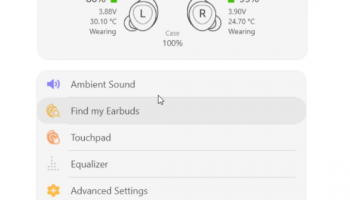
One of the standout features of Galaxy Buds Client is its intuitive user interface. The design is sleek and user-friendly, ensuring that even those who are not tech-savvy can navigate and utilize the software with ease. The main dashboard provides a clear overview of the connected Galaxy Buds, including battery levels for both the earbuds and the charging case, connection status, and more.
Customization is at the heart of Galaxy Buds Client. Users can tweak various settings to suit their personal preferences, such as adjusting the equalizer to fine-tune the audio output, enabling or disabling touch controls, and managing noise cancellation levels. This level of customization ensures that users can optimize their listening experience according to their specific needs and environments.
Another notable feature is the firmware update capability. Galaxy Buds Client allows users to check for and install firmware updates directly from their desktop, ensuring that their earbuds are always running the latest software with the newest features and improvements. This eliminates the need to rely solely on mobile devices for updates, adding a layer of convenience for users who prefer desktop management.
The software also includes a comprehensive troubleshooting section, providing users with detailed guides and solutions for common issues. This proactive approach to customer support helps users resolve problems quickly and efficiently, minimizing downtime and enhancing overall satisfaction.
Performance-wise, Galaxy Buds Client is lightweight and efficient, ensuring that it does not bog down system resources. It runs smoothly on various operating systems, including Windows, macOS, and Linux, making it accessible to a wide range of users.
In summary, Galaxy Buds Client by Tim Schneeberger is a must-have tool for any Samsung Galaxy Buds owner looking to maximize their earbuds' potential. Its combination of a user-friendly interface, extensive customization options, firmware update capabilities, and robust troubleshooting support makes it an invaluable addition to the Galaxy Buds ecosystem. Whether you're an audiophile seeking the perfect sound or a casual user wanting more control over your earbuds, Galaxy Buds Client delivers a seamless and enhanced user experience.
One of the standout features of Galaxy Buds Client is its intuitive user interface. The design is sleek and user-friendly, ensuring that even those who are not tech-savvy can navigate and utilize the software with ease. The main dashboard provides a clear overview of the connected Galaxy Buds, including battery levels for both the earbuds and the charging case, connection status, and more.
Customization is at the heart of Galaxy Buds Client. Users can tweak various settings to suit their personal preferences, such as adjusting the equalizer to fine-tune the audio output, enabling or disabling touch controls, and managing noise cancellation levels. This level of customization ensures that users can optimize their listening experience according to their specific needs and environments.
Another notable feature is the firmware update capability. Galaxy Buds Client allows users to check for and install firmware updates directly from their desktop, ensuring that their earbuds are always running the latest software with the newest features and improvements. This eliminates the need to rely solely on mobile devices for updates, adding a layer of convenience for users who prefer desktop management.
The software also includes a comprehensive troubleshooting section, providing users with detailed guides and solutions for common issues. This proactive approach to customer support helps users resolve problems quickly and efficiently, minimizing downtime and enhancing overall satisfaction.
Performance-wise, Galaxy Buds Client is lightweight and efficient, ensuring that it does not bog down system resources. It runs smoothly on various operating systems, including Windows, macOS, and Linux, making it accessible to a wide range of users.
In summary, Galaxy Buds Client by Tim Schneeberger is a must-have tool for any Samsung Galaxy Buds owner looking to maximize their earbuds' potential. Its combination of a user-friendly interface, extensive customization options, firmware update capabilities, and robust troubleshooting support makes it an invaluable addition to the Galaxy Buds ecosystem. Whether you're an audiophile seeking the perfect sound or a casual user wanting more control over your earbuds, Galaxy Buds Client delivers a seamless and enhanced user experience.
OS: Windows 11, Windows 10 64 bit
Add Your Review or 64-bit Compatibility Report
Top Other 64-bit downloads


WinImage 11.00
A disk-imager for floppies, CD-ROMs, USBs, hard drives and VHD/VMDKs
Trialware | $30.00


Voxengo Polysquasher x64 3.5
Mastering compressor audio plugin designed to be transparent
Demo | $89.95

Blue Cat's Parametr'EQ x64 3.52
Equalizer with absolutely no latency,perfect for real time applications
Demo | $89.00

Voxengo Deft Compressor x64 1.13
Audio signal compressor plug-in for professional audio production applications
Demo | $59.95
Members area
Top 64-bit Downloads
-
MSpectralDynamics 2.09
x64 demo download -
Serato DJ Lite 3.1.5
x64 freeware download -
Plogue Bidule x64 0.9786
x64 demo download -
Voxengo Stereo Touch x64 2.17
x64 freeware download -
Fazortan x64 2.2.2
x64 trialware download -
Voxengo Polysquasher x64 3.5
x64 demo download -
Blue Cat's Parametr'EQ
x64 3.52
x64 demo download -
Ashampoo Slideshow
Studio HD 4 4.0.9
x64 shareware download -
Voxengo Deft Compressor
x64 1.13
x64 demo download -
Plex 1.93.0.144
x64 freeware download
Top Downloads
-
Xilisoft iPod Mate 4.0.3.0311
shareware download -
ImTOO WMA MP3 Converter 6.2.0.0331
shareware download -
Xilisoft Blackberry
Ringtone Maker 1.0.12.1204
shareware download -
MediaCoder 0.8.65 B6050
freeware download -
Xilisoft MP3 WAV
Converter 6.3.0.0805
shareware download -
VSDC Free Audio
Converter 1.6.3
freeware download -
Serato DJ Lite 3.1.5
freeware download -
Quod Libet 4.5.0
open source download -
Nero 7 Ultra Edition 7.10.1
shareware download -
Free Movie DVD Maker 10.0.0.3214
freeware download -
Nero Video 2020 2.1.1.7
shareware download -
Plogue Bidule x64 0.9786
demo download -
Tanida Demo Builder 11.0.33.0
shareware download -
AMC Presentation Wizard 17.0a.1
shareware download -
Moyea Christmas PPT to
Video Converter Edu
Edition 1.5.1.4
shareware download