
Google Ads Editor - X 64-bit Download
Popular x64 Tags
- software x64 download
- file x64 download
- analysis x64 download
- free x64 download
- model x64 download
- extracting x64 download
- pdf x64 download
- document management x64 download
- files x64 download
- marketing x64 download
- pdfs x64 download
- windows x64 download
- management x64 download
- office x64 download
- business x64 download
- printing x64 download
- development x64 download
- print x64 download
- strategy x64 download
- acrobat x64 download
- converter x64 download
- framework x64 download
- mba x64 download
- converting x64 download
- strategic management x64 download
- conversion x64 download
- sharepoint x64 download
- advertising wizard x64 download
- shareware x64 download
- moss x64 download
Google Ads Editor 2.12.2
Sponsored links:
license: Freeware
downloads: 54
size: 10.50 MB
updated: 2026-03-12
tags: Google Ads Editor, download Google Ads Editor, Google Ads Editor free download, keyword bid, AdSense bid, Gogole Ads campaign, AdSense, AdWords, bid, keywords
Add to Basket

Google

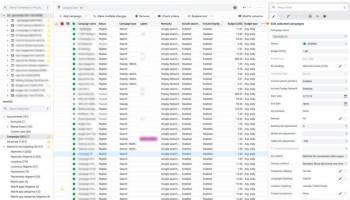
Google Ads Editor is a powerful, free application developed by Google, designed to streamline the management of your Google Ads campaigns. Tailored for advertisers who need to handle multiple accounts and large-scale campaigns, this desktop tool offers a robust suite of features that enhance efficiency and precision in campaign management.
At its core, Google Ads Editor provides a user-friendly interface that allows you to download your campaigns, make bulk changes offline, and then upload the revisions to Google Ads. This offline capability is particularly beneficial for users who need to work without a constant internet connection or prefer to make extensive edits without the lag of an online interface.
One of the standout features of Google Ads Editor is its bulk editing functionality. Whether you need to update bids, change ad copy, or adjust targeting settings across hundreds of campaigns, this tool simplifies the process, saving you significant time and effort. The ability to copy and paste items between campaigns and ad groups further enhances productivity, making it easier to replicate successful strategies across different segments.
The application also excels in providing advanced search and filtering options. Users can quickly locate specific ads, keywords, or campaigns using a variety of criteria, ensuring that no detail is overlooked. This feature is particularly useful for large accounts with extensive data, where manual searches would be cumbersome and time-consuming.
Google Ads Editor supports multiple accounts, making it an ideal solution for agencies and marketers managing several clients. The tool allows you to view and edit multiple accounts simultaneously, facilitating a more streamlined workflow. Additionally, the shared library feature enables you to reuse common assets like keywords and negative keywords across different accounts, ensuring consistency and saving time.
Error checking is another critical component of Google Ads Editor. The tool automatically flags potential issues before you upload changes, helping to prevent costly mistakes. This preemptive error detection includes checks for policy violations, budget constraints, and other common pitfalls, providing peace of mind and ensuring your campaigns run smoothly.
Moreover, Google Ads Editor offers a range of reporting and analysis tools. Users can generate detailed reports to evaluate campaign performance, identify trends, and make data-driven decisions. The ability to export these reports in various formats adds flexibility, allowing for easy sharing and further analysis.
In summary, Google Ads Editor is an indispensable tool for any serious Google Ads user. Its combination of offline editing, bulk management capabilities, advanced search functions, multi-account support, error checking, and robust reporting tools make it a comprehensive solution for optimizing your advertising efforts. Whether you're managing a single account or juggling multiple clients, Google Ads Editor empowers you to achieve greater efficiency and effectiveness in your campaigns.
At its core, Google Ads Editor provides a user-friendly interface that allows you to download your campaigns, make bulk changes offline, and then upload the revisions to Google Ads. This offline capability is particularly beneficial for users who need to work without a constant internet connection or prefer to make extensive edits without the lag of an online interface.
One of the standout features of Google Ads Editor is its bulk editing functionality. Whether you need to update bids, change ad copy, or adjust targeting settings across hundreds of campaigns, this tool simplifies the process, saving you significant time and effort. The ability to copy and paste items between campaigns and ad groups further enhances productivity, making it easier to replicate successful strategies across different segments.
The application also excels in providing advanced search and filtering options. Users can quickly locate specific ads, keywords, or campaigns using a variety of criteria, ensuring that no detail is overlooked. This feature is particularly useful for large accounts with extensive data, where manual searches would be cumbersome and time-consuming.
Google Ads Editor supports multiple accounts, making it an ideal solution for agencies and marketers managing several clients. The tool allows you to view and edit multiple accounts simultaneously, facilitating a more streamlined workflow. Additionally, the shared library feature enables you to reuse common assets like keywords and negative keywords across different accounts, ensuring consistency and saving time.
Error checking is another critical component of Google Ads Editor. The tool automatically flags potential issues before you upload changes, helping to prevent costly mistakes. This preemptive error detection includes checks for policy violations, budget constraints, and other common pitfalls, providing peace of mind and ensuring your campaigns run smoothly.
Moreover, Google Ads Editor offers a range of reporting and analysis tools. Users can generate detailed reports to evaluate campaign performance, identify trends, and make data-driven decisions. The ability to export these reports in various formats adds flexibility, allowing for easy sharing and further analysis.
In summary, Google Ads Editor is an indispensable tool for any serious Google Ads user. Its combination of offline editing, bulk management capabilities, advanced search functions, multi-account support, error checking, and robust reporting tools make it a comprehensive solution for optimizing your advertising efforts. Whether you're managing a single account or juggling multiple clients, Google Ads Editor empowers you to achieve greater efficiency and effectiveness in your campaigns.
OS: Windows 11, Windows 10 64 bit, Windows 8 64 bit, Windows 7 64 bit
Add Your Review or 64-bit Compatibility Report
Top Other 64-bit downloads


DeskWork Standard 4.0.2827
ECM software can help to optimize the workflow in your company
Trialware | $3 200.00


LawTrust 5.1.1
Used primarily by lawyers, it is also used by real estate agents, landlords
Shareware | $79.95

HelpDesk 11.19.9557.25020
Streamline customer support with HelpDesk's intuitive ticketing system.
Trialware | $2 199.00

Odoo 19.0.20260320

All-in-one business management software with integrated apps for various needs.
Demo | $14.80


Village Tracker for Instruments 1.2
Keep track of the musical instruments from your collection
Demo | $49.95
Net Tracker For Lab Equipment 1.05
Helps you manage the equipment that you use in your lab
Trialware | $499.95


Vladovsoft Hotel 17.1.0
Effortlessly manage hotel operations with intuitive features and tools.
Trialware | $99.00
Members area
Top 64-bit Downloads
-
mbFXWords 2.80
x64 freeware download -
FontAgent Pro 10.0.15.0
x64 trialware download -
Microsoft Office 2016
x64 2405 B17628.20164
x64 trialware download -
Print to PDF Toolkit Pro 3.0
x64 shareware download -
Microsoft Office 2010
Service Pack x64 SP2
x64 freeware download -
Adeptia Integration
Suite x64 5.3.3
x64 trialware download -
Microsoft Deployment
Toolkit x64 6.3.8456.1000
x64 freeware download -
Logizian Simulacian
Portable x64 11.0 B20141203
x64 trialware download -
Logizian Analyst
Portable x64 11.0 B20141203
x64 trialware download -
ProPrompter 6.1
x64 trialware download
Top Downloads
-
Active Barcode and QR
code Generator 1.24.8.15
freeware download -
Quite Imposing Plus 6.0d
demo download -
SilentNotes 8.7.1
open source download -
LiquiBase 5.0.2
trialware download -
mbFXWords 2.80
freeware download -
CZ Excel Converter 1.9.4.6366
demo download -
Miro for Windows 0.11.110
shareware download -
DeskWork Standard 4.0.2827
trialware download -
Flipping Book Writer 2.6
shareware download -
Total CSV Converter 4.0
shareware download -
TablePlus 6.9.2 (334)
demo download -
StockwareLite 2.0
freeware download -
LawTrust 5.1.1
shareware download -
HelpDesk 11.19.9557.25020
trialware download -
DbGate 7.1.4
trialware download