
Longtion Application Builder - X 64-bit Download
Popular x64 Tags
- compile x64 download
- compiler x64 download
- pascal x64 download
- web site x64 download
- web site management x64 download
- sitemaps generator x64 download
- ide x64 download
- python debugger x64 download
- visual studio x64 download
- python x64 download
- programming x64 download
- debug x64 download
- software x64 download
- create application x64 download
- development x64 download
- python ide x64 download
- wingware x64 download
- language x64 download
- browser x64 download
- vb net x64 download
- debugger x64 download
- audio processing x64 download
- free controls x64 download
- java ide x64 download
- improve x64 download
- development environment x64 download
- javascript x64 download
- parser x64 download
- dll x64 download
- code optimization x64 download
You are here: X-64-bit Download
\ Development
\ Compilers & Interpreters \ Longtion Application Builder
Longtion Application Builder 5.21.0.720
Sponsored links:

Longtion Software Inc.

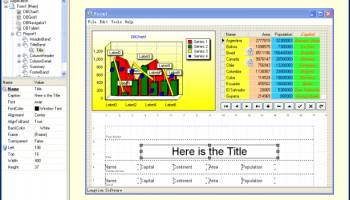
Longtion Application Builder is a tool for designing and developing database applications and Web applications without writing any code. And you don't have to be a software programmer to do it. With its intuitive integrated development environment (IDE) and drag-and-drop objects, it's quick to learn and easy to use. It requires no programming knowledge whatsoever! You'll be amazed with the powerful functionality and stylish visual appeal that Longtion Application Builder puts at your mouse-clicking fingertip. Design and distribute your software with a few clicks of the mouse.
With Longtion Application Builder you can build standalone Web applications exactly the same way you would build normal database applications. It is a revolutionary new way to create web-based applications. The standalone Web application is a web server that run without dependencies from any other web server (IIS or Apache).
Features:
- Create database applications and Web applications without writing any code. No programming experience is required.
- Connect to database servers. Create application that can create, restructure, fetch data from, update, and otherwise manipulate local (Paradox, dBASE, FoxPro, and Access) and remote database servers (Oracle, Sybase, Informix, Microsoft SQL server, and DB2). You can access a wide variety of database servers, using ADO or ODBC to connect to different databases.
- Connect directly to Microsoft Jet OLE Database (Access) database files.
- Create Microsoft Jet OLE Database (Access) database and create database tables.
- Provides a set of data-aware objects that represent data from fields in a database record, and, if the dataset allows it, enable users to edit that data and post changes back to the database. By placing data objects onto the forms in your database application, you can build your database application's user interface (UI) so that information is visible and accessible to users.
- You can choose between objects that are designed to display and edit plain text, objects that work with formatted text, objects for graphics, multimedia elements, and so on.
- You can display information from a single record on the screen, or list the information from multiple records using a grid (DBGrid).
- You can let users navigate through the records of datasets and add or edit data. You may want to add your own objects or mechanisms to navigate and edit, or you may want to use a built-in object such as a DBNavigator.
- Create master/detail relationships. DBTable datasets can be linked into master/detail relationships. When you set up a master/detail relationship, you link two datasets so that all the records of one (the detail) always correspond to the single current record in the other (the master).
- Define lookup fields. You can define lookup fields for dataset object, DBQuery or DBTable. A lookup field is a read-only field that displays values based on search criteria you specify. In its simplest form, a lookup field is passed the name of an existing field to search on, a field value to search for, and a different field in a lookup dataset whose value it should display. For example, consider a mail-order application that enables an operator to use a lookup field to determine automatically the city and state that correspond to the zip code a customer provides. The column to search on might be called ZipTable.Zip, the value to search for is the customer's zip code as entered in Order.CustZip, and the values to return would be those for the ZipTable.City and ZipTable.State columns of the record where the value of ZipTable.Zip matches the current value in the Order.CustZip field.
- Define calculated fields. You can define calculated fields for dataset object, DBQuery or DBTable. A calculated field displays values calculated at runtime. For example, you might create a float field that displays values calculated from other fields.
With Longtion Application Builder you can build standalone Web applications exactly the same way you would build normal database applications. It is a revolutionary new way to create web-based applications. The standalone Web application is a web server that run without dependencies from any other web server (IIS or Apache).
Features:
- Create database applications and Web applications without writing any code. No programming experience is required.
- Connect to database servers. Create application that can create, restructure, fetch data from, update, and otherwise manipulate local (Paradox, dBASE, FoxPro, and Access) and remote database servers (Oracle, Sybase, Informix, Microsoft SQL server, and DB2). You can access a wide variety of database servers, using ADO or ODBC to connect to different databases.
- Connect directly to Microsoft Jet OLE Database (Access) database files.
- Create Microsoft Jet OLE Database (Access) database and create database tables.
- Provides a set of data-aware objects that represent data from fields in a database record, and, if the dataset allows it, enable users to edit that data and post changes back to the database. By placing data objects onto the forms in your database application, you can build your database application's user interface (UI) so that information is visible and accessible to users.
- You can choose between objects that are designed to display and edit plain text, objects that work with formatted text, objects for graphics, multimedia elements, and so on.
- You can display information from a single record on the screen, or list the information from multiple records using a grid (DBGrid).
- You can let users navigate through the records of datasets and add or edit data. You may want to add your own objects or mechanisms to navigate and edit, or you may want to use a built-in object such as a DBNavigator.
- Create master/detail relationships. DBTable datasets can be linked into master/detail relationships. When you set up a master/detail relationship, you link two datasets so that all the records of one (the detail) always correspond to the single current record in the other (the master).
- Define lookup fields. You can define lookup fields for dataset object, DBQuery or DBTable. A lookup field is a read-only field that displays values based on search criteria you specify. In its simplest form, a lookup field is passed the name of an existing field to search on, a field value to search for, and a different field in a lookup dataset whose value it should display. For example, consider a mail-order application that enables an operator to use a lookup field to determine automatically the city and state that correspond to the zip code a customer provides. The column to search on might be called ZipTable.Zip, the value to search for is the customer's zip code as entered in Order.CustZip, and the values to return would be those for the ZipTable.City and ZipTable.State columns of the record where the value of ZipTable.Zip matches the current value in the Order.CustZip field.
- Define calculated fields. You can define calculated fields for dataset object, DBQuery or DBTable. A calculated field displays values calculated at runtime. For example, you might create a float field that displays values calculated from other fields.
Homepage: Longtion Application Builder
OS: Windows XP, Windows Vista, Windows Vista x64, Windows 7, Windows 7 x64, Windows 8, Windows 8 x64, Windows 10, Windows 10 x64
Add Your Review or 64-bit Compatibility Report
Top Compilers & Interpreters 64-bit downloads


Python 3.14.3
Python: Versatile, high-level programming language for web, data, and automation.
Open Source

AppStudio 9.4.6.1

Create cross-platform mobile apps effortlessly with AppStudio's intuitive tools.
Demo | $150.00

Qt 6.10.2
Qt: A powerful framework for cross-platform application development.
Trialware | $4 110.00

Gravilux for Win8 UI 1.20.6
Antigravity: A revolutionary tool for effortless project management and collaboration.
Shareware


Understand 7.2 Build 1246
Understand: Advanced static analysis tool for code comprehension and quality.
Demo


Prepros 7.39.0
Prepros simplifies web development with live reloading and asset compilation.
Demo | $29.00
Members area
Top 64-bit Downloads
-
PyScripter x64 4.3.4
x64 open source download -
Software Ideas Modeler
Portable x64 14.55
x64 freeware download -
TortoiseSVN for 64-bit
System 1.14.7.29687
x64 freeware download -
DotNetBrowser 3.5.0
x64 commercial download -
Java Runtime Environment
64bit 10.0.2
x64 freeware download -
Microsoft Speech SDK 11
x64 freeware download -
HDFView x64 3.3.2
x64 freeware download -
Strawberry Perl Portable
x64 5.38.2.2
x64 open source download -
Argyll x64 3.2.0
x64 freeware download -
BowPad x64 2.5.1
x64 open source download
Top Downloads
-
NASM 2.16.01
open source download -
Delphi 12.0
shareware download -
WebData 10.2.4.0
shareware download -
PHP 8.5.4
open source download -
.NET Logging Library 2.20
shareware download -
Python 3.14.3
open source download -
Document .Net 2026.3.5
demo download -
Fiddler 5.0.20242.10753 Clas
trialware download -
Swapy 0.5.4
open source download -
PeStudio 9.60
shareware download -
UtilsLib 7.2
demo download -
Devart ODAC 14.0.0
shareware download -
OpenWire 8.0.0.156
freeware download -
Library .NET 19.8.8201
trialware download -
Paddy 5.2 Beta 2
freeware download