
Nomad.NET - X 64-bit Download
Popular x64 Tags
- files x64 download
- file manager x64 download
- zip x64 download
- tool x64 download
- software x64 download
- ntfs x64 download
- remove x64 download
- disk x64 download
- free x64 download
- duplicate x64 download
- copy x64 download
- folder x64 download
- utility x64 download
- data recovery software x64 download
- undelete x64 download
- erase x64 download
- directory x64 download
- backup x64 download
- file x64 download
- hard x64 download
- data recovery x64 download
- delete x64 download
- recovery x64 download
- find x64 download
- file recovery x64 download
- unerase x64 download
- recover x64 download
- mp3 x64 download
- space x64 download
- search x64 download
Nomad.NET 3.2.0.2890
Sponsored links:

Eugene Sichkar

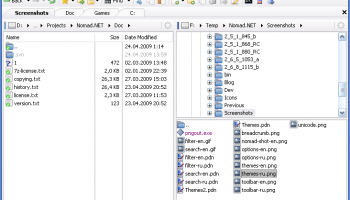
Nomad.NET is the successor of Nomad, a powerful file manager written by me a couple of years ago. It is completely rewritten (no single line of code was taken from previous Nomad) using best ideas and algorithms and implementing everything in a completely new way.
Several years ago I changed my employer and moved to Microsoft new technology called ".Net". For better understanding of many hidden areas, techniques and classes from new framework I started to write small simple applications that did what I knew the best - how to work with OS in file manager way. When I had dozens of such simple applications an idea to completely rewrite old Nomad on new framework had come. So in 2008 the work began.
New Nomad was developed with multi-threading in mind, so almost all long operations can take advantage of multi-core cpu (comparing, copying, searching, detecting archive format and so on - too many to list all of them here).
I do not want to create all-in-one mega monster that plays mp3, shows movies, etc, as many other file managers do. My goal is to build only file manager functionality, but do it very good, or even best of all. For other purposes there are dedicated programs that always do things better than such jack-of-all-trades programs.
Features Overview
As for features of original Nomad, you can take a look at them on appropriate page. Here I describe the features that are significantly changed or just are new:
* Full Unicode support.[screenshot]
* Tabbed interface. But in contrast to almost every other file manager tabs are not panel based.
* Powerful bookmarks system. You can bookmark you favorite folders, ftp sites or even searches (yes, you can create virtual search folders).
* One of the most powerful search engines on market (if I can say market, project is freeware). You can create very complex search rules, with ability to search in different encoding (complete encodings auto detect), use IFilter filters, apply custom text search rules (including regular expressions), search in hex, duplicates search and so on... For novices there is a simplified search that is not so scary at first sight.[screenshot]
* Powerful filtering system, based on the same core as search. You can use dedicated advanced filter dialog, or use simple toolstrip for quick filtering.[screenshot]
* Much simpler, elegant and polished UI (program must look nice, right?)[screenshot]
* Customizable visual themes[screenshot] and icon packs. And you can even create your own themes and icon packs.
* The most powerful toolbar you can even find in file manager.[screenshot]
* Improved main form layout. You can use single panel or dual panel mode (horizontal or vertical). Each panel can have its own tree view that can be hidden or displayed horizontally or vertically. And you can even store your customized layouts for future use.
* Ability to customize selected folders view and options (filter, sort, etc). This is unique feature and you cannot find it in other managers.[screenshot]
* Program is highly customizable via Options dialog[screenshot], including simple UI scaling according to your current system DPI settings (or manually).
* Breadcrumb folder toolstrip on every panel is much more powerful than simple folder name.[screenshot]
* Full internal support for many archive types (using 7-Zip libraries). Program can also handle WCX Total Commander plug-in, even in more powerful way than Total Commander did. You can view, create and edit archives.
* FTP folders support (with limitations yet, for example, only one http proxy allowed with no UI to configure).
* Many things were done more correctly - drag'n'drop from explorer, clipboard handling, shell file menus and so on.
* Support for shell shortcuts, url shortcuts (ftp only) and even shell folder shortcuts (rarely supported in other file managers).
* And last, Nomad is the first and only file manager written on .net. This is not advantag
Several years ago I changed my employer and moved to Microsoft new technology called ".Net". For better understanding of many hidden areas, techniques and classes from new framework I started to write small simple applications that did what I knew the best - how to work with OS in file manager way. When I had dozens of such simple applications an idea to completely rewrite old Nomad on new framework had come. So in 2008 the work began.
New Nomad was developed with multi-threading in mind, so almost all long operations can take advantage of multi-core cpu (comparing, copying, searching, detecting archive format and so on - too many to list all of them here).
I do not want to create all-in-one mega monster that plays mp3, shows movies, etc, as many other file managers do. My goal is to build only file manager functionality, but do it very good, or even best of all. For other purposes there are dedicated programs that always do things better than such jack-of-all-trades programs.
Features Overview
As for features of original Nomad, you can take a look at them on appropriate page. Here I describe the features that are significantly changed or just are new:
* Full Unicode support.[screenshot]
* Tabbed interface. But in contrast to almost every other file manager tabs are not panel based.
* Powerful bookmarks system. You can bookmark you favorite folders, ftp sites or even searches (yes, you can create virtual search folders).
* One of the most powerful search engines on market (if I can say market, project is freeware). You can create very complex search rules, with ability to search in different encoding (complete encodings auto detect), use IFilter filters, apply custom text search rules (including regular expressions), search in hex, duplicates search and so on... For novices there is a simplified search that is not so scary at first sight.[screenshot]
* Powerful filtering system, based on the same core as search. You can use dedicated advanced filter dialog, or use simple toolstrip for quick filtering.[screenshot]
* Much simpler, elegant and polished UI (program must look nice, right?)[screenshot]
* Customizable visual themes[screenshot] and icon packs. And you can even create your own themes and icon packs.
* The most powerful toolbar you can even find in file manager.[screenshot]
* Improved main form layout. You can use single panel or dual panel mode (horizontal or vertical). Each panel can have its own tree view that can be hidden or displayed horizontally or vertically. And you can even store your customized layouts for future use.
* Ability to customize selected folders view and options (filter, sort, etc). This is unique feature and you cannot find it in other managers.[screenshot]
* Program is highly customizable via Options dialog[screenshot], including simple UI scaling according to your current system DPI settings (or manually).
* Breadcrumb folder toolstrip on every panel is much more powerful than simple folder name.[screenshot]
* Full internal support for many archive types (using 7-Zip libraries). Program can also handle WCX Total Commander plug-in, even in more powerful way than Total Commander did. You can view, create and edit archives.
* FTP folders support (with limitations yet, for example, only one http proxy allowed with no UI to configure).
* Many things were done more correctly - drag'n'drop from explorer, clipboard handling, shell file menus and so on.
* Support for shell shortcuts, url shortcuts (ftp only) and even shell folder shortcuts (rarely supported in other file managers).
* And last, Nomad is the first and only file manager written on .net. This is not advantag
OS: Windows XP, Windows Vista, Windows Vista x64, Windows 7, Windows 7 x64
Add Your Review or 64-bit Compatibility Report
Top File & Disk Management 64-bit downloads


Open Files from XLSX to XLS 5.2
Convert XLSX to XLS with Open files from XLSX to XLS program
Shareware | $29.00

Pitara 4.0.9567.41753

Pitara: Your all-in-one solution for seamless project management and collaboration.
Open Source


WinFindr 1.8
Effortlessly locate files and folders with WinFindr's intuitive search.
Shareware | $23.00


AnyMP4 DVD Creator 7.3.28
Create and customize DVDs from videos with AnyMP4 DVD Creator.
Trialware | $39.96


tail for Windows 2.1
tail for Windows is a UNIX/Linux like tail DOS Command for Windows.
Shareware | $29.99
Members area
Top 64-bit Downloads
-
EasyTune6 B24.0119.1
x64 freeware download -
HWMonitor (64-bit) 1.53
x64 freeware download -
Disk Pulse Pro x64 16.1.28
x64 trialware download -
HWiNFO64 6.28 B4200
x64 freeware download -
7z SFX Builder x64 2.1
x64 freeware download -
PhotoRenamer 4.1
x64 freeware download -
XtraTools Professional
x64 26.2.1
x64 shareware download -
Windows 7 x64
x64 trialware download -
Areca Backup x64 7.5
x64 open source download -
PKZIP 64-bit 14.40.0028
x64 trialware download
Top Downloads
-
Open Files from XLSX to
XLS 5.2
shareware download -
Shell Tools 2.0.1
freeware download -
Caffeine 1.98
freeware download -
AnyMP4 Data Recovery 1.5.12
shareware download -
PCtransfer 1.0.0.1033
freeware download -
EaseUS Key Finder 4.1.6 Build 20240910
demo download -
Pitara 4.0.9567.41753
open source download -
Office 365 Backup 3.0
shareware download -
DRevitalize 4.10
demo download -
WinFindr 1.8
shareware download -
WinToUSB 10.5 Build January 2
shareware download -
Vim 9.2.0148
open source download -
Cursor 0.45.12
demo download -
WriterClassic 10.8.0
open source download -
WinnaLotto 2.0
demo download