
Outlook on the Desktop - X 64-bit Download
Popular x64 Tags
- office x64 download
- microsoft x64 download
- importing x64 download
- exporting x64 download
- acrobat x64 download
- xls x64 download
- printer x64 download
- pdf x64 download
- pdf converter x64 download
- software x64 download
- word x64 download
- outlook x64 download
- excel x64 download
- powerpoint x64 download
- tool x64 download
- ppt x64 download
- adobe x64 download
- convert x64 download
- spreadsheet x64 download
- text x64 download
- create x64 download
- doc x64 download
- printing x64 download
- files x64 download
- add in x64 download
- open x64 download
- document x64 download
- data x64 download
- export x64 download
- saving x64 download
Outlook on the Desktop 4.3.19
Sponsored links:
license: Open Source
downloads: 54
size: 3.80 MB
updated: 2025-01-26
tags: Outlook, Outlook Calendar, Edit Note, software, Note, Outlook on the Desktop free download, Desktop, Outlook on the Desktop, productivity, Outlook Viewer, calendar, SMR Computer Services, Calendar, download Outlook on the Desktop
Add to Basket

SMR Computer Services

"Outlook on the Desktop" by SMR Computer Services is a unique productivity tool designed to enhance the accessibility and functionality of Microsoft Outlook by bringing it directly to your desktop. This innovative software transforms the way users interact with their Outlook calendar, tasks, and emails, providing a seamless experience that integrates effortlessly into your daily workflow.
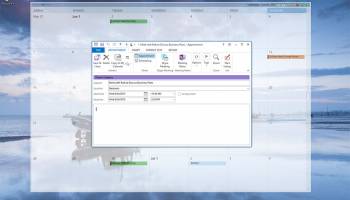
At its core, "Outlook on the Desktop" offers a dynamic and resizable calendar view that sits on your desktop, allowing you to keep track of your schedule without the need to open the full Outlook application. This feature is particularly beneficial for professionals who rely heavily on time management and need constant visibility of their appointments and meetings. The calendar is fully interactive, enabling users to add, delete, and modify appointments directly from the desktop interface.
One of the standout features of this software is its customization options. Users can adjust the transparency and size of the calendar, ensuring it fits neatly into their desktop environment without obstructing other applications. This level of customization ensures that "Outlook on the Desktop" can be tailored to suit individual preferences and work habits, making it a versatile tool for a wide range of users.
In addition to the calendar, the software provides access to other Outlook features such as tasks, contacts, and emails. This integration means that users can manage their entire Outlook experience from their desktop, streamlining their workflow and reducing the need to switch between different applications. The ability to view and interact with emails and tasks alongside the calendar enhances productivity and ensures that important information is always at your fingertips.
"Outlook on the Desktop" is also designed with user-friendliness in mind. The interface is intuitive and easy to navigate, making it accessible for users of all technical abilities. Installation is straightforward, and the software is compatible with various versions of Windows, ensuring broad usability.
For those concerned about security, "Outlook on the Desktop" respects user privacy and integrates securely with Outlook, maintaining the integrity of your data. This makes it a reliable choice for both individual users and businesses looking to improve their organizational efficiency.
In summary, "Outlook on the Desktop" by SMR Computer Services is an essential tool for anyone looking to enhance their productivity and streamline their interaction with Microsoft Outlook. Its ability to bring Outlook's powerful features directly to the desktop, combined with its customization options and user-friendly design, make it a valuable addition to any professional's toolkit. Whether you're managing a busy schedule, keeping track of tasks, or staying on top of your emails, this software provides a practical and efficient solution.
At its core, "Outlook on the Desktop" offers a dynamic and resizable calendar view that sits on your desktop, allowing you to keep track of your schedule without the need to open the full Outlook application. This feature is particularly beneficial for professionals who rely heavily on time management and need constant visibility of their appointments and meetings. The calendar is fully interactive, enabling users to add, delete, and modify appointments directly from the desktop interface.
One of the standout features of this software is its customization options. Users can adjust the transparency and size of the calendar, ensuring it fits neatly into their desktop environment without obstructing other applications. This level of customization ensures that "Outlook on the Desktop" can be tailored to suit individual preferences and work habits, making it a versatile tool for a wide range of users.
In addition to the calendar, the software provides access to other Outlook features such as tasks, contacts, and emails. This integration means that users can manage their entire Outlook experience from their desktop, streamlining their workflow and reducing the need to switch between different applications. The ability to view and interact with emails and tasks alongside the calendar enhances productivity and ensures that important information is always at your fingertips.
"Outlook on the Desktop" is also designed with user-friendliness in mind. The interface is intuitive and easy to navigate, making it accessible for users of all technical abilities. Installation is straightforward, and the software is compatible with various versions of Windows, ensuring broad usability.
For those concerned about security, "Outlook on the Desktop" respects user privacy and integrates securely with Outlook, maintaining the integrity of your data. This makes it a reliable choice for both individual users and businesses looking to improve their organizational efficiency.
In summary, "Outlook on the Desktop" by SMR Computer Services is an essential tool for anyone looking to enhance their productivity and streamline their interaction with Microsoft Outlook. Its ability to bring Outlook's powerful features directly to the desktop, combined with its customization options and user-friendly design, make it a valuable addition to any professional's toolkit. Whether you're managing a busy schedule, keeping track of tasks, or staying on top of your emails, this software provides a practical and efficient solution.
OS: Windows 11, Windows 10 32/64 bit
Requirements: Microsoft Outlook 2010 or higher
Add Your Review or 64-bit Compatibility Report
Top Office Suites & Tools 64-bit downloads


Quite Imposing Plus 6.0c
Effortlessly create and manage complex impositions for PDF documents.
Demo | $949.00


Imposition Wizard 3.6.8
Streamline your print layout with Imposition Wizard's intuitive tools.
Demo | $264.00

CZ Excel Converter 1.9.4.6366
CZ V: A powerful synth emulation with rich sounds and intuitive controls.
Demo | $149.00


WinCalendar 4.43
Integrated Desktop Calendar, Calendar Creator & Pop-up Calendar for Windows
Demo | $32.00

callas pdfaPilot 14.2.400
Powerful tool for creating, validating, and optimizing PDF/A documents.
Trialware

mini PDF to TXT OCR Converter 3.2
PDF to TXT OCR Converter is a best OCR Converter
Shareware | $59.95
Members area
Top 64-bit Downloads
-
mbFXWords 2.80
x64 freeware download -
FontAgent Pro 10.0.15.0
x64 trialware download -
Microsoft Office 2016
x64 2405 B17628.20164
x64 trialware download -
Print to PDF Toolkit Pro 3.0
x64 shareware download -
Microsoft Office 2010
Service Pack x64 SP2
x64 freeware download -
Logizian Analyst
Portable x64 11.0 B20141203
x64 trialware download -
Microsoft Office 2010
x64 14.0.6023.1000
x64 trialware download -
Zed Axis 64bit 10.0
x64 trialware download -
Microsoft Deployment
Toolkit x64 6.3.8456.1000
x64 freeware download -
iNFekt 1.3.0
x64 open source download
Top Downloads
-
Active Barcode and QR
code Generator 1.24.8.15
freeware download -
Quite Imposing Plus 6.0c
demo download -
Miro for Windows 0.11.110
shareware download -
Flipping Book Writer 2.6
shareware download -
DeskWork Standard 4.0.2827
trialware download -
Forex Strategy Trader 3.6.0.0
freeware download -
StockwareLite 2.0
freeware download -
mbFXWords 2.80
freeware download -
SmarThru 4.04
freeware download -
Imposition Wizard 3.6.8
demo download -
FileMaker Pro 22.0.5.500
trialware download -
CZ Excel Converter 1.9.4.6366
demo download -
Citavi 5.0.0.11
demo download -
FontAgent Pro 10.0.15.0
trialware download -
WinCalendar 4.43
demo download