
Scrivener for Windows - X 64-bit Download
Popular x64 Tags
- office x64 download
- microsoft x64 download
- importing x64 download
- exporting x64 download
- acrobat x64 download
- xls x64 download
- printer x64 download
- pdf x64 download
- pdf converter x64 download
- software x64 download
- word x64 download
- outlook x64 download
- excel x64 download
- powerpoint x64 download
- tool x64 download
- ppt x64 download
- adobe x64 download
- convert x64 download
- spreadsheet x64 download
- text x64 download
- create x64 download
- doc x64 download
- printing x64 download
- files x64 download
- add in x64 download
- open x64 download
- document x64 download
- data x64 download
- export x64 download
- saving x64 download
Scrivener for Windows 1.9.16.0
Sponsored links:

Literature & Latte Ltd.


Scrivener is a powerful content-generation tool for writers that allows you to concentrate on composing and structuring long and difficult documents. While it gives you complete control of the formatting, its focus is on helping you get to the end of that awkward first draft.
Your complete writing studio
Writing a novel, research paper, script or any long-form text involves more than hammering away at the keys until you’re done. Collecting research, ordering fragmented ideas, shuffling index cards in search of that elusive structure—most writing software is fired up only after much of the hard work is over. Enter Scrivener: a word processor and project management tool that stays with you from that first, unformed idea all the way through to the final draft. Outline and structure your ideas, take notes, view research alongside your writing and compose the constituent pieces of your text in isolation or in context. Scrivener won't tell you how to write—it just makes all the tools you have scattered around your desk available in one application.
Write, structure, revise
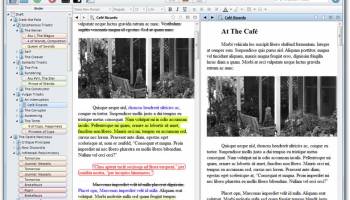
Scrivener puts everything you need for structuring, writing and editing long documents at your fingertips. On the left of the window, the “binder” allows you to navigate between the different parts of your manuscript, your notes, and research materials, with ease. Break your text into pieces as small or large as you want—so you can forget wrestling with one long document. Restructuring your draft is as simple as drag and drop. Select a single document to edit a section of your manuscript in isolation, or use “Scrivenings” mode to work on multiple sections as though they were one: Scrivener makes it easy to switch between focussing on the details and stepping back to get a wider view of your composition.
With access to a powerful underlying text engine, you can add tables, bullet points, images and mark up your text with comments and footnotes. Format as you go using the format bar at the top of the page, or use any font you want for the writing and let Scrivener reformat your manuscript after you're done—allowing you to concentrate on the words rather than their presentation.
Create order from chaos
Most word processors approach composing a long-form text the same as typing a letter or flyer—they expect you to start on page one and keep typing until you reach the end. Scrivener lets you work in any order you want and gives you tools for planning and restructuring your writing. In Scrivener, you can enter a synopsis for each document on a virtual index card and then stack and shuffle the cards in the corkboard until you find the most effective sequence. Plan out your work in Scrivener’s outliner and use the synopses you create as prompts while you write. Or just get everything down into a first draft and break it apart later for rearrangement on the outliner or corkboard. Create collections of documents to read and edit related text without affecting its place in the overall draft; label and track connected documents or mark what still needs to be done. Whether you like to plan everything in advance, write first and structure later—or do a bit of both—Scrivener supports the way you work.
Your research—always within reach
No more switching between multiple applications to refer to research files: keep all of your background material—images, PDF files, movies, web pages, sound files—right inside Scrivener. And unlike other programs that only let you view one document at a time, in Scrivener you can split the editor to view research in one pane while composing your text right alongside it in another. Transcribe an interview or conversation, make notes on an image or article, or just refer back to another chapter, all without leaving the document you’re working on.
Your complete writing studio
Writing a novel, research paper, script or any long-form text involves more than hammering away at the keys until you’re done. Collecting research, ordering fragmented ideas, shuffling index cards in search of that elusive structure—most writing software is fired up only after much of the hard work is over. Enter Scrivener: a word processor and project management tool that stays with you from that first, unformed idea all the way through to the final draft. Outline and structure your ideas, take notes, view research alongside your writing and compose the constituent pieces of your text in isolation or in context. Scrivener won't tell you how to write—it just makes all the tools you have scattered around your desk available in one application.
Write, structure, revise
Scrivener puts everything you need for structuring, writing and editing long documents at your fingertips. On the left of the window, the “binder” allows you to navigate between the different parts of your manuscript, your notes, and research materials, with ease. Break your text into pieces as small or large as you want—so you can forget wrestling with one long document. Restructuring your draft is as simple as drag and drop. Select a single document to edit a section of your manuscript in isolation, or use “Scrivenings” mode to work on multiple sections as though they were one: Scrivener makes it easy to switch between focussing on the details and stepping back to get a wider view of your composition.
With access to a powerful underlying text engine, you can add tables, bullet points, images and mark up your text with comments and footnotes. Format as you go using the format bar at the top of the page, or use any font you want for the writing and let Scrivener reformat your manuscript after you're done—allowing you to concentrate on the words rather than their presentation.
Create order from chaos
Most word processors approach composing a long-form text the same as typing a letter or flyer—they expect you to start on page one and keep typing until you reach the end. Scrivener lets you work in any order you want and gives you tools for planning and restructuring your writing. In Scrivener, you can enter a synopsis for each document on a virtual index card and then stack and shuffle the cards in the corkboard until you find the most effective sequence. Plan out your work in Scrivener’s outliner and use the synopses you create as prompts while you write. Or just get everything down into a first draft and break it apart later for rearrangement on the outliner or corkboard. Create collections of documents to read and edit related text without affecting its place in the overall draft; label and track connected documents or mark what still needs to be done. Whether you like to plan everything in advance, write first and structure later—or do a bit of both—Scrivener supports the way you work.
Your research—always within reach
No more switching between multiple applications to refer to research files: keep all of your background material—images, PDF files, movies, web pages, sound files—right inside Scrivener. And unlike other programs that only let you view one document at a time, in Scrivener you can split the editor to view research in one pane while composing your text right alongside it in another. Transcribe an interview or conversation, make notes on an image or article, or just refer back to another chapter, all without leaving the document you’re working on.
OS: Windows XP, Windows Vista, Windows Vista x64, Windows 7, Windows 7 x64, Windows 8, Windows 8 x64, Windows 10, Windows 10 x64

Add Your Review or 64-bit Compatibility Report
Top Office Suites & Tools 64-bit downloads


Quite Imposing Plus 6.0d

Effortlessly create and manage complex impositions for PDF documents.
Demo | $949.00

SilentNotes 8.7.1
SilentNotes: Secure, offline note-taking app with encryption and cross-device sync.
Open Source


CZ Excel Converter 1.9.4.6366
CZ V: A powerful synth emulation with rich sounds and intuitive controls.
Demo | $149.00

callas pdfaPilot 14.2.400
Powerful tool for creating, validating, and optimizing PDF/A documents.
Trialware


Imposition Wizard 3.6.8
Streamline your print layout with Imposition Wizard's intuitive tools.
Demo | $22.00
Members area
Top 64-bit Downloads
-
mbFXWords 2.80
x64 freeware download -
FontAgent Pro 10.0.15.0
x64 trialware download -
Microsoft Office 2016
x64 2405 B17628.20164
x64 trialware download -
Print to PDF Toolkit Pro 3.0
x64 shareware download -
Microsoft Office 2010
Service Pack x64 SP2
x64 freeware download -
Adeptia Integration
Suite x64 5.3.3
x64 trialware download -
Microsoft Deployment
Toolkit x64 6.3.8456.1000
x64 freeware download -
Logizian Simulacian
Portable x64 11.0 B20141203
x64 trialware download -
Logizian Analyst
Portable x64 11.0 B20141203
x64 trialware download -
ProPrompter 6.1
x64 trialware download
Top Downloads
-
Active Barcode and QR
code Generator 1.24.8.15
freeware download -
Quite Imposing Plus 6.0d
demo download -
SilentNotes 8.7.1
open source download -
LiquiBase 5.0.2
trialware download -
mbFXWords 2.80
freeware download -
CZ Excel Converter 1.9.4.6366
demo download -
Miro for Windows 0.11.110
shareware download -
DeskWork Standard 4.0.2827
trialware download -
Flipping Book Writer 2.6
shareware download -
Total CSV Converter 4.0
shareware download -
TablePlus 6.9.2 (334)
demo download -
StockwareLite 2.0
freeware download -
LawTrust 5.1.1
shareware download -
HelpDesk 11.19.9557.25020
trialware download -
DbGate 7.1.4
trialware download