
TextConverter Basic - X 64-bit Download
Popular x64 Tags
- office x64 download
- microsoft x64 download
- importing x64 download
- exporting x64 download
- acrobat x64 download
- xls x64 download
- printer x64 download
- pdf x64 download
- pdf converter x64 download
- software x64 download
- word x64 download
- outlook x64 download
- excel x64 download
- powerpoint x64 download
- tool x64 download
- ppt x64 download
- adobe x64 download
- convert x64 download
- spreadsheet x64 download
- text x64 download
- create x64 download
- doc x64 download
- printing x64 download
- files x64 download
- add in x64 download
- open x64 download
- document x64 download
- data x64 download
- export x64 download
- saving x64 download
TextConverter Basic 24.5.21
Sponsored links:

Stefan Trost Media

Again and again, different computer users face the problem, that they have to edit some things in many text files. Text passages have to be deleted from some files, some text have to be inserted in each file at a special position or a section must be replaced by a different one.
It is conceivable, for example, that a website owner or web designer wants to write the same header at the top of many text files or would like to replace an old note with a new one. Another example could be a writer or a programmer that require similar tasks.
It is rather cumbersome, to open all files to modify and change them by hand. Even by using the "Find and Replace" function of traditional programs, we come quickly to its limits. Not many programs support, for example, replacing text across multiple lines, or many replacements simultaneously and even in more than one files.
That and much more makes can be done by the TextOonverter, that can be downloaded on this page. Besides the function "Find and Replace", there are for example functions to delete lines or text passages, functions to insert text at user-defined positions (for example at the beginning or the end of a file or at a line), but also functions for changing case, inserting line numbers, sorting text or changing special characters in your HTML coding (Named Entities). Alone this function can very helpful for web designers.
Furthermore it is possible to hang an arbitrary number of text files on each other to save them as a single file. But also the opposite way can be gone using another function. So it is possible to separate files at a special text to save them as several new files.
Download the TextConverter for free in the download area and experience in the help section how you can benefit from the software.
* Ease of Use: Immediately after you have added the files to be processed and entered the first amendment, you already see the first results and the files can be saved as new files. You can go into any detail at the functions, and exploit more and more opportunities. Despite these, the program's interface is also clear for the casual user.
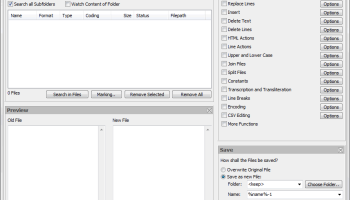
* Batch Processing: It can be worked on any number of text files at the same time. The files can be easily added to the program, by being dragged from any folder of your computer in the processing list. Additionaly, it is also possible to open single files or to search in folders (optionally with a customized filter to search for special file formats). After adding the files, only one click on "Convert" is necessary to apply all settings to all files. The settings are enabled only by clicking on them in the box "Actions" on the upper right.
* Preview: Without destroying the original file, you will see the effect of your settings in the preview box (bottom left) immediately after selecting an option. If you prefer, you can view the original file next to the changed file so that you are able to review any changes directly or, for example when replacing text, you can copy the text to be replaced direclty from the original source without opening this file. It is also possible to display only the original or the changed file individually, for example, if your screen is not big enough for a full presentation. Of course, furthermore, it is also possible to disable the preview at any time (Box "Preview" under the preview), for example when editing very large files or you have a slow computer, so the immediate display does not work smoothly.
* Replacing Text or Lines: You can replace any text passage (even multi-line text passages) by any other text. The same is possible in terms of lines. When replacing lines, you can simply indicate a line, that will be replaced by a text regardless of the content of this line. You can also apply more than one of these replacements at one time. For example, it is easily possible to replaced three lines with another text and replace some text parts at the same time.
It is conceivable, for example, that a website owner or web designer wants to write the same header at the top of many text files or would like to replace an old note with a new one. Another example could be a writer or a programmer that require similar tasks.
It is rather cumbersome, to open all files to modify and change them by hand. Even by using the "Find and Replace" function of traditional programs, we come quickly to its limits. Not many programs support, for example, replacing text across multiple lines, or many replacements simultaneously and even in more than one files.
That and much more makes can be done by the TextOonverter, that can be downloaded on this page. Besides the function "Find and Replace", there are for example functions to delete lines or text passages, functions to insert text at user-defined positions (for example at the beginning or the end of a file or at a line), but also functions for changing case, inserting line numbers, sorting text or changing special characters in your HTML coding (Named Entities). Alone this function can very helpful for web designers.
Furthermore it is possible to hang an arbitrary number of text files on each other to save them as a single file. But also the opposite way can be gone using another function. So it is possible to separate files at a special text to save them as several new files.
Download the TextConverter for free in the download area and experience in the help section how you can benefit from the software.
* Ease of Use: Immediately after you have added the files to be processed and entered the first amendment, you already see the first results and the files can be saved as new files. You can go into any detail at the functions, and exploit more and more opportunities. Despite these, the program's interface is also clear for the casual user.
* Batch Processing: It can be worked on any number of text files at the same time. The files can be easily added to the program, by being dragged from any folder of your computer in the processing list. Additionaly, it is also possible to open single files or to search in folders (optionally with a customized filter to search for special file formats). After adding the files, only one click on "Convert" is necessary to apply all settings to all files. The settings are enabled only by clicking on them in the box "Actions" on the upper right.
* Preview: Without destroying the original file, you will see the effect of your settings in the preview box (bottom left) immediately after selecting an option. If you prefer, you can view the original file next to the changed file so that you are able to review any changes directly or, for example when replacing text, you can copy the text to be replaced direclty from the original source without opening this file. It is also possible to display only the original or the changed file individually, for example, if your screen is not big enough for a full presentation. Of course, furthermore, it is also possible to disable the preview at any time (Box "Preview" under the preview), for example when editing very large files or you have a slow computer, so the immediate display does not work smoothly.
* Replacing Text or Lines: You can replace any text passage (even multi-line text passages) by any other text. The same is possible in terms of lines. When replacing lines, you can simply indicate a line, that will be replaced by a text regardless of the content of this line. You can also apply more than one of these replacements at one time. For example, it is easily possible to replaced three lines with another text and replace some text parts at the same time.
OS: Windows 7, Windows 7 x64, Windows 8, Windows 8 x64, Windows 10, Windows 10 x64, Windows 11
Add Your Review or 64-bit Compatibility Report
Top Office Suites & Tools 64-bit downloads


Office Tab x64 8.50
Add Tabbed Editing and Managing User Interface to Microsoft Office 64-bit
Shareware | $25.00

MS Word Resume Template Software 7.0
Create resume templates in MS Word. Word 2000 or higher required.
Shareware | $4.99

ABBYY FineReader Professional 16.0.13
ABBYY FineReader is an intelligent OCR and PDF conversion application
Trialware | $271.38

Quite Imposing Plus 6.0d
Effortlessly create and manage complex impositions for PDF documents.
Demo | $949.00

Hyper Publish PRO 2016.34
Make a catalog catalogue Web site CD DVD with a single easy professional tool
Shareware | $18.00
Microsoft Office 2010 x64 14.0.6023.1000
Powerful new tools to express your ideas and connect with people
Trialware | $499.99

4Media PDF to PowerPoint Converter 1.0.2.0827
Convert a batch of PDF files to PowerPoint (PPT) presentations
Shareware | $29.99

mini Acrobat to PPSX Converter 2.0
Acrobat to PPSX Converter converts Acrobat to PPSX
Shareware | $29.95

Boxoft Free Flip Page Creator 1.0
100% Free Flip Page Creator, make amazing digital flipping book!
Freeware

Members area
Top 64-bit Downloads
-
Office Tab x64 8.50
x64 shareware download -
ABBYY FineReader
Professional 16.0.13
x64 trialware download -
Microsoft Office 2010
x64 14.0.6023.1000
x64 trialware download -
clrmamepro x64 4.048d
x64 freeware download -
Zed Axis 64bit 10.0
x64 trialware download -
PSPP x64 1.6.2
x64 open source download -
Bluebeam PDF Revu
Standard Edition x64 21.0.30
x64 trialware download -
Club Accounting x64 3.2.1 Build 229
x64 demo download -
Foxit Reader 2023.3
x64 freeware download -
Hl7Spy 24.1.227
x64 trialware download
Top Downloads
-
Zed Axis 64bit 10.0
trialware download -
CHM to Flash Brochure 2.0
shareware download -
SlidePDF to Flash Book 1.0
freeware download -
ImageWinSoft Free Image
to PDF 1.5
freeware download -
PostgreSQL Sybase ASE
Import, Export &
Convert Software 7.0
shareware download -
sitewebdesk 7.8
demo download -
Label Spirit PrintOnly 7.0.17
shareware download -
ISMN barcode generator 2 2.91
shareware download -
Adaptive Modeler 1.6.0
shareware download -
Gekko 1.6
freeware download -
Office Tab x64 8.50
shareware download -
MS Word Resume Template
Software 7.0
shareware download -
ABBYY FineReader
Professional 16.0.13
trialware download -
Quite Imposing Plus 6.0d
demo download -
Hyper Publish PRO 2016.34
shareware download