
Thunder Page - X 64-bit Download
Popular x64 Tags
- office x64 download
- microsoft x64 download
- importing x64 download
- exporting x64 download
- acrobat x64 download
- xls x64 download
- printer x64 download
- pdf x64 download
- pdf converter x64 download
- software x64 download
- word x64 download
- outlook x64 download
- excel x64 download
- powerpoint x64 download
- tool x64 download
- ppt x64 download
- adobe x64 download
- convert x64 download
- spreadsheet x64 download
- text x64 download
- create x64 download
- doc x64 download
- printing x64 download
- files x64 download
- add in x64 download
- open x64 download
- document x64 download
- data x64 download
- export x64 download
- saving x64 download
Thunder Page 1.9.2
Sponsored links:

Wade Instruments and Service, Inc.

Thunder Page allows you to scan and analyze any document (text) for specific words and/or keywords. The keywords (which can be used later for analysis) can consist of words and phrases previously contrived and compiled into a Keyword List, they could be words and phrases you've imported from another text document or they could be words and phrases contained within the open text itself.
More simply put, the program is designed to find and highlight chosen words from any text document. The fact is, there exists no easier way to "cut to the chase" - that being, find out what you need to know and get the sought after information quickly - for any article, any document, any text... period.
Using the following example, we'll examine its usefulness from a job seeker's point of view (though employer's view would be similar) - but if you limit your understanding to this scenario only, you'll certainly miss out on the true power of the software.
Before we continue, Thunder Page is a very powerful text analytical tool, but it remains strictly an analyzer and editor for pure text - it is not a Rich Text editor as one might use to improve the visual appearance and formatting of a job resume. Other applications should be used for such purposes - that is, AFTER you've analyzed and edited your resume for the keyword content and word frequency desirable.
Continuing... and as an example, you may be seeking a job and want your job resume to reflect the keywords that the employer is seeking. In this case, you would save a job advertisement – analyze the keywords that they’re seeking – and restructure your resume to become aligned with those keywords they obviously seek.
In a different scenario, you may be a Human Resource Manager or Employer needing to screen job resumes quickly for targeted keywords. In a matter of seconds using Thunder Page, you'll know whether the job seeker is qualified for the position you seek to fill.
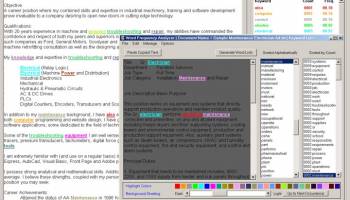
Getting back to the first example, we'll describe the usefulness of the application from a job seekers standpoint. In the image above, you'll see 2 windows - one inside the other. The smaller window represents the Word Frequency Analyzer. The Word Frequency Analyzer examines a document and allows the end user to generate 2 Word Lists - one sorted by word count (frequency), the other arranged alphabetically. These Lists contain every word that appears in the document... well almost every word. Commonly used words such as "the", "and", "or", etc. are omitted from the count. These are known as Stop Words and can be managed by the end user.
Clicking on any word in either list highlights that word in every found location within the contents. Additionally, each word is highlighted in its own unique color. Adjusting the background shading allows the end user to turn up or turn down the contrast, allowing every word to be found easily - depending upon the shading.
From the Word Frequency Analyzer you could open a job advertisement and analyze the contents by:
1. Generating Word Lists
2. Viewing the Frequency of those Words
3. Viewing the union of 2 or more words being used collectively to form a Phrase
It is also from here that you would start building a Keyword List based on the Contents of the Job Ad which would later be used to analyze your resume in the main window.
Keywords can be added to the Keyword List in 4 ways:
1. One at a time by highlighting the word or phrase in the text and pressing CTRL + T
2. As a group based on Word Count (number of occurrences)
3. Manually - using the Keyword List Manager
4. By importing an external list saved to memory
Once a Keyword List has been built, the Word Frequency Analyzer window can be closed and you can open your resume from within the main window. Your resume can either be in a text format or rich text format, the latter of which cannot be browsed to but must be pasted from memory.
More simply put, the program is designed to find and highlight chosen words from any text document. The fact is, there exists no easier way to "cut to the chase" - that being, find out what you need to know and get the sought after information quickly - for any article, any document, any text... period.
Using the following example, we'll examine its usefulness from a job seeker's point of view (though employer's view would be similar) - but if you limit your understanding to this scenario only, you'll certainly miss out on the true power of the software.
Before we continue, Thunder Page is a very powerful text analytical tool, but it remains strictly an analyzer and editor for pure text - it is not a Rich Text editor as one might use to improve the visual appearance and formatting of a job resume. Other applications should be used for such purposes - that is, AFTER you've analyzed and edited your resume for the keyword content and word frequency desirable.
Continuing... and as an example, you may be seeking a job and want your job resume to reflect the keywords that the employer is seeking. In this case, you would save a job advertisement – analyze the keywords that they’re seeking – and restructure your resume to become aligned with those keywords they obviously seek.
In a different scenario, you may be a Human Resource Manager or Employer needing to screen job resumes quickly for targeted keywords. In a matter of seconds using Thunder Page, you'll know whether the job seeker is qualified for the position you seek to fill.
Getting back to the first example, we'll describe the usefulness of the application from a job seekers standpoint. In the image above, you'll see 2 windows - one inside the other. The smaller window represents the Word Frequency Analyzer. The Word Frequency Analyzer examines a document and allows the end user to generate 2 Word Lists - one sorted by word count (frequency), the other arranged alphabetically. These Lists contain every word that appears in the document... well almost every word. Commonly used words such as "the", "and", "or", etc. are omitted from the count. These are known as Stop Words and can be managed by the end user.
Clicking on any word in either list highlights that word in every found location within the contents. Additionally, each word is highlighted in its own unique color. Adjusting the background shading allows the end user to turn up or turn down the contrast, allowing every word to be found easily - depending upon the shading.
From the Word Frequency Analyzer you could open a job advertisement and analyze the contents by:
1. Generating Word Lists
2. Viewing the Frequency of those Words
3. Viewing the union of 2 or more words being used collectively to form a Phrase
It is also from here that you would start building a Keyword List based on the Contents of the Job Ad which would later be used to analyze your resume in the main window.
Keywords can be added to the Keyword List in 4 ways:
1. One at a time by highlighting the word or phrase in the text and pressing CTRL + T
2. As a group based on Word Count (number of occurrences)
3. Manually - using the Keyword List Manager
4. By importing an external list saved to memory
Once a Keyword List has been built, the Word Frequency Analyzer window can be closed and you can open your resume from within the main window. Your resume can either be in a text format or rich text format, the latter of which cannot be browsed to but must be pasted from memory.
OS: Windows 2000, Windows 2003, Windows XP, Windows Vista, Windows Vista x64, Windows 7, Windows 7 x64, Windows 8, Windows 8 x64, Windows 10, Windows 10 x64
Add Your Review or 64-bit Compatibility Report
Top Office Suites & Tools 64-bit downloads


Quite Imposing Plus 6.0d

Effortlessly create and manage complex impositions for PDF documents.
Demo | $949.00


Seavus Project Viewer 19.0
Free to experience the best viewer for Micrsoft Project. Try our Project Viewer
Trialware | $29.50

SilentNotes 8.7.1
SilentNotes: Secure, offline note-taking app with encryption and cross-device sync.
Open Source

CZ Excel Converter 1.9.4.6366
CZ V: A powerful synth emulation with rich sounds and intuitive controls.
Demo | $149.00


callas pdfaPilot 14.2.400
Powerful tool for creating, validating, and optimizing PDF/A documents.
Trialware

mini PDF to TXT OCR Converter 3.2
PDF to TXT OCR Converter is a best OCR Converter
Shareware | $59.95

Enterprise Architect 16.1.1628
Provides powerful document generation and reporting tools
Trialware | $135.00
Members area
Top 64-bit Downloads
-
mbFXWords 2.80
x64 freeware download -
FontAgent Pro 10.0.15.0
x64 trialware download -
Microsoft Office 2016
x64 2405 B17628.20164
x64 trialware download -
Print to PDF Toolkit Pro 3.0
x64 shareware download -
Microsoft Office 2010
Service Pack x64 SP2
x64 freeware download -
CSV2IIF Portable 5.0.060
x64 demo download -
Foxit Reader 2023.3
x64 freeware download -
ABBYY FineReader
Professional 16.0.13
x64 trialware download -
Zed Axis 64bit 10.0
x64 trialware download -
Microsoft Deployment
Toolkit x64 6.3.8456.1000
x64 freeware download
Top Downloads
-
Quite Imposing Plus 6.0d
demo download -
Active Barcode and QR
code Generator 1.24.8.15
freeware download -
Miro for Windows 0.11.110
shareware download -
Flipping Book Writer 2.6
shareware download -
Total CSV Converter 4.0
shareware download -
mbFXWords 2.80
freeware download -
SmarThru 4.04
freeware download -
Seavus Project Viewer 19.0
trialware download -
SilentNotes 8.7.1
open source download -
LawTrust 5.1.1
shareware download -
HelpDesk 11.19.9557.25020
trialware download -
DeskWork Standard 4.0.2827
trialware download -
LiquiBase 5.0.2
trialware download -
CZ Excel Converter 1.9.4.6366
demo download -
Odoo 19.0.20260323
demo download