
TSplus Server Monitoring - X 64-bit Download
Popular x64 Tags
- server x64 download
- web server x64 download
- software x64 download
- log analysis x64 download
- raid x64 download
- analysis x64 download
- manage x64 download
- database driven x64 download
- file server x64 download
- cd rom x64 download
- mail server x64 download
- ftp server x64 download
- log x64 download
- client server x64 download
- virtualization x64 download
- network disk x64 download
- idisk x64 download
- smtp server x64 download
- iscsi target x64 download
- live reports x64 download
- windows 2008 ts gateway x64 download
- history x64 download
- disk mapping x64 download
- iscsi x64 download
- active directory management x64 download
- dscsi x64 download
- virtualized disk x64 download
- pop3 server x64 download
- ipds printing x64 download
- ipds x64 download
TSplus Server Monitoring 6.1.122.1200
Sponsored links:
license: Demo ($100.00)
downloads: 99
size: 2.50 MB
updated: 2026-01-22
tags: TSplus Server Monitoring, download TSplus Server Monitoring, TSplus Server Monitoring free download, Server Monitoring, Monitor Server, Domain Monitor, server, domain, monitor, monitoring
Add to Basket

TSplus

TSplus Server Monitoring is a robust and intuitive software solution developed by TSplus, designed to provide comprehensive oversight and management of server environments. This tool is tailored for IT administrators and businesses seeking to ensure optimal performance, security, and reliability of their server infrastructure.
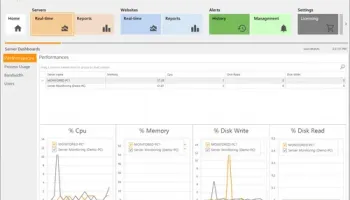
At its core, TSplus Server Monitoring offers real-time monitoring capabilities, allowing users to keep a vigilant eye on server performance metrics such as CPU usage, memory consumption, disk activity, and network traffic. This ensures that any potential issues can be identified and addressed promptly, minimizing downtime and maintaining smooth operations.
One of the standout features of TSplus Server Monitoring is its user-friendly dashboard, which presents critical data in a clear and accessible manner. The dashboard is customizable, enabling users to prioritize the information most relevant to their specific needs. This level of personalization ensures that administrators can quickly access the insights they need without wading through unnecessary data.
In addition to real-time monitoring, TSplus Server Monitoring provides detailed historical data and trend analysis. This feature is invaluable for identifying patterns and predicting future performance issues, allowing for proactive maintenance and resource planning. The software generates comprehensive reports that can be scheduled and automated, ensuring that stakeholders are always informed about the health and performance of their servers.
Security is a paramount concern for any server management tool, and TSplus Server Monitoring does not disappoint. It includes robust alerting mechanisms that notify administrators of any unusual activity or potential security breaches. These alerts can be customized to suit the specific security policies of an organization, ensuring that any threats are swiftly addressed.
Another key advantage of TSplus Server Monitoring is its scalability. Whether managing a single server or an extensive network of servers, the software is designed to handle varying levels of complexity with ease. This makes it an ideal solution for businesses of all sizes, from small enterprises to large corporations.
The installation and setup process for TSplus Server Monitoring is straightforward, with clear instructions and support provided by TSplus. The software is compatible with a wide range of server environments, ensuring broad applicability and ease of integration into existing IT infrastructures.
In summary, TSplus Server Monitoring is a powerful and versatile tool that empowers IT administrators with the insights and controls needed to maintain high-performing and secure server environments. Its combination of real-time monitoring, historical analysis, customizable alerts, and user-friendly interface makes it an essential asset for any organization committed to optimizing their server operations.
At its core, TSplus Server Monitoring offers real-time monitoring capabilities, allowing users to keep a vigilant eye on server performance metrics such as CPU usage, memory consumption, disk activity, and network traffic. This ensures that any potential issues can be identified and addressed promptly, minimizing downtime and maintaining smooth operations.
One of the standout features of TSplus Server Monitoring is its user-friendly dashboard, which presents critical data in a clear and accessible manner. The dashboard is customizable, enabling users to prioritize the information most relevant to their specific needs. This level of personalization ensures that administrators can quickly access the insights they need without wading through unnecessary data.
In addition to real-time monitoring, TSplus Server Monitoring provides detailed historical data and trend analysis. This feature is invaluable for identifying patterns and predicting future performance issues, allowing for proactive maintenance and resource planning. The software generates comprehensive reports that can be scheduled and automated, ensuring that stakeholders are always informed about the health and performance of their servers.
Security is a paramount concern for any server management tool, and TSplus Server Monitoring does not disappoint. It includes robust alerting mechanisms that notify administrators of any unusual activity or potential security breaches. These alerts can be customized to suit the specific security policies of an organization, ensuring that any threats are swiftly addressed.
Another key advantage of TSplus Server Monitoring is its scalability. Whether managing a single server or an extensive network of servers, the software is designed to handle varying levels of complexity with ease. This makes it an ideal solution for businesses of all sizes, from small enterprises to large corporations.
The installation and setup process for TSplus Server Monitoring is straightforward, with clear instructions and support provided by TSplus. The software is compatible with a wide range of server environments, ensuring broad applicability and ease of integration into existing IT infrastructures.
In summary, TSplus Server Monitoring is a powerful and versatile tool that empowers IT administrators with the insights and controls needed to maintain high-performing and secure server environments. Its combination of real-time monitoring, historical analysis, customizable alerts, and user-friendly interface makes it an essential asset for any organization committed to optimizing their server operations.
OS: Windows 11, Windows Server 2022, Windows Server 2019, Windows Server 2016, Windows 10 32/64 bit, Windows Server 2012 R2, Windows Server 2012, Windows 2008 32/64 bit, Windows 8 32/64 bit, Windows 7 32/64 bit
Add Your Review or 64-bit Compatibility Report
Top Other Server Applications 64-bit downloads


ServersCheck Monitoring Software 16.4.10
A tool running on Windows based systems for monitoring, reporting
Trialware | $199.00

Home Media Center 2.9.6042.28114
Home Media Center is a server application for UPnP / DLNA compatible devices
Open Source


Sawmill Enterprise 8.8.1
An application that shows you all the details of your server's traffic patterns
Trialware | $699.00
Marshal Repository 1.0.3741.29745
A windows application for administration of your Marshal Repository
Shareware

miniDBA Desktop 4.1.5415.0
Streamline database management with miniDBA Desktop's intuitive tools.
Trialware


Members area
Top 64-bit Downloads
-
Tableau Server 2023.3.6
x64 trialware download -
Mullvad 2021.5
x64 trialware download -
Microsoft® SQL Server®
2012 x64 SP1
x64 freeware download -
Lavasoft Personal
Firewall (64-bit) 3.0.2293
x64 trialware download -
Titan FTP Server x64 19.00 B3676
x64 trialware download -
UMove x64 1.10.974
x64 demo download -
ThreatSentry x64 4.0.25.0
x64 demo download -
Wing FTP Server For
Solaris(x64) 3.6.6
x64 shareware download -
Fortitude HTTP x 64 1.0.4.2
x64 freeware download -
NetXMS x64 2.0.6
x64 open source download
Top Downloads
-
Home Media Center 2.9.6042.28114
open source download -
ServersCheck Monitoring
Software 16.4.10
trialware download -
smtp4dev 3.15.0
open source download -
Sawmill Enterprise 8.8.1
trialware download -
Tableau Server 2023.3.6
trialware download -
VShell 4.9.4 Build 3478
trialware download -
miniDBA Desktop 4.1.5415.0
trialware download -
freeSSHD 1.3.1
freeware download -
Webmin 1.690
open source download -
Marshal Repository 1.0.3741.29745
shareware download -
News Solution 1.2.18.25
trialware download -
eyeOS 2.5
freeware download -
AXIGEN Enterprise
Edition 10.6.29
trialware download -
Datadog Agent Manager 7.76.3
trialware download -
QueueExplorer
Professional 5.0.73
trialware download