
Unicode Viewer - X 64-bit Download
Popular x64 Tags
- freeware x64 download
- windows x64 download
- free x64 download
- web x64 download
- software x64 download
- folder x64 download
- utility x64 download
- convert x64 download
- monitor x64 download
- download x64 download
- tool x64 download
- memory x64 download
- video x64 download
- audio x64 download
- text x64 download
- password x64 download
- editor x64 download
- file x64 download
- security x64 download
- image x64 download
- database x64 download
- jpeg x64 download
- icon x64 download
- organizer x64 download
- viewer x64 download
- data x64 download
- print x64 download
- edit x64 download
- search x64 download
- pim x64 download
Unicode Viewer 1.9
Sponsored links:

Canadian Mind Products

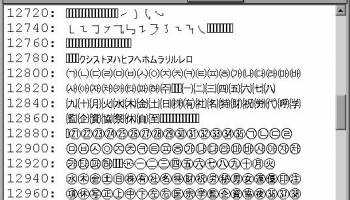
In the applet shown below (Java enabled browsers only) 256 characters are displayed in a grid. By clicking on the bottom and right “sliders” the offset of this character window into the Unicode character set can be changed.
If, Unicode, the above Unicode signed Java Applet does not work…
Often problems can be fixed simply by clicking the reload button on your browser.
Make sure you have both JavaScript and Java enabled in your browser.
This signed Java Applet needs 32-bit (not 64-bit) Java 1.5 or later. For best results use the latest 1.6.0_26. and a recent browser.
Firefox 3.6 requires Java 1.6.0_10 or later.
If you have Windows 7 64-bit and Internet Explorer 64-bit, you can use 64-bit Java.
It works under any operating system that supports Java e.g. W2K/XP/W2K3/Vista/W7-32/W7-64/Linux/OSX
You should see the Applet above looking much like the screenshot. If you don’t, the following should help you get it working:
If you are using Microsoft Internet Explorer, try another browser. Seriously. Microsoft has taken great pains, over and over, to screw up Java and every other multi-platform standardisation.
If you are using Internet Explorer 7 or 8, you must allow blocked content permission for Active X to run. This also gives permission to Java to run. Click the Information bar, and then click Allow blocked content. Unfortunately, this also allows dangerous ActiveX code to run. However, you must do this in order to get access to perfectly-safe Java Applets running in a sandbox. This is part of Microsoft’s war on Java. Don’t put up with it! Use a different browser.
For this Applet to work, you must click grant/accept to give it permission to allow you to set the look & feel and to turn on anti-aliased fonts..
Optionally, you may permanently install the Canadian Mind Products code-signing certificate so you don’t have to grant each time.
If the above Applet appears to freeze-up, click Alt-Esc repeatedly to check for any buried permission dialog box.
If you have certificate troubles, check the installed certificates and remove or update any obsolete or suspected defective certificates. The only certificate used by this program is mindprodcert2011dsa.cer.
Especially if this Applet has worked before, try clearing the browser cache and rebooting.
To ensure your Java is up to date, check with Wassup. First, download it and run it as an application independent of your browser, then run it online as an Applet to add the complication of your browser.
If the above Applet does not work, check the Java console for error messages.
If the above Applet does not work, you might have better luck with the downloadable version.
If you are using Mac OS X and would like an improved Look and Feel, download the QuaQua look & feel from randelshofer.ch/quaqua. UnZip the contained quaqua.jar and install it in ~/Library/Java/Extensions or one of the other ext dirs.
If you still can’t get the program working click HELP for more detail.
If, Unicode, the above Unicode signed Java Applet does not work…
Often problems can be fixed simply by clicking the reload button on your browser.
Make sure you have both JavaScript and Java enabled in your browser.
This signed Java Applet needs 32-bit (not 64-bit) Java 1.5 or later. For best results use the latest 1.6.0_26. and a recent browser.
Firefox 3.6 requires Java 1.6.0_10 or later.
If you have Windows 7 64-bit and Internet Explorer 64-bit, you can use 64-bit Java.
It works under any operating system that supports Java e.g. W2K/XP/W2K3/Vista/W7-32/W7-64/Linux/OSX
You should see the Applet above looking much like the screenshot. If you don’t, the following should help you get it working:
If you are using Microsoft Internet Explorer, try another browser. Seriously. Microsoft has taken great pains, over and over, to screw up Java and every other multi-platform standardisation.
If you are using Internet Explorer 7 or 8, you must allow blocked content permission for Active X to run. This also gives permission to Java to run. Click the Information bar, and then click Allow blocked content. Unfortunately, this also allows dangerous ActiveX code to run. However, you must do this in order to get access to perfectly-safe Java Applets running in a sandbox. This is part of Microsoft’s war on Java. Don’t put up with it! Use a different browser.
For this Applet to work, you must click grant/accept to give it permission to allow you to set the look & feel and to turn on anti-aliased fonts..
Optionally, you may permanently install the Canadian Mind Products code-signing certificate so you don’t have to grant each time.
If the above Applet appears to freeze-up, click Alt-Esc repeatedly to check for any buried permission dialog box.
If you have certificate troubles, check the installed certificates and remove or update any obsolete or suspected defective certificates. The only certificate used by this program is mindprodcert2011dsa.cer.
Especially if this Applet has worked before, try clearing the browser cache and rebooting.
To ensure your Java is up to date, check with Wassup. First, download it and run it as an application independent of your browser, then run it online as an Applet to add the complication of your browser.
If the above Applet does not work, check the Java console for error messages.
If the above Applet does not work, you might have better luck with the downloadable version.
If you are using Mac OS X and would like an improved Look and Feel, download the QuaQua look & feel from randelshofer.ch/quaqua. UnZip the contained quaqua.jar and install it in ~/Library/Java/Extensions or one of the other ext dirs.
If you still can’t get the program working click HELP for more detail.
OS: Windows 2000, Windows 2003, Windows XP, Windows Vista, Windows Vista x64, Windows 7, Windows 7 x64, Windows 8, Windows 8 x64, Windows 10, Windows 10 x64
Add Your Review or 64-bit Compatibility Report
Top Other 64-bit downloads


Caffeine 1.98
Keep your computer awake effortlessly with Caffeine, the ultimate productivity tool.
Freeware


Thaiphoon Burner 17.4.1.2
Designed for those who are in need of getting all available information
Freeware


Portable Don't Panic 3.1.0 Build 30
Aplication that can close and open multiple programs with the click of a button
Open Source

Download Master 7.3
Most effective acceleration, resuming, and management of your downloads.
Freeware

HWMonitor (64-bit) 1.53
Hardware monitoring program that reads PC systems main health sensors
Freeware
Members area
Top 64-bit Downloads
-
EasyTune6 B24.0119.1
x64 freeware download -
HWMonitor (64-bit) 1.53
x64 freeware download -
7z SFX Builder x64 2.1
x64 freeware download -
PhotoRenamer 4.1
x64 freeware download -
XtraTools Professional
x64 26.2.1
x64 shareware download -
Windows 7 x64
x64 trialware download -
Disk Pulse Pro x64 16.1.28
x64 trialware download -
HWiNFO64 6.28 B4200
x64 freeware download -
Areca Backup x64 7.5
x64 open source download -
PKZIP 64-bit 14.40.0028
x64 trialware download
Top Downloads
-
Open Files from XLSX to
XLS 5.2
shareware download -
Caffeine 1.98
freeware download -
AnyMP4 Data Recovery 1.5.12
shareware download -
EaseUS Key Finder 4.1.6 Build 20240910
demo download -
Pitara 4.0.9566.34157
open source download -
Office 365 Backup 3.0
shareware download -
DRevitalize 4.10
demo download -
WinFindr 1.8
shareware download -
Vim 9.2.0140
open source download -
Cursor 0.45.12
demo download -
WriterClassic 10.8.0
open source download -
FMDiff 4.0.5
demo download -
SyncBreeze 17.8.26
freeware download -
GoodSync 12.9.26
freeware download -
Software to Data
Recovery 5.8.4.1
shareware download