
Wing IDE Personal - X 64-bit Download
Popular x64 Tags
- compile x64 download
- compiler x64 download
- pascal x64 download
- web site x64 download
- web site management x64 download
- ide x64 download
- sitemaps generator x64 download
- python debugger x64 download
- visual studio x64 download
- python x64 download
- programming x64 download
- debug x64 download
- software x64 download
- create application x64 download
- development x64 download
- python ide x64 download
- wingware x64 download
- language x64 download
- browser x64 download
- vb net x64 download
- debugger x64 download
- audio processing x64 download
- free controls x64 download
- java ide x64 download
- improve x64 download
- development environment x64 download
- javascript x64 download
- parser x64 download
- code optimization x64 download
- dll x64 download
Wing IDE Personal 10.0.4.0
Sponsored links:

Wingware

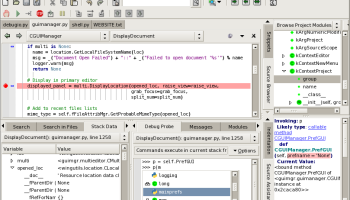
Wing IDE Personal is designed for for hobbyists and educational users that are looking for a lower-cost product and don't require the full feature set of Wing IDE Professional. Wing understands your Python code and puts context appropriate-knowledge at your fingertips, whether you're typing in the editor, working in the source browser, managing your project, or debugging your application.
You can change the overall look and feel of the user interface on the fly by selecting among 28 themes including black background, low contrast, high contrast and large print options.
FEATURES:
· Auto-completer: Reduces typing burden and mistakes. The completion options are always context-appropriate and update immediately after code is edited.
· Source assistant: Provides context-appropriate call signature and source documentation while you edit or browse your code.
· Error indicators: Flag bad code as you type.
· Source browser: Browse single files or your whole project by module or class heirarchy.
· Goto-definition: Jump directly to point of definition.
· Navigation menus: Layered menus in each editor provide a handy index into your code.
· Indentation analyser: Inspect, repair, and convert indentation style in source files. Wing's editor also auto-indents and block indents according to context.
· Advanced Debugger: Wing can debug all forms of Python code, whether it is launched from the IDE, externally by a web server, or running as a script in an embedded copy of Python. The debugger also include special support for Zope and Plone.
· Exception Detection: Wing distinguishes handled and unhandled exceptions at the moment that they occur, allowing inspection of runtime state at the point of failure, not after the fact.
· Debug Probe: Run interactive Python commands in the context of your paused debug process. This tool is unmatched for complex debugging, and a great way to try out code in context while crafting a bug fix.
· Conditional Breakpoints: Stop only on the cases you're interested in debugging, even in code that is executed thousands of times before your problem case is reached. Ignore-counted breakpoints are also available.
· Watch Debug Data and Expressions: Track values as your program runs, by object reference, symbolic path, or by symbolic slot within a referenced object. A great way to keep track of values as you move outside of their scope of definition, this tool also allows watching the value of Python expressions as the run state changes.
· Module View: Browse program data starting at sys.modules, the list of all loaded Python modules.
· Change Debug: Data Debug data values can be changed from the graphical display and from the Debug Probe, as a way to test out alternative runtime environments while debugging.
Wing provides three different ways to search your source files: Quick search from the toolbar, keyboard driven interactive mini-search, and using one or more instances of the Search Manager. Advanced search capabilities include:
· Multi-file Search: Search through all project files or all open files, optionally constrained by file type.
· Disk Search: Search all files within a directory, or directory tree, optionally constrained by file type.
· Wildcard Search: Use simple wildcards as part of your search string.
· Regular Expression: Search Craft complex searches using regular expressions. This can also be used to design and test regular expressions for your program.
· Multi-file Replace: Replace search matches across multiple files.
· Visual Studio, VI/Vim, Emacs, and Brief Emulation: Optional key bindings are available to make Wing act like many of the most commonly used editors.
· CVS, Subversion, and Perforce Support: Access these popular revision control systems directly from the editor.
· Syntax Highlighting: Colorized files are easy on your eyes, for over 50 different programming languages and file types.
· Split Views: Divide editors horizontally, vertically, or any combination thereof.
You can change the overall look and feel of the user interface on the fly by selecting among 28 themes including black background, low contrast, high contrast and large print options.
FEATURES:
· Auto-completer: Reduces typing burden and mistakes. The completion options are always context-appropriate and update immediately after code is edited.
· Source assistant: Provides context-appropriate call signature and source documentation while you edit or browse your code.
· Error indicators: Flag bad code as you type.
· Source browser: Browse single files or your whole project by module or class heirarchy.
· Goto-definition: Jump directly to point of definition.
· Navigation menus: Layered menus in each editor provide a handy index into your code.
· Indentation analyser: Inspect, repair, and convert indentation style in source files. Wing's editor also auto-indents and block indents according to context.
· Advanced Debugger: Wing can debug all forms of Python code, whether it is launched from the IDE, externally by a web server, or running as a script in an embedded copy of Python. The debugger also include special support for Zope and Plone.
· Exception Detection: Wing distinguishes handled and unhandled exceptions at the moment that they occur, allowing inspection of runtime state at the point of failure, not after the fact.
· Debug Probe: Run interactive Python commands in the context of your paused debug process. This tool is unmatched for complex debugging, and a great way to try out code in context while crafting a bug fix.
· Conditional Breakpoints: Stop only on the cases you're interested in debugging, even in code that is executed thousands of times before your problem case is reached. Ignore-counted breakpoints are also available.
· Watch Debug Data and Expressions: Track values as your program runs, by object reference, symbolic path, or by symbolic slot within a referenced object. A great way to keep track of values as you move outside of their scope of definition, this tool also allows watching the value of Python expressions as the run state changes.
· Module View: Browse program data starting at sys.modules, the list of all loaded Python modules.
· Change Debug: Data Debug data values can be changed from the graphical display and from the Debug Probe, as a way to test out alternative runtime environments while debugging.
Wing provides three different ways to search your source files: Quick search from the toolbar, keyboard driven interactive mini-search, and using one or more instances of the Search Manager. Advanced search capabilities include:
· Multi-file Search: Search through all project files or all open files, optionally constrained by file type.
· Disk Search: Search all files within a directory, or directory tree, optionally constrained by file type.
· Wildcard Search: Use simple wildcards as part of your search string.
· Regular Expression: Search Craft complex searches using regular expressions. This can also be used to design and test regular expressions for your program.
· Multi-file Replace: Replace search matches across multiple files.
· Visual Studio, VI/Vim, Emacs, and Brief Emulation: Optional key bindings are available to make Wing act like many of the most commonly used editors.
· CVS, Subversion, and Perforce Support: Access these popular revision control systems directly from the editor.
· Syntax Highlighting: Colorized files are easy on your eyes, for over 50 different programming languages and file types.
· Split Views: Divide editors horizontally, vertically, or any combination thereof.
OS: Windows XP, Windows Vista, Windows Vista x64, Windows 7, Windows 7 x64, Windows 8, Windows 8 x64, Windows 10, Windows 10 x64, Windows 11
Add Your Review or 64-bit Compatibility Report
Top Compilers & Interpreters 64-bit downloads


Python 3.14.3
Python: Versatile, high-level programming language for web, data, and automation.
Open Source


Code::Blocks forMac OS X 20.03 Build Apr 3 20
The open source, cross platform, free C++ IDE
Open Source

AppStudio 9.4.6.1
Create cross-platform mobile apps effortlessly with AppStudio's intuitive tools.
Demo | $150.00


Gravilux for Win8 UI 1.21.9

Antigravity: A revolutionary tool for effortless project management and collaboration.
Shareware

Wing IDE Personal 10.0.4.0
An integrated development environment (IDE) for the Python programming language
Freeware

Qt 6.11.0
Qt: A powerful framework for cross-platform application development.
Trialware | $4 110.00
Members area
Top 64-bit Downloads
-
dotNet Sniffer 64-bit
x64 2.0
x64 freeware download -
DotNetBrowser 3.5.1
x64 commercial download -
Syncro SVN Client x64 10.1 B2015040812
x64 trialware download -
Dart Editor 2.19.6
x64 open source download -
Argyll x64 3.2.0
x64 freeware download -
PDF Viewer SDK ActiveX
x64 8.5
x64 shareware download -
Software Ideas Modeler
Portable x64 14.55
x64 freeware download -
TortoiseSVN for 64-bit
System 1.14.7.29687
x64 freeware download -
Lazarus x64 3.2
x64 freeware download -
HPC Pack 2008 R2 SDK x64 3.3.3950 SP3
x64 freeware download
Top Downloads
-
NASM 2.16.01
open source download -
Library .NET 19.8.8201
trialware download -
WebData 10.2.4.0
shareware download -
jPDFImages 2021R1
demo download -
IdleX 1.11.2
freeware download -
Python 3.14.3
open source download -
Delphi 12.0
shareware download -
UtilsLib 7.2
demo download -
OpenWire 8.0.0.156
freeware download -
Swapy 0.5.4
open source download -
GeeXLab 0.32.0
freeware download -
PHP 8.5.4
open source download -
.NET Logging Library 2.20
shareware download -
Document .Net 2026.3.5
demo download -
PythonCard 0.8.2
open source download