
1-abc.net Right Click Configurator - X 64-bit Download
Popular x64 Tags
- cpu x64 download
- performance x64 download
- windows x64 download
- driver updates x64 download
- driver update x64 download
- cleaner x64 download
- defrag x64 download
- system x64 download
- drivers update x64 download
- tune x64 download
- tweak x64 download
- registry cleaner x64 download
- security x64 download
- video driver update x64 download
- optimizer x64 download
- registry x64 download
- uninstall x64 download
- speed x64 download
- boost x64 download
- faster x64 download
- system utilities x64 download
- utility x64 download
- optimize x64 download
- driver update software x64 download
- startup x64 download
- disk cleaner x64 download
- clean disk x64 download
- clean x64 download
- vista x64 download
- disk x64 download
You are here: X-64-bit Download
\ System Utilities
\ System Maintenance \ 1-abc.net Right Click Configurator
1-abc.net Right Click Configurator 7.00
Sponsored links:

1-abc.net

Decide what the Windows Explorer popup menu does!
When you use Windows Explorer for opening, deleting, moving or copying files (e.g. by executing it through the “My Computer” icon on your desktop) a popup menu is opened by clicking the right mouse button on any entry that allows you to get access to many different programs and features.
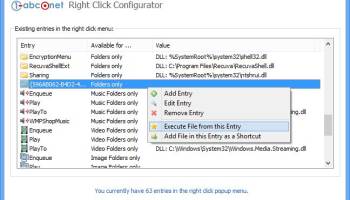
1-abc.net Right Click Configurator has a very clean user interface that is pretty easy to understand. All of your context menu options are listed in a large window and are grouped together by availability. For example, certain entries, such as file encryption, are only available by right-clicking on a file, while others are only available by right-clicking on a folder. Thanks to the straightforward commands buttons, removing and deactivating entries required only a single mouse click. Adding and editing new entries required a little more work and a visit to the Help menu. To add and edit an entry, we had to specify the type of entry, the name, and the command line. However, we were a little confused by the parameters option. The Help menu didn't really offer any kind of explanation, other than that you needed to make sure the added program could work with the parameters. But it was also in the Help menu that we came across a little tidbit of info regarding Vista users and deactivating the UAC to ensure that the program works correctly. We didn't deactivate our UAC, and we didn't have any issues.
Features:
* Very easy-to-use interface
* Configure the right click behaviour for files, drives, music files, image files, video files or even files of any type
* Add customized entries of any kind to the right click menu
* Activate already existing features on your Windows system like copying or moving a file or folder to another place
* Add hidden Windows default features like the Character Map, Windows Cleaning Manager or the Registry Editor to your popup menu
* Configure the 'Send To' sub menu in your right click menu
* Add parameters to your right click entries
* Print out your current right click menu settings on your local printer or via network
* Right click configuration report - to see what changes you made with this program
* Check right click entries for errors
* Program can be installed on USB sticks, floppy disks or nearly all other re-writable media
* Very low system resources required
When you use Windows Explorer for opening, deleting, moving or copying files (e.g. by executing it through the “My Computer” icon on your desktop) a popup menu is opened by clicking the right mouse button on any entry that allows you to get access to many different programs and features.
1-abc.net Right Click Configurator has a very clean user interface that is pretty easy to understand. All of your context menu options are listed in a large window and are grouped together by availability. For example, certain entries, such as file encryption, are only available by right-clicking on a file, while others are only available by right-clicking on a folder. Thanks to the straightforward commands buttons, removing and deactivating entries required only a single mouse click. Adding and editing new entries required a little more work and a visit to the Help menu. To add and edit an entry, we had to specify the type of entry, the name, and the command line. However, we were a little confused by the parameters option. The Help menu didn't really offer any kind of explanation, other than that you needed to make sure the added program could work with the parameters. But it was also in the Help menu that we came across a little tidbit of info regarding Vista users and deactivating the UAC to ensure that the program works correctly. We didn't deactivate our UAC, and we didn't have any issues.
Features:
* Very easy-to-use interface
* Configure the right click behaviour for files, drives, music files, image files, video files or even files of any type
* Add customized entries of any kind to the right click menu
* Activate already existing features on your Windows system like copying or moving a file or folder to another place
* Add hidden Windows default features like the Character Map, Windows Cleaning Manager or the Registry Editor to your popup menu
* Configure the 'Send To' sub menu in your right click menu
* Add parameters to your right click entries
* Print out your current right click menu settings on your local printer or via network
* Right click configuration report - to see what changes you made with this program
* Check right click entries for errors
* Program can be installed on USB sticks, floppy disks or nearly all other re-writable media
* Very low system resources required
OS: Windows XP, Windows Vista, Windows Vista x64, Windows 7, Windows 7 x64, Windows 8, Windows 8 x64, Windows 10, Windows 10 x64
Add Your Review or 64-bit Compatibility Report
Top System Maintenance 64-bit downloads


Windows 7 Service Pack 1 7601.17514.1011
SP1 - all previously publicly released updates for Windows 7 and Server 2008 R2
Freeware


Revo Uninstaller 2.00
Freeware innovative uninstall utility with many cleaning tools included
Freeware

TweakNow WinSecret 7.9.8 Plus
Unlock hidden Windows features and optimize your system effortlessly.
Trialware | $11.24

Max Secure Total Security 1.0.7.1
MAX Secure total security is a most advanced enabled antivirus available.
Shareware | $49.99

XtraTools Professional x64 26.2.1

XtraTools increases productivity and makes working with MS Windows easier.
Shareware | $29.99

TweakNow WinSecret 7.9.8 Plus
Unlock hidden Windows features and optimize your system effortlessly.
Trialware | $11.24


Outbyte PC Repair 1.1.2.58265
Outbyte PC Repair is an app that is designed to optimize Windows performance
Shareware | $29.95

XtraTools Pro 26.2.1
XtraTools increases productivity and makes working with MS Windows easier.
Shareware | $29.99

Cacheman 10.20
Cacheman allows the user to choose from 10 Windows auto optimization profiles.
Shareware | $28.95
Members area
Top 64-bit Downloads
-
Windows 10 x64 22H2
x64 trialware download -
SoftPerfect RAM Disk 26.2
x64 shareware download -
XtraTools Professional
x64 26.2.1
x64 shareware download -
HWMonitor (64-bit) 1.53
x64 freeware download -
Windows 7 x64
x64 trialware download -
Lenovo Vantage 10.2001.10.0
x64 freeware download -
Windows 8 x64 RTM Build 9200
x64 trialware download -
Ashampoo WinOptimizer
FREE 26.00.12
x64 freeware download -
7-Zip (x64 bit) 24.07
x64 open source download -
BestSync Portable x64 2024 (19.0.1.5)
x64 trialware download
Top Downloads
-
FreeCommander XE 2026 Build 941
shareware download -
Windows 10 x64 22H2
trialware download -
Windows 7 Service Pack 1 7601.17514.1011
freeware download -
FreeCommander XE
Portable 2026 Build 941
freeware download -
Dr. Hardware 2026 26.0.0
shareware download -
Thaiphoon Burner 17.4.1.2
freeware download -
RecoveryRobot Memory
Card Recovery 1.3.3
shareware download -
Revo Uninstaller 2.00
freeware download -
BIOS Agent Plus 2.2019.1.31
demo download -
Caffeine 1.98
freeware download -
Qemu Simple Boot 1.3
freeware download -
DirPrintOK 7.52
freeware download -
TweakNow WinSecret 7.9.8 Plus
trialware download -
SoftPerfect RAM Disk 26.2
shareware download -
Don't Sleep 9.99
freeware download