
123PPT Video Backgrounds Studio - X 64-bit Download
Popular x64 Tags
- office x64 download
- microsoft x64 download
- importing x64 download
- exporting x64 download
- acrobat x64 download
- xls x64 download
- printer x64 download
- pdf x64 download
- pdf converter x64 download
- software x64 download
- word x64 download
- outlook x64 download
- excel x64 download
- powerpoint x64 download
- tool x64 download
- ppt x64 download
- adobe x64 download
- convert x64 download
- spreadsheet x64 download
- text x64 download
- create x64 download
- doc x64 download
- printing x64 download
- files x64 download
- add in x64 download
- open x64 download
- document x64 download
- data x64 download
- export x64 download
- saving x64 download
You are here: X-64-bit Download
\ Business
\ Office Suites & Tools \ 123PPT Video Backgrounds Studio
123PPT Video Backgrounds Studio 3.5
Sponsored links:

123PPT.com

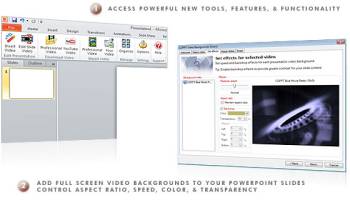
Add and play video backgrounds in PowerPoint and Insert YouTube in PowerPoint presentations.
Whether you create presentations in older and more dated versions of PowerPoint such as PowerPoint 2000 or 2003, or newer and up to date releases such as PowerPoint 2007 or 2010, your audience still sees and experiences the same PowerPoint presentation today as they did over 10 years ago.
The limitation of PowerPoint to create engaging presentations means your PowerPoint presentations are the same today as they have always been. Created from static slides and stationary backgrounds PowerPoint produces static presentations. Whilst 10 years ago audiences may have been satisfied with the limitations of PowerPoint, and static slide presentations, today they are not. Today audience expectations have made it impossible for presenters to grab and maintain their attention using PowerPoint alone...or so it was...until now.
FEATURES:
· Playback full screen full motion video PowerPoint presentations
· Create full screen full motion video PowerPoint presentations
· Create new presentations using video backgrounds
· Apply one video background to your entire presentation
· Assign individual video backgrounds to individual slides in your presentation
· Complete video control to adjust the independent video properties of your video backgrounds for each slide or for your entire presentation
· Edit video playback speed
· Slow video playback speed down from Normal (25 frames per second) to two thirds speed, one third speed, or to static "still"
· Increase video playback speed from Normal (25 frames per second) up to 3 X Normal Speed (Processor dependent)
· Use backdrop functionality to alter, adjust, and change the colour of your presentation video background
· Full slide previews with video backgrounds
· Pack your presentations for easy distribution to friends and colleagues via email, vpn, Internet, or internal network
· In-built video management system to manage, organize, add, and delete your presentation video backgrounds
· Limited import of video movies, clips and files for use as video backgrounds (maximum of 3 before upgrade is required)
· Unlimited import of videos purchased from 123PPT for use as video backgrounds in your PowerPoint presentations
· Unlimited import of your own video movies, clips and files for use as video backgrounds
· Supports all MPEG (.mpg), Windows Media Video (.wmv), and Audio Video Interleave (.avi) video file formats
· Playback your own full screen video presentations or full screen video presentations created by others
Whether you create presentations in older and more dated versions of PowerPoint such as PowerPoint 2000 or 2003, or newer and up to date releases such as PowerPoint 2007 or 2010, your audience still sees and experiences the same PowerPoint presentation today as they did over 10 years ago.
The limitation of PowerPoint to create engaging presentations means your PowerPoint presentations are the same today as they have always been. Created from static slides and stationary backgrounds PowerPoint produces static presentations. Whilst 10 years ago audiences may have been satisfied with the limitations of PowerPoint, and static slide presentations, today they are not. Today audience expectations have made it impossible for presenters to grab and maintain their attention using PowerPoint alone...or so it was...until now.
FEATURES:
· Playback full screen full motion video PowerPoint presentations
· Create full screen full motion video PowerPoint presentations
· Create new presentations using video backgrounds
· Apply one video background to your entire presentation
· Assign individual video backgrounds to individual slides in your presentation
· Complete video control to adjust the independent video properties of your video backgrounds for each slide or for your entire presentation
· Edit video playback speed
· Slow video playback speed down from Normal (25 frames per second) to two thirds speed, one third speed, or to static "still"
· Increase video playback speed from Normal (25 frames per second) up to 3 X Normal Speed (Processor dependent)
· Use backdrop functionality to alter, adjust, and change the colour of your presentation video background
· Full slide previews with video backgrounds
· Pack your presentations for easy distribution to friends and colleagues via email, vpn, Internet, or internal network
· In-built video management system to manage, organize, add, and delete your presentation video backgrounds
· Limited import of video movies, clips and files for use as video backgrounds (maximum of 3 before upgrade is required)
· Unlimited import of videos purchased from 123PPT for use as video backgrounds in your PowerPoint presentations
· Unlimited import of your own video movies, clips and files for use as video backgrounds
· Supports all MPEG (.mpg), Windows Media Video (.wmv), and Audio Video Interleave (.avi) video file formats
· Playback your own full screen video presentations or full screen video presentations created by others
OS: Windows XP, Windows Vista, Windows Vista x64, Windows 7, Windows 7 x64, Windows 8, Windows 8 x64, Windows 10, Windows 10 x64
Add Your Review or 64-bit Compatibility Report
Top Office Suites & Tools 64-bit downloads


Quite Imposing Plus 6.0d
Effortlessly create and manage complex impositions for PDF documents.
Demo | $949.00

Seavus Project Viewer 19.0
Free to experience the best viewer for Micrsoft Project. Try our Project Viewer
Trialware | $29.50


SilentNotes 8.7.1
SilentNotes: Secure, offline note-taking app with encryption and cross-device sync.
Open Source


CZ Excel Converter 1.9.4.6366
CZ V: A powerful synth emulation with rich sounds and intuitive controls.
Demo | $149.00


callas pdfaPilot 14.2.400
Powerful tool for creating, validating, and optimizing PDF/A documents.
Trialware

mini PDF to TXT OCR Converter 3.2
PDF to TXT OCR Converter is a best OCR Converter
Shareware | $59.95
Members area
Top 64-bit Downloads
-
mbFXWords 2.80
x64 freeware download -
FontAgent Pro 10.0.15.0
x64 trialware download -
Microsoft Office 2016
x64 2405 B17628.20164
x64 trialware download -
Print to PDF Toolkit Pro 3.0
x64 shareware download -
Microsoft Office 2010
Service Pack x64 SP2
x64 freeware download -
PDFill PDF and Image
Writer x64 15.0 Build 2
x64 freeware download -
CSV2IIF Portable 5.0.060
x64 demo download -
Foxit Reader 2023.3
x64 freeware download -
Hl7Spy 24.1.227
x64 trialware download -
ABBYY FineReader
Professional 16.0.13
x64 trialware download
Top Downloads
-
Quite Imposing Plus 6.0d
demo download -
Total CSV Converter 4.0
shareware download -
Active Barcode and QR
code Generator 1.24.8.15
freeware download -
Seavus Project Viewer 19.0
trialware download -
Miro for Windows 0.11.110
shareware download -
Odoo 19.0.20260327
demo download -
Flipping Book Writer 2.6
shareware download -
mbFXWords 2.80
freeware download -
SmarThru 4.04
freeware download -
SilentNotes 8.7.1
open source download -
LawTrust 5.1.1
shareware download -
HelpDesk 11.19.9557.25020
trialware download -
DeskWork Standard 4.0.2827
trialware download -
LiquiBase 5.0.2
trialware download -
Smart Phone Recorder 3.6.5
demo download