
A4ScanDoc - X 64-bit Download
Popular x64 Tags
- office x64 download
- microsoft x64 download
- importing x64 download
- exporting x64 download
- acrobat x64 download
- xls x64 download
- printer x64 download
- pdf x64 download
- pdf converter x64 download
- software x64 download
- word x64 download
- outlook x64 download
- excel x64 download
- powerpoint x64 download
- tool x64 download
- ppt x64 download
- adobe x64 download
- convert x64 download
- spreadsheet x64 download
- text x64 download
- create x64 download
- doc x64 download
- printing x64 download
- files x64 download
- add in x64 download
- open x64 download
- document x64 download
- data x64 download
- export x64 download
- saving x64 download
A4ScanDoc 2.0.9.20
Sponsored links:
license: Trialware
downloads: 47
size: 8.50 MB
updated: 2025-01-28
tags: A4ScanDoc, download A4ScanDoc, A4ScanDoc free download, scanning software, scan document, document scanner, scanner, scanner, autoscan, autoscan
Add to Basket

Riman

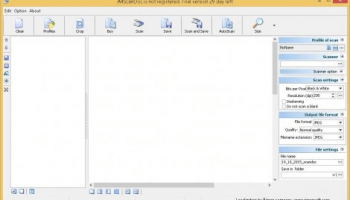
A4ScanDoc, developed by Riman, is a versatile and user-friendly scanning software designed to streamline document digitization for both personal and professional use. This robust application stands out with its intuitive interface and powerful features, making it an ideal choice for users who require efficient and high-quality document scanning.
One of the key strengths of A4ScanDoc is its simplicity. The software is designed to be accessible to users of all technical levels, from beginners to advanced users. Its clean and straightforward interface allows users to quickly understand and navigate the various functionalities without a steep learning curve. This ease of use is complemented by a comprehensive set of features that cater to a wide range of scanning needs.
A4ScanDoc supports a variety of file formats, including PDF, TIFF, JPEG, and PNG, providing flexibility in how scanned documents are saved and shared. The software also offers advanced image processing capabilities, such as automatic deskewing, color correction, and background removal, ensuring that scanned documents are of the highest quality. These features are particularly useful for users who need to digitize old or damaged documents, as they help to enhance the readability and appearance of the scanned images.
Batch scanning is another notable feature of A4ScanDoc. This functionality allows users to scan multiple pages in a single session, significantly improving productivity and efficiency. The software can automatically detect and separate individual documents within a batch, saving users the time and effort of manually organizing scanned files. Additionally, A4ScanDoc supports multi-page PDF creation, enabling users to compile multiple scanned pages into a single, cohesive document.
Customization is a key aspect of A4ScanDoc, with a range of settings and options that allow users to tailor the scanning process to their specific needs. Users can adjust resolution, color depth, and file compression settings to achieve the desired balance between image quality and file size. The software also includes predefined profiles for common scanning tasks, such as text documents, photos, and receipts, making it easy to quickly select the appropriate settings for different types of documents.
A4ScanDoc is compatible with a wide range of scanners, including both flatbed and sheet-fed models, ensuring that users can seamlessly integrate the software with their existing hardware. The software also supports TWAIN and WIA drivers, providing broad compatibility with various scanner brands and models.
In conclusion, A4ScanDoc by Riman is a powerful and user-friendly scanning solution that offers a comprehensive set of features to meet the diverse needs of its users. Its intuitive interface, advanced image processing capabilities, and flexible customization options make it an excellent choice for anyone looking to streamline their document digitization process. Whether you are a home user looking to digitize personal documents or a professional needing to manage large volumes of paperwork, A4ScanDoc provides the tools and functionality to get the job done efficiently and effectively.
One of the key strengths of A4ScanDoc is its simplicity. The software is designed to be accessible to users of all technical levels, from beginners to advanced users. Its clean and straightforward interface allows users to quickly understand and navigate the various functionalities without a steep learning curve. This ease of use is complemented by a comprehensive set of features that cater to a wide range of scanning needs.
A4ScanDoc supports a variety of file formats, including PDF, TIFF, JPEG, and PNG, providing flexibility in how scanned documents are saved and shared. The software also offers advanced image processing capabilities, such as automatic deskewing, color correction, and background removal, ensuring that scanned documents are of the highest quality. These features are particularly useful for users who need to digitize old or damaged documents, as they help to enhance the readability and appearance of the scanned images.
Batch scanning is another notable feature of A4ScanDoc. This functionality allows users to scan multiple pages in a single session, significantly improving productivity and efficiency. The software can automatically detect and separate individual documents within a batch, saving users the time and effort of manually organizing scanned files. Additionally, A4ScanDoc supports multi-page PDF creation, enabling users to compile multiple scanned pages into a single, cohesive document.
Customization is a key aspect of A4ScanDoc, with a range of settings and options that allow users to tailor the scanning process to their specific needs. Users can adjust resolution, color depth, and file compression settings to achieve the desired balance between image quality and file size. The software also includes predefined profiles for common scanning tasks, such as text documents, photos, and receipts, making it easy to quickly select the appropriate settings for different types of documents.
A4ScanDoc is compatible with a wide range of scanners, including both flatbed and sheet-fed models, ensuring that users can seamlessly integrate the software with their existing hardware. The software also supports TWAIN and WIA drivers, providing broad compatibility with various scanner brands and models.
In conclusion, A4ScanDoc by Riman is a powerful and user-friendly scanning solution that offers a comprehensive set of features to meet the diverse needs of its users. Its intuitive interface, advanced image processing capabilities, and flexible customization options make it an excellent choice for anyone looking to streamline their document digitization process. Whether you are a home user looking to digitize personal documents or a professional needing to manage large volumes of paperwork, A4ScanDoc provides the tools and functionality to get the job done efficiently and effectively.
OS: Windows 11, Windows 10 32/64 bit, Windows 8 32/64 bit
Add Your Review or 64-bit Compatibility Report
Top Office Suites & Tools 64-bit downloads


Quite Imposing Plus 6.0d
Effortlessly create and manage complex impositions for PDF documents.
Demo | $949.00

Seavus Project Viewer 19.0
Free to experience the best viewer for Micrsoft Project. Try our Project Viewer
Trialware | $29.50


SilentNotes 8.7.1
SilentNotes: Secure, offline note-taking app with encryption and cross-device sync.
Open Source


CZ Excel Converter 1.9.4.6366
CZ V: A powerful synth emulation with rich sounds and intuitive controls.
Demo | $149.00


callas pdfaPilot 14.2.400
Powerful tool for creating, validating, and optimizing PDF/A documents.
Trialware

mini PDF to TXT OCR Converter 3.2
PDF to TXT OCR Converter is a best OCR Converter
Shareware | $59.95
Members area
Top 64-bit Downloads
-
mbFXWords 2.80
x64 freeware download -
FontAgent Pro 10.0.15.0
x64 trialware download -
Microsoft Office 2016
x64 2405 B17628.20164
x64 trialware download -
Print to PDF Toolkit Pro 3.0
x64 shareware download -
Microsoft Office 2010
Service Pack x64 SP2
x64 freeware download -
PDFill PDF and Image
Writer x64 15.0 Build 2
x64 freeware download -
CSV2IIF Portable 5.0.060
x64 demo download -
Foxit Reader 2023.3
x64 freeware download -
Hl7Spy 24.1.227
x64 trialware download -
ABBYY FineReader
Professional 16.0.13
x64 trialware download
Top Downloads
-
Quite Imposing Plus 6.0d
demo download -
Total CSV Converter 4.0
shareware download -
Active Barcode and QR
code Generator 1.24.8.15
freeware download -
Seavus Project Viewer 19.0
trialware download -
Miro for Windows 0.11.110
shareware download -
Odoo 19.0.20260327
demo download -
Flipping Book Writer 2.6
shareware download -
mbFXWords 2.80
freeware download -
SmarThru 4.04
freeware download -
SilentNotes 8.7.1
open source download -
LawTrust 5.1.1
shareware download -
HelpDesk 11.19.9557.25020
trialware download -
DeskWork Standard 4.0.2827
trialware download -
LiquiBase 5.0.2
trialware download -
Smart Phone Recorder 3.6.5
demo download