
Advanced CSV Converter - X 64-bit Download
Popular x64 Tags
- windows x64 download
- tool x64 download
- software x64 download
- view x64 download
- editor x64 download
- python x64 download
- xml x64 download
- sql x64 download
- dll x64 download
- resource x64 download
- compare x64 download
- dotnet x64 download
- csv x64 download
- uml x64 download
- table x64 download
- delphi x64 download
- xls x64 download
- perl x64 download
- html x64 download
- diff x64 download
- database x64 download
- query x64 download
- convert x64 download
- sql tools x64 download
- ide x64 download
- sql tool x64 download
- activestate x64 download
- doc x64 download
- txt x64 download
- mssql x64 download
Advanced CSV Converter 7.93
Sponsored links:
license: Demo ($39.95)
downloads: 693
size: 3.10 MB
updated: 2026-03-23
tags: Advanced CSV Converter, download Advanced CSV Converter, Advanced CSV Converter free download, convert CSV, CSV to DBF, CSV to RTF, converter, CSV2DBF, CSV2RTF, batch
Add to Basket

HiBase Group

**Advanced CSV Converter by HiBase Group: A Comprehensive Tool for Seamless Data Transformation**
Advanced CSV Converter, developed by HiBase Group, is an indispensable tool for anyone who regularly works with CSV files and needs to convert them into various other formats. This software stands out for its versatility, ease of use, and powerful features that cater to both novice users and seasoned data professionals.
**Key Features and Functionality**
1. **Wide Range of Supported Formats**:
Advanced CSV Converter supports an impressive array of output formats including XLS, XLSX, DBF, SQL, XML, HTML, and more. This extensive compatibility ensures that users can seamlessly integrate CSV data into different applications and workflows without any hassle.
2. **User-Friendly Interface**:
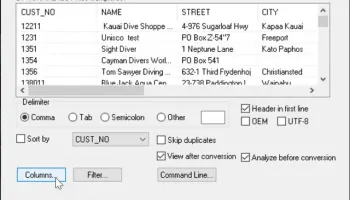
The software boasts an intuitive and straightforward interface that makes the conversion process simple and efficient. Users can easily navigate through the application, select their desired output format, and execute conversions with just a few clicks.
3. **Batch Conversion**:
One of the standout features of Advanced CSV Converter is its ability to handle batch conversions. Users can convert multiple CSV files simultaneously, saving valuable time and effort, especially when dealing with large datasets.
4. **Customizable Conversion Settings**:
The software provides a range of customizable settings that allow users to tailor the conversion process to their specific needs. Options include field mapping, data filtering, and the ability to specify output file parameters, ensuring that the resulting files meet precise requirements.
5. **High Performance and Accuracy**:
Advanced CSV Converter is designed to deliver high-speed conversions without compromising on accuracy. The software ensures that data integrity is maintained throughout the conversion process, providing reliable and error-free results.
6. **Command Line Support**:
For advanced users and developers, the software offers command line support, enabling automation of the conversion process and integration into custom scripts and applications.
7. **Preview and Editing Capabilities**:
Before finalizing the conversion, users can preview the data and make necessary edits directly within the software. This feature is particularly useful for verifying data accuracy and making last-minute adjustments.
**Why Choose Advanced CSV Converter?**
- **Versatility**: The ability to convert CSV files into a multitude of formats makes this software a versatile tool for various industries and use cases.
- **Efficiency**: Batch conversion and high-speed processing significantly enhance productivity, making it an ideal choice for users with large volumes of data.
- **Ease of Use**: The intuitive interface and straightforward workflow ensure that even users with minimal technical expertise can perform conversions effortlessly.
- **Reliability**: With a focus on maintaining data integrity and accuracy, Advanced CSV Converter provides dependable results every time.
**Conclusion**
Advanced CSV Converter by HiBase Group is a robust and reliable solution for anyone in need of converting CSV files into different formats. Its combination of versatility, user-friendliness, and powerful features makes it a valuable addition to any data management toolkit. Whether you are a data analyst, developer, or business professional, this software is designed to meet your conversion needs with precision and efficiency.
Advanced CSV Converter, developed by HiBase Group, is an indispensable tool for anyone who regularly works with CSV files and needs to convert them into various other formats. This software stands out for its versatility, ease of use, and powerful features that cater to both novice users and seasoned data professionals.
**Key Features and Functionality**
1. **Wide Range of Supported Formats**:
Advanced CSV Converter supports an impressive array of output formats including XLS, XLSX, DBF, SQL, XML, HTML, and more. This extensive compatibility ensures that users can seamlessly integrate CSV data into different applications and workflows without any hassle.
2. **User-Friendly Interface**:
The software boasts an intuitive and straightforward interface that makes the conversion process simple and efficient. Users can easily navigate through the application, select their desired output format, and execute conversions with just a few clicks.
3. **Batch Conversion**:
One of the standout features of Advanced CSV Converter is its ability to handle batch conversions. Users can convert multiple CSV files simultaneously, saving valuable time and effort, especially when dealing with large datasets.
4. **Customizable Conversion Settings**:
The software provides a range of customizable settings that allow users to tailor the conversion process to their specific needs. Options include field mapping, data filtering, and the ability to specify output file parameters, ensuring that the resulting files meet precise requirements.
5. **High Performance and Accuracy**:
Advanced CSV Converter is designed to deliver high-speed conversions without compromising on accuracy. The software ensures that data integrity is maintained throughout the conversion process, providing reliable and error-free results.
6. **Command Line Support**:
For advanced users and developers, the software offers command line support, enabling automation of the conversion process and integration into custom scripts and applications.
7. **Preview and Editing Capabilities**:
Before finalizing the conversion, users can preview the data and make necessary edits directly within the software. This feature is particularly useful for verifying data accuracy and making last-minute adjustments.
**Why Choose Advanced CSV Converter?**
- **Versatility**: The ability to convert CSV files into a multitude of formats makes this software a versatile tool for various industries and use cases.
- **Efficiency**: Batch conversion and high-speed processing significantly enhance productivity, making it an ideal choice for users with large volumes of data.
- **Ease of Use**: The intuitive interface and straightforward workflow ensure that even users with minimal technical expertise can perform conversions effortlessly.
- **Reliability**: With a focus on maintaining data integrity and accuracy, Advanced CSV Converter provides dependable results every time.
**Conclusion**
Advanced CSV Converter by HiBase Group is a robust and reliable solution for anyone in need of converting CSV files into different formats. Its combination of versatility, user-friendliness, and powerful features makes it a valuable addition to any data management toolkit. Whether you are a data analyst, developer, or business professional, this software is designed to meet your conversion needs with precision and efficiency.
OS: Windows Server 2025, Windows 11, Windows Server 2022, Windows Server 2019, Windows Server 2016, Windows 10 32/64 bit, Windows Server 2012 R2, Windows Server 2012, Windows 2008 R2, Windows 2008 32/64 bit, Windows 2003, Windows 8 32/64 bit, Windows 7 32/64
Add Your Review or 64-bit Compatibility Report
Top Other 64-bit downloads


JProfiler 16.0.0
JProfiler is a powerful Java profiler for performance tuning and memory analysis.
Trialware | $549.00

Android Studio 2025.3.2 Panda 2
Android Studio: Powerful IDE for Android app development with robust tools.
Freeware


Flyff 2.4.9
Vagrant simplifies environment setup for developers with portable, reproducible workflows.
Open Source
Members area
Top 64-bit Downloads
-
dotNet Sniffer 64-bit
x64 2.0
x64 freeware download -
DotNetBrowser 3.5.1
x64 commercial download -
Dart Editor 2.19.6
x64 open source download -
PDF Viewer SDK ActiveX
x64 8.5
x64 shareware download -
Software Ideas Modeler
Portable x64 14.55
x64 freeware download -
TortoiseSVN for 64-bit
System 1.14.7.29687
x64 freeware download -
Syncro SVN Client x64 10.1 B2015040812
x64 trialware download -
HPC Pack 2008 R2 SDK x64 3.3.3950 SP3
x64 freeware download -
Microsoft Speech SDK 11
x64 freeware download -
HDFView x64 3.3.2
x64 freeware download
Top Downloads
-
NASM 2.16.01
open source download -
Library .NET 19.8.8201
trialware download -
WebData 10.2.4.0
shareware download -
jPDFImages 2021R1
demo download -
IdleX 1.11.2
freeware download -
Python 3.14.3
open source download -
Delphi 12.0
shareware download -
OpenWire 8.0.0.156
freeware download -
GeeXLab 0.32.0
freeware download -
PHP 8.5.4
open source download -
.NET Logging Library 2.20
shareware download -
Document .Net 2026.3.5
demo download -
Swapy 0.5.4
open source download -
UtilsLib 7.2
demo download -
PythonCard 0.8.2
open source download