
ArtSage - X 64-bit Download
Popular x64 Tags
- photo viewer x64 download
- image browser x64 download
- digital x64 download
- gif x64 download
- psd x64 download
- camera x64 download
- picture x64 download
- show x64 download
- picture viewer x64 download
- images x64 download
- graphic x64 download
- viewer x64 download
- image x64 download
- tga x64 download
- browser x64 download
- photo x64 download
- image viewer x64 download
- thumbnail x64 download
- convert x64 download
- edit x64 download
- free x64 download
- png x64 download
- slide show x64 download
- slideshow x64 download
- jpg x64 download
- tif x64 download
- pcx x64 download
- jpeg x64 download
- tiff x64 download
- bmp x64 download
ArtSage 2.00.0001
Sponsored links:

Rick Xavier

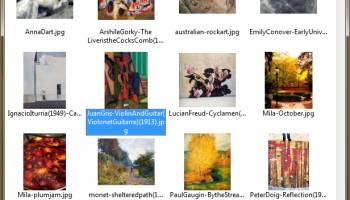
ArtSage is a small graphics viewer. It displays the image files in a folder tree. It features transparency, drag and Drop in main window to exhibit, option for crop, squeeze, shrink, stretch, full screen, and command line.
What It Is?
ArtSage is a small graphics viewer. It displays the image files (JPG etc.) in a folder tree.
Features and Options
* Slideshow (slideshow, timer, windowed/fullscreen/wallpaper, stay on top)
* Transparency (blend, opacity)
* Loop (loop/pause/exit, reshuffle)
* Sort (forward/reverse/random, tree/name/date, case sensitive)
* Navigate (next/previous w/gears, first, last, current, next/prev folder, mousewheel)
* Scroll (mouse, arrow keys w/ gears, autoscroll)
* View (exhibit/favorites/desktop/archive, image folder, link target)
* Exhibit (folder, refresh, subfolders, hidden folders, autorefresh)
* Formats (bmp, emf, gif, ico, jpg, png, tif)
* Find (find/filter/exclude, find next, landscape/portrait, bookmark, goto)
* Favorites (send shortcut/copy, favorites folder, shortcut/copy to desktop)
* Archive (move to archive, confirm, archive folder, log)
* Catalog (thumbsize, hide viewer, show on launch)
* Standard Catalog (navigation, sort, find, block recycle/archive/favorite)
* Wrap (resize window to wrap around each image)
* Crop (remove borders and unused background)
* Squeeze (scale down to fit window/desktop)
* Shrink (scale down to fit one side)
* Stretch (scale up to window/desktop)
* Zoom (in, out, 100%, 1% gear, zoom lock, zoom step, zoom/scale quality, mousewheel)
* Rotate (rotate, rotate left, rotate lock, aspect filter, flip horizontal)
* Collage (fixed-size roaming images)
* Transitions (select effects, overlap/wipe)
* Window (caption, status, tray icon, decor, bg colour, center/roam, corral, draggable, show/hide hotkey, single instance)
* Presets (save/restore 5 window positions)
* Layout (image centered, at corners, roaming within window)
* Fullscreen (caption, cursor, centered/roaming image)
* Wallpaper (center/tile/stretch, clear, restore)
* Shell (view, explore, open with, copy file, move/rename, save as, copy image, copy view, paste, recycle, confirm, view with, explore with, blackbox)
* Settings (save now, save as, save on exit, save folder)
* Info (F1 menu, menu pins, menu at cursor, help, about)
* Drag and Drop in main window to exhibit (folders/files/shortcuts, Shift appends)
* Command line (inifile, options, path)
* Portable (no install, settings in program folder, relative paths)
* Language support (unicode, language files for translation)
* 32-bit and 64-bit versions included
What It Is?
ArtSage is a small graphics viewer. It displays the image files (JPG etc.) in a folder tree.
Features and Options
* Slideshow (slideshow, timer, windowed/fullscreen/wallpaper, stay on top)
* Transparency (blend, opacity)
* Loop (loop/pause/exit, reshuffle)
* Sort (forward/reverse/random, tree/name/date, case sensitive)
* Navigate (next/previous w/gears, first, last, current, next/prev folder, mousewheel)
* Scroll (mouse, arrow keys w/ gears, autoscroll)
* View (exhibit/favorites/desktop/archive, image folder, link target)
* Exhibit (folder, refresh, subfolders, hidden folders, autorefresh)
* Formats (bmp, emf, gif, ico, jpg, png, tif)
* Find (find/filter/exclude, find next, landscape/portrait, bookmark, goto)
* Favorites (send shortcut/copy, favorites folder, shortcut/copy to desktop)
* Archive (move to archive, confirm, archive folder, log)
* Catalog (thumbsize, hide viewer, show on launch)
* Standard Catalog (navigation, sort, find, block recycle/archive/favorite)
* Wrap (resize window to wrap around each image)
* Crop (remove borders and unused background)
* Squeeze (scale down to fit window/desktop)
* Shrink (scale down to fit one side)
* Stretch (scale up to window/desktop)
* Zoom (in, out, 100%, 1% gear, zoom lock, zoom step, zoom/scale quality, mousewheel)
* Rotate (rotate, rotate left, rotate lock, aspect filter, flip horizontal)
* Collage (fixed-size roaming images)
* Transitions (select effects, overlap/wipe)
* Window (caption, status, tray icon, decor, bg colour, center/roam, corral, draggable, show/hide hotkey, single instance)
* Presets (save/restore 5 window positions)
* Layout (image centered, at corners, roaming within window)
* Fullscreen (caption, cursor, centered/roaming image)
* Wallpaper (center/tile/stretch, clear, restore)
* Shell (view, explore, open with, copy file, move/rename, save as, copy image, copy view, paste, recycle, confirm, view with, explore with, blackbox)
* Settings (save now, save as, save on exit, save folder)
* Info (F1 menu, menu pins, menu at cursor, help, about)
* Drag and Drop in main window to exhibit (folders/files/shortcuts, Shift appends)
* Command line (inifile, options, path)
* Portable (no install, settings in program folder, relative paths)
* Language support (unicode, language files for translation)
* 32-bit and 64-bit versions included
OS: Windows 7, Windows 7 x64, Windows 8, Windows 8 x64, Windows 10, Windows 10 x64
Add Your Review or 64-bit Compatibility Report
Top Viewers 64-bit downloads


PDF-XChange Viewer 2.5.322.10
Free - Everything needed to View & Modify PDF Files - SDK available
Freeware
tags: PDF, PDF Reader, PDF Viewer, Editor, OCR, PDF-Tools, Acrobat, Foxit, PDF Driver, Print Driver, Document Archiving, Document Management, File Management, API, SDK, Royalty Free, Scan2PDF, Filing, EDM, EDMS, Workflow, Merge, Split, Extract, Image Conversion

EAGLE Light 4.0.0 Build 19
Eagle: A powerful tool for organizing and managing visual content seamlessly.
Trialware | $34.95


RadiAnt Viewer 2020.2.2
Viewer for medical images designed to provide you with a unique experience
Freeware

Adobe Bridge for Mac OS X CC 2026 v16.0.1
Streamline your creative workflow with powerful media management tools.
Freeware

ACDSee Photo Manager 27.0.2.2553
View, organize, and enhance your photos more quickly and easily than ever before
Trialware | $59.99

FastPictureViewer x64 1.95.400.0
An easy-to-use application that will display all your photos in fullscreen
Freeware
Members area
Top 64-bit Downloads
-
cPicture (x64 bit) 4.1
x64 freeware download -
HyperCam (x64 bit) 2.29.00
x64 freeware download -
PhotoFiltre 11.6.1
x64 freeware download -
VanceAI 1.0.0.7
x64 shareware download -
Adobe Photoshop Elements 2024.3
x64 trialware download -
PDF Writer for Windows
2022 1.02
x64 shareware download -
Gimp for x64 Windows 2.10.38
x64 open source download -
ICO file format x64 2.1f1
x64 open source download -
Archicad 64bit 27 B3001
x64 demo download -
Portable PhotoFiltre 11.6.1
x64 freeware download
Top Downloads
-
CorelDRAW X5 2025 26.2.0.29
trialware download -
Fotosizer 3.21.0.594
freeware download -
CorelDRAW X6 16.4.0.1280
trialware download -
Scanahand 8.0.0.320
demo download -
MSU Subtitle Remover
VirtualDub plugin 3.0beta2
freeware download -
TinyPDF 3.00
freeware download -
PDF24 Creator 11.17.0
freeware download -
cPicture (x64 bit) 4.1
freeware download -
VueScan 9.8.52
demo download -
Scripthea 3.0.0
open source download -
PhotoFiltre 11.6.1
freeware download -
WinScan2PDF 9.55
freeware download -
VanceAI 1.0.0.7
shareware download -
ReaConverter Standard 8.200
demo download -
FreeFotoWorks 2026 26.0.9
freeware download