
Back4Sure x64 - X 64-bit Download
Popular x64 Tags
- windows x64 download
- backup x64 download
- files x64 download
- data x64 download
- file backup x64 download
- file recovery x64 download
- file x64 download
- zip x64 download
- transfer x64 download
- restore x64 download
- outlook x64 download
- mail x64 download
- ftp x64 download
- office x64 download
- address x64 download
- data recovery x64 download
- backup software x64 download
- disk x64 download
- data backup x64 download
- contacts x64 download
- synchronize x64 download
- bookmarks x64 download
- storage x64 download
- save x64 download
- offsite backup x64 download
- express x64 download
- book x64 download
- outlook backup x64 download
- online backup x64 download
- remote backup x64 download
Back4Sure x64 3.7.9
Sponsored links:

Ulrich Krebs

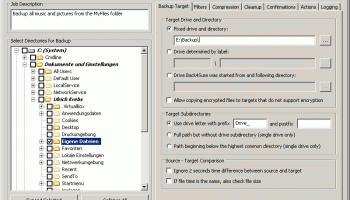
Back4Sure x64 is a backup program for your documents, pictures, music, videos and anything you find valuable. The files to copy may be distributed all over your computer, even on different drives.
Back4Sure x64 lets you create a list of included or excluded default filters or filters for the selected directory, configure compression settings (e.g. default file name, archive format, password), set up the cleanup mode (e.g. all files that don't match the current backup job), enable confirmations, schedule actions before or after the backup is executed, as well as view log details. The backup job can be saved to file for further projects, and you can verify the job consistency. The program is very light on the system resources, has a good response time and finishes a backup job rapidly and error-free. We have not encountered any difficulties throughout our evaluation, since the app did not hang or crash.
Back4Sure x64 does not use a proprietary file format to store your data. All files are simply copied or alternatively stored in standardized ZIP or 7ZIP containers. This way you don't need Back4Sure to get your files back, your file manager will do the job!
Additionally, Back4Sure x64 has an option to cleanup the target directory. With this option you can remove orphaned files, that only exist in the target directory but do not have correponding source files anymore.
While offering lots of options for the backup process, Back4Sure x64 is still handy and flexible: It occupies less than 1 MB of storage space and can easily be run from a flash disk without installation. It does not leave any traces on the host system and does not install any kind of extensions or services.
FEATURES:
Easy folder selection:
· You can easily select multiple folders from the directory tree to include them into the backup set. Just as easy you can exclude certain folders from the backup.
Efficient filter system:
· You can easily create filter set to determine which files to include in or to exclude from the backup. And this not only for the whole backup, but also for individual folders.
Compression option with adjustable directory depth:
· Backups may be stored in a compressed format. If you choose to enable compression, you can specify the directory depth from which on all files are packed into a single archive file. This way you can avoid very large archives and improve overall safety of you backup process.
Cleanup the target directory:
· After larger restructuring of your file organization, lots of files in the backup target directory do not have corresponding source files anymore. Using the cleanup function of Back4Sure you can easily remove those orphaned files from the target directory.
Logging of the backup process:
· All actions performed during backup may be logged into a plain text file. You can choose between two different formats of the log file: either an easy to read version or version in ini format optimized for automated analysis.
Creating desktop links to backup jobs:
· You can easily create a desktop link to a backup job from within the program, from which the backup job can be directly started by just double clicking it.
Portable use or fixed installation:
· Besides the normal setup file for a fixed installation, a zipped version for use from a USB drive is also available.
Back4Sure x64 lets you create a list of included or excluded default filters or filters for the selected directory, configure compression settings (e.g. default file name, archive format, password), set up the cleanup mode (e.g. all files that don't match the current backup job), enable confirmations, schedule actions before or after the backup is executed, as well as view log details. The backup job can be saved to file for further projects, and you can verify the job consistency. The program is very light on the system resources, has a good response time and finishes a backup job rapidly and error-free. We have not encountered any difficulties throughout our evaluation, since the app did not hang or crash.
Back4Sure x64 does not use a proprietary file format to store your data. All files are simply copied or alternatively stored in standardized ZIP or 7ZIP containers. This way you don't need Back4Sure to get your files back, your file manager will do the job!
Additionally, Back4Sure x64 has an option to cleanup the target directory. With this option you can remove orphaned files, that only exist in the target directory but do not have correponding source files anymore.
While offering lots of options for the backup process, Back4Sure x64 is still handy and flexible: It occupies less than 1 MB of storage space and can easily be run from a flash disk without installation. It does not leave any traces on the host system and does not install any kind of extensions or services.
FEATURES:
Easy folder selection:
· You can easily select multiple folders from the directory tree to include them into the backup set. Just as easy you can exclude certain folders from the backup.
Efficient filter system:
· You can easily create filter set to determine which files to include in or to exclude from the backup. And this not only for the whole backup, but also for individual folders.
Compression option with adjustable directory depth:
· Backups may be stored in a compressed format. If you choose to enable compression, you can specify the directory depth from which on all files are packed into a single archive file. This way you can avoid very large archives and improve overall safety of you backup process.
Cleanup the target directory:
· After larger restructuring of your file organization, lots of files in the backup target directory do not have corresponding source files anymore. Using the cleanup function of Back4Sure you can easily remove those orphaned files from the target directory.
Logging of the backup process:
· All actions performed during backup may be logged into a plain text file. You can choose between two different formats of the log file: either an easy to read version or version in ini format optimized for automated analysis.
Creating desktop links to backup jobs:
· You can easily create a desktop link to a backup job from within the program, from which the backup job can be directly started by just double clicking it.
Portable use or fixed installation:
· Besides the normal setup file for a fixed installation, a zipped version for use from a USB drive is also available.
OS: Windows Vista x64, Windows 7 x64, Windows 8 x64, Windows 10 x64, Windows 11
Add Your Review or 64-bit Compatibility Report
Top Backup & Restore 64-bit downloads


EaseUS Key Finder 4.1.6 Build 20240910
Effortlessly recover lost product keys for software and operating systems.
Demo

AnyMP4 Data Recovery 1.5.12
Recover or rescue data from computer, flash media drive and other devices
Shareware | $24.50

PCtransfer 1.0.0.1033
the best free, secure and portable transfer assistant for Windows XP/Vista/7/8
Freeware

Software to Data Recovery 5.8.4.1
Download Software to Data Recovery for instant salvage of lost memorable snaps
Shareware | $79.00

GRBackPro Server Backup x64 11.2.0
Server Backup Software, fast data back-up for Windows Server 2022/2019/2016/2012/2008 x64
Shareware | $199.00

Wondershare Recoverit 14.0.22

Wondershare Recoverit: Reliable data recovery for lost or deleted files.
Demo | $64.99


QuickMirror 1.71
QuickMirror provides quick updating of backups, synchronization, and mirroring.
Shareware | $25.00

Members area
Top 64-bit Downloads
-
HWiNFO64 6.28 B4200
x64 freeware download -
Windows 7 x64
x64 trialware download -
GRBackPro Server Backup
x64 11.2.0
x64 shareware download -
Windows 10 x64 22H2
x64 trialware download -
XtraTools Professional
x64 26.3.1
x64 shareware download -
EasyTune6 B24.0119.1
x64 freeware download -
DAR 2.7.14
x64 open source download -
Processor X32 or X64 1.5
x64 freeware download -
O&O MediaRecovery
64-bit 14.0.17
x64 demo download -
BusDog x64 0.2
x64 freeware download
Top Downloads
-
FreeCommander XE
Portable 2026 Build 941
freeware download -
FURY CTRL 2.0.65.0
freeware download -
FMDiff 4.0.5
demo download -
Open Files from XLSX to
XLS 5.2
shareware download -
Vim 9.2.0265
open source download -
Shell Tools 2.0.1
freeware download -
HWiNFO64 6.28 B4200
freeware download -
EaseUS Key Finder 4.1.6 Build 20240910
demo download -
Pitara 5.0.9583.34420
open source download -
iSunshare iBypass Genius 3.1.2.1
shareware download -
AnyMP4 Data Recovery 1.5.12
shareware download -
PCtransfer 1.0.0.1033
freeware download -
Software to Data
Recovery 5.8.4.1
shareware download -
Music Collection 3.9.7.3
freeware download -
WinFindr 1.9
shareware download