
BatchRename - X 64-bit Download
Popular x64 Tags
- files x64 download
- file manager x64 download
- zip x64 download
- tool x64 download
- software x64 download
- ntfs x64 download
- remove x64 download
- disk x64 download
- free x64 download
- duplicate x64 download
- copy x64 download
- folder x64 download
- utility x64 download
- data recovery software x64 download
- undelete x64 download
- erase x64 download
- directory x64 download
- backup x64 download
- file x64 download
- hard x64 download
- data recovery x64 download
- delete x64 download
- recovery x64 download
- find x64 download
- file recovery x64 download
- unerase x64 download
- recover x64 download
- mp3 x64 download
- space x64 download
- search x64 download
BatchRename 4.5.1.1
Sponsored links:

foryoursoft.com

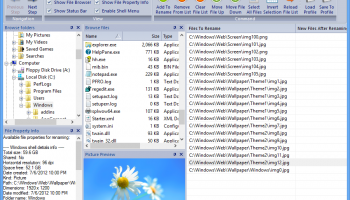
BatchRename provides a no-nonsense method for renaming files. With its well-planned setup and customizable flexibility, this should meet the needs of any user. BatchRename (pro) - help you rename a batch of files and folders easily. You can define all kinds of renaming rules. Especially, rename MP3 files with ID3 Tags and rename photos using EXIF data. Also, you can use BatchRename to batch convert and resize your photos by just a few clicks.
Main features:
* Support Encrypt/Decrypt file name using RC4, Base64 and MD5 algorithm.
* Support EXIF data - rename digital camera pictures with the EXIF data information: Camera name, Digitized date, Original date time, ISO speed, Exposure time, Shutter speed, Lens aperture, F-Number, GPS data. All EXIF properties supported now!
* Support renaming files using their Shell detail properties* - you can use what you see on the columns of Windows explorer (including video properties, audio properties ...) to rename the files.
* Support for MP3 Tag ID3 v1 and v2, rename by music's Title, Album, Artist, Genre, BitRate, Frequency, SubTitle, Language, Comment, Copyright, Composer and etc,... All MP3 ID3 tags supported now!
* Support rename picture files by their Image properties: resolution, color bits, type format.
* Support Rename fles by the local date time format, or file's date time attribute.
* Insert specific length of digits ascending or descending to file or folder names. Also support add random numbers now.
* Uppercase/lowercase the first letter of each word, and Uppercase/Lowercase/Remove any specific character in the filenames.
* Support store the renamed files to a different folder by specifying destination output directory.
* Support truncate filename to a specific length.
* Favorite rename rules - you can easily save and pick up your favorite renaming rules. Also, you may ask us to build renaming rules for you, and download them from foryoursoft.com to your favorite directory. A filter for favorite renaming rules also available to group all the renaming rules.
* QuickView* - it allows you view (picture) or play (movie or music) the selected file in the "QuickView" window. So you can see the files directly and decide how to rename them. Also, you can view all the file properties in the quickview area including: MP3 Tag info, Picture's EXIF data, and Windows shell details info. With this, you can easily decide which property you want to use to rename the file.
* Drag and Drop - It's easy to add files to the renaming list, just drag them anywhere and drop to BatchRename's files list.
* Support windows shell context menu* - The menu item "BatchRename files..." is added to the windows shell context menu after installation. By selecting some files in your windows explorer, right-click the files and select "BatchRename files" from the context menu, it will open "BatchRename" to rename the selected files and folders.
* Picture adjustment and editing* - You can select the "PICADJUST" command to resize your photos to a specific size, and even rotate or flip them with a batch rename rule.
* Batch picture convertsion*
By adding picture convert rules "PICCONVERT", you can easily convert your pictures to most popular format (bmp, jpg, gif, tif, png) and support JPEG quality control.
* Preview Renaming - whenyou set up the FileList and the RuleList, you may want to preview the result to see whether it meet your requirements before you decide to really rename them.
* Undo Renaming - After you rename the files, this function allows you to cancel the changes, and restore the old filenames.
* Load/Save Batch - The Filelist, RuleList and the result list even the Undo state can be saved to a file, so you can reuse the rules, review the file list or restore the old filenames by load the batch you saved.
Main features:
* Support Encrypt/Decrypt file name using RC4, Base64 and MD5 algorithm.
* Support EXIF data - rename digital camera pictures with the EXIF data information: Camera name, Digitized date, Original date time, ISO speed, Exposure time, Shutter speed, Lens aperture, F-Number, GPS data. All EXIF properties supported now!
* Support renaming files using their Shell detail properties* - you can use what you see on the columns of Windows explorer (including video properties, audio properties ...) to rename the files.
* Support for MP3 Tag ID3 v1 and v2, rename by music's Title, Album, Artist, Genre, BitRate, Frequency, SubTitle, Language, Comment, Copyright, Composer and etc,... All MP3 ID3 tags supported now!
* Support rename picture files by their Image properties: resolution, color bits, type format.
* Support Rename fles by the local date time format, or file's date time attribute.
* Insert specific length of digits ascending or descending to file or folder names. Also support add random numbers now.
* Uppercase/lowercase the first letter of each word, and Uppercase/Lowercase/Remove any specific character in the filenames.
* Support store the renamed files to a different folder by specifying destination output directory.
* Support truncate filename to a specific length.
* Favorite rename rules - you can easily save and pick up your favorite renaming rules. Also, you may ask us to build renaming rules for you, and download them from foryoursoft.com to your favorite directory. A filter for favorite renaming rules also available to group all the renaming rules.
* QuickView* - it allows you view (picture) or play (movie or music) the selected file in the "QuickView" window. So you can see the files directly and decide how to rename them. Also, you can view all the file properties in the quickview area including: MP3 Tag info, Picture's EXIF data, and Windows shell details info. With this, you can easily decide which property you want to use to rename the file.
* Drag and Drop - It's easy to add files to the renaming list, just drag them anywhere and drop to BatchRename's files list.
* Support windows shell context menu* - The menu item "BatchRename files..." is added to the windows shell context menu after installation. By selecting some files in your windows explorer, right-click the files and select "BatchRename files" from the context menu, it will open "BatchRename" to rename the selected files and folders.
* Picture adjustment and editing* - You can select the "PICADJUST" command to resize your photos to a specific size, and even rotate or flip them with a batch rename rule.
* Batch picture convertsion*
By adding picture convert rules "PICCONVERT", you can easily convert your pictures to most popular format (bmp, jpg, gif, tif, png) and support JPEG quality control.
* Preview Renaming - whenyou set up the FileList and the RuleList, you may want to preview the result to see whether it meet your requirements before you decide to really rename them.
* Undo Renaming - After you rename the files, this function allows you to cancel the changes, and restore the old filenames.
* Load/Save Batch - The Filelist, RuleList and the result list even the Undo state can be saved to a file, so you can reuse the rules, review the file list or restore the old filenames by load the batch you saved.
OS: Windows XP, Windows Vista, Windows Vista x64, Windows 7, Windows 7 x64, Windows 8, Windows 8 x64
Add Your Review or 64-bit Compatibility Report
Top File & Disk Management 64-bit downloads


Open Files from XLSX to XLS 5.2
Convert XLSX to XLS with Open files from XLSX to XLS program
Shareware | $29.00


Pitara 4.0.9569.20465

Pitara: Your all-in-one solution for seamless project management and collaboration.
Open Source


Tablacus Explorer 26.2.2
Tablacus Explorer: A versatile, customizable file manager for Windows.
Open Source

Windows Surface Scanner 2.20
Free Full Version Windows Surface Scanner - Detects Bad Sectors!
Freeware


Members area
Top 64-bit Downloads
-
EasyTune6 B24.0119.1
x64 freeware download -
Windows 7 x64
x64 trialware download -
SoftPerfect RAM Disk 26.2
x64 shareware download -
HWiNFO64 6.28 B4200
x64 freeware download -
BusDog x64 0.2
x64 freeware download -
HWMonitor (64-bit) 1.53
x64 freeware download -
Disk Pulse Pro x64 16.1.28
x64 trialware download -
NiceCopier x64 13.02.03
x64 open source download -
FixWin for Win 10 10.2.2.0
x64 freeware download -
7z SFX Builder x64 2.1
x64 freeware download
Top Downloads
-
Open Files from XLSX to
XLS 5.2
shareware download -
FMDiff 4.0.5
demo download -
File Compression 1.0
commercial download -
Shell Tools 2.0.1
freeware download -
Hotkeycontrol 8.3
shareware download -
Caffeine 1.98
freeware download -
Nomad.NET 3.2.0.2890
freeware download -
Music Collection 3.9.6.0
freeware download -
FastKeys 6.05
demo download -
WinToUSB 10.5 Build January 2
shareware download -
FURY CTRL 2.0.65.0
freeware download -
Vim 9.2.0173
open source download -
novelWriter 2.8.2
open source download -
Thaiphoon Burner 17.4.1.2
freeware download -
GoodSync 12.9.26
freeware download