
Bill Payment Organizer - X 64-bit Download
Popular x64 Tags
- office x64 download
- microsoft x64 download
- importing x64 download
- exporting x64 download
- acrobat x64 download
- xls x64 download
- printer x64 download
- pdf x64 download
- pdf converter x64 download
- software x64 download
- word x64 download
- outlook x64 download
- excel x64 download
- powerpoint x64 download
- tool x64 download
- ppt x64 download
- adobe x64 download
- convert x64 download
- spreadsheet x64 download
- text x64 download
- create x64 download
- doc x64 download
- printing x64 download
- files x64 download
- add in x64 download
- open x64 download
- document x64 download
- data x64 download
- export x64 download
- saving x64 download
Bill Payment Organizer 1.1
Sponsored links:
license: Freeware
downloads: 419
size: 328 kB
updated: 2012-04-03
tags: bill payment organizer, bill payment schedule, bill payment spreadsheet, payment organizer, payment manager, Excel template, payment, finance, template
Add to Basket

Exceltemplate.net

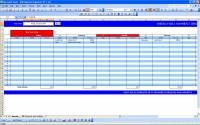
Bill Payment Organizer is an Excel template that allows you to organize your bill payments.
There are some requests about making an automatic bill payment reminder that will be displayed automatically in the calendar based on its recurring dates or days. Usually people have to mark or type their bill due dates on their calendar manually. Or, if you are using my monthly calendar, say if you have to pay once a month, you have to type 12 dates in each columns in setting worksheet to make the calendar display the reminder dates each month.
So, using the same approach with that monthly calendar, I created this bill payment organizer that will allow you to organize your bill payments with additional recurring day and dates adjustment formula. But, I choose to create it in weekly calendar first due to limitation concerns. If your due dates which share the same dates are more than five bills, I think this calendar will be your solution. If you want to have the bill reminder for one full month, you can print it four times with four different week period.
This spreadsheet consist of two worksheets. The first worksheet is a bill payment data entry and holiday setup worksheet. In this worksheet, you can type all your bills and select or type its due dates. For example, you have Mastercard credit card that due every 2nd date each month, and then you have to type Mastercard name in Detail column, Credit Card in type column and minimum amount you usually pay. What if the amount is changing each month ? If this is the case, typing the date in fixed date column is a current solution. You can expand the use of this scheduler as a reminder of any bill payments. For example, day reminder of weekly allowance reminder, where you want to have the calendar display the reminder of giving your son weekly allowance every Monday.
Once you finished entering all of your bill payments or other reminders, you can go to the second worksheet to see how the calendar display your due dates in a week period plus the sum of your bills amount. First, you have to type the start date reference, where it will be used as the sliding bar reference. After that, you can slide right or slide left to customize the weekly period for your printing. There is a red color mark at the date title if the day is Sunday or if the day is a national holiday. You can add more holidays in the first worksheets or modify the holiday since these are US holidays.
There are maximum 20 bills that can be displayed at the same date using this bill payment calendar.
There are some requests about making an automatic bill payment reminder that will be displayed automatically in the calendar based on its recurring dates or days. Usually people have to mark or type their bill due dates on their calendar manually. Or, if you are using my monthly calendar, say if you have to pay once a month, you have to type 12 dates in each columns in setting worksheet to make the calendar display the reminder dates each month.
So, using the same approach with that monthly calendar, I created this bill payment organizer that will allow you to organize your bill payments with additional recurring day and dates adjustment formula. But, I choose to create it in weekly calendar first due to limitation concerns. If your due dates which share the same dates are more than five bills, I think this calendar will be your solution. If you want to have the bill reminder for one full month, you can print it four times with four different week period.
This spreadsheet consist of two worksheets. The first worksheet is a bill payment data entry and holiday setup worksheet. In this worksheet, you can type all your bills and select or type its due dates. For example, you have Mastercard credit card that due every 2nd date each month, and then you have to type Mastercard name in Detail column, Credit Card in type column and minimum amount you usually pay. What if the amount is changing each month ? If this is the case, typing the date in fixed date column is a current solution. You can expand the use of this scheduler as a reminder of any bill payments. For example, day reminder of weekly allowance reminder, where you want to have the calendar display the reminder of giving your son weekly allowance every Monday.
Once you finished entering all of your bill payments or other reminders, you can go to the second worksheet to see how the calendar display your due dates in a week period plus the sum of your bills amount. First, you have to type the start date reference, where it will be used as the sliding bar reference. After that, you can slide right or slide left to customize the weekly period for your printing. There is a red color mark at the date title if the day is Sunday or if the day is a national holiday. You can add more holidays in the first worksheets or modify the holiday since these are US holidays.
There are maximum 20 bills that can be displayed at the same date using this bill payment calendar.
OS: Windows 2000, Windows 2003, Windows XP, Windows Vista, Windows Vista x64, Windows 7, Windows 7 x64
Add Your Review or 64-bit Compatibility Report
Top Office Suites & Tools 64-bit downloads


Quite Imposing Plus 6.0d
Effortlessly create and manage complex impositions for PDF documents.
Demo | $949.00

Seavus Project Viewer 19.0
Free to experience the best viewer for Micrsoft Project. Try our Project Viewer
Trialware | $29.50


SilentNotes 8.7.1
SilentNotes: Secure, offline note-taking app with encryption and cross-device sync.
Open Source


CZ Excel Converter 1.9.4.6366
CZ V: A powerful synth emulation with rich sounds and intuitive controls.
Demo | $149.00


callas pdfaPilot 14.2.400
Powerful tool for creating, validating, and optimizing PDF/A documents.
Trialware

mini PDF to TXT OCR Converter 3.2
PDF to TXT OCR Converter is a best OCR Converter
Shareware | $59.95
Members area
Top 64-bit Downloads
-
mbFXWords 2.80
x64 freeware download -
FontAgent Pro 10.0.15.0
x64 trialware download -
Microsoft Office 2016
x64 2405 B17628.20164
x64 trialware download -
Print to PDF Toolkit Pro 3.0
x64 shareware download -
Microsoft Office 2010
Service Pack x64 SP2
x64 freeware download -
PDFill PDF and Image
Writer x64 15.0 Build 2
x64 freeware download -
CSV2IIF Portable 5.0.060
x64 demo download -
Foxit Reader 2023.3
x64 freeware download -
Hl7Spy 24.1.227
x64 trialware download -
ABBYY FineReader
Professional 16.0.13
x64 trialware download
Top Downloads
-
Quite Imposing Plus 6.0d
demo download -
Total CSV Converter 4.0
shareware download -
Active Barcode and QR
code Generator 1.24.8.15
freeware download -
Seavus Project Viewer 19.0
trialware download -
Miro for Windows 0.11.110
shareware download -
Odoo 19.0.20260329
demo download -
Flipping Book Writer 2.6
shareware download -
mbFXWords 2.80
freeware download -
SmarThru 4.04
freeware download -
SilentNotes 8.7.1
open source download -
LawTrust 5.1.1
shareware download -
HelpDesk 11.19.9557.25020
trialware download -
DeskWork Standard 4.0.2827
trialware download -
LiquiBase 5.0.2
trialware download -
4EPOS POS 12.20.48
demo download