
Budget Worksheet - X 64-bit Download
Popular x64 Tags
- payroll x64 download
- invoice x64 download
- sales x64 download
- invoicing x64 download
- inventory x64 download
- budget x64 download
- business x64 download
- bookkeeping x64 download
- billing x64 download
- free x64 download
- financial x64 download
- accounting x64 download
- software x64 download
- excel x64 download
- purchase order x64 download
- time tracking x64 download
- time and expense x64 download
- online timesheet x64 download
- finance x64 download
- time tracking software x64 download
- management x64 download
- asp x64 download
- time x64 download
- timesheet x64 download
- forex x64 download
- tax x64 download
- shareware x64 download
- profit x64 download
- bizpep x64 download
- medlin x64 download
Budget Worksheet 1.3
Sponsored links:

Dataware

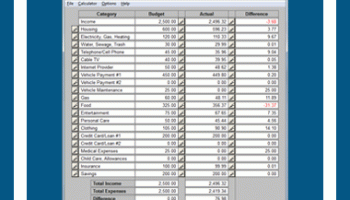
Budget Worksheet is the simple way to keep track of where your money is going. Enter your budget goals and expenses, then Budget Worksheet will calculate the difference to let you know if you have met your goals each month.
This simple program makes it easy to adjust your budget so you can save more each month. It's an excellent way to track your expenses so you can make the necessary adjustments to maximize your savings. Financial planning has never been easier than it is with Budget Worksheet. This easy to use tool is essential to your financial health.
Instructions
To create your first budget, load Budget Worksheet and select "Create New Budget". You will then be able to select the month for your budget. The current month will be displayed so select OK unless you want to make a budget for a different month.
Your first task will be to enter your budget amounts in the column titled "Budget". First enter your monthly after-tax income (your income minus taxes that are deducted). Next enter an amount for all your expenses (the remaining categories under Income). If you want to change a category name select the button to the left of the category name.
As a general guideline, use the 50/30/20 plan. 50% of your income for needs, 30% for wants, and 20% for savings.
Needs include housing, utilities, transportation, food, essential clothing, insurance, child care, tuition, and minimum loan payments. If you are contractually obligated to pay something, it's a need, so choose your obligations wisely.
Wants include entertainment, vacations, and extra clothing. If you can delay a purchase with no serious consequences, it's a want.
Savings includes money for an emergency fund (3 to 6 months of after-tax income). After your emergency fund goal has been reached, use the savings portion of your budget for long-term savings such as college funds, retirement, etc.
Entering Data
BUDGET
Select the button to the right of the budget amount to edit this amount. Enter the total amount that you want to spend for the month.
ACTUAL
Select the button to the right of the actual amount to edit this amount. Enter the amount that you want to spend on each day for the category. For amounts that you only pay once a month, enter that amount on the day you paid it. Change the day by selecting the arrow buttons or sliding the button (scroll thumb) along the scrollbar.
Menu
CREATE NEW BUDGET
Use this option to create a new budget. Select the month for the budget.
CREATE SIMILAR BUDGET
Select this option to create a new budget that is similar to a saved budget. The budget amounts and category names from the saved budget will be transferrred to the new budget. This is option is useful when creating the next month's budget if nothing or very little is going to change from your current month's budget to your next month's budget.
OPEN EXISTING BUDGET
Select this option to open a budget that you previously saved.
SAVE BUDGET
Select this option to save your budget.
SAVE AS
Select this option to save your budget as a new name.
PRINT
Select this option to print your budget.
EXIT
Select this option to quit Budget Worksheet.
CALCULATOR
Use this option (or press F2) to load Microsoft Windows Calculator.
PASSWORD PROTECT
Use this option to to create a password for using Budget Worksheet. If you forget your password, you can reset it by reinstalling Budget Worksheet.
HELP
Use this menu selection to view the instructions for Budget Worksheet. You will be taken to our site.
ABOUT
Use this menu selection to view publisher information.
This simple program makes it easy to adjust your budget so you can save more each month. It's an excellent way to track your expenses so you can make the necessary adjustments to maximize your savings. Financial planning has never been easier than it is with Budget Worksheet. This easy to use tool is essential to your financial health.
Instructions
To create your first budget, load Budget Worksheet and select "Create New Budget". You will then be able to select the month for your budget. The current month will be displayed so select OK unless you want to make a budget for a different month.
Your first task will be to enter your budget amounts in the column titled "Budget". First enter your monthly after-tax income (your income minus taxes that are deducted). Next enter an amount for all your expenses (the remaining categories under Income). If you want to change a category name select the button to the left of the category name.
As a general guideline, use the 50/30/20 plan. 50% of your income for needs, 30% for wants, and 20% for savings.
Needs include housing, utilities, transportation, food, essential clothing, insurance, child care, tuition, and minimum loan payments. If you are contractually obligated to pay something, it's a need, so choose your obligations wisely.
Wants include entertainment, vacations, and extra clothing. If you can delay a purchase with no serious consequences, it's a want.
Savings includes money for an emergency fund (3 to 6 months of after-tax income). After your emergency fund goal has been reached, use the savings portion of your budget for long-term savings such as college funds, retirement, etc.
Entering Data
BUDGET
Select the button to the right of the budget amount to edit this amount. Enter the total amount that you want to spend for the month.
ACTUAL
Select the button to the right of the actual amount to edit this amount. Enter the amount that you want to spend on each day for the category. For amounts that you only pay once a month, enter that amount on the day you paid it. Change the day by selecting the arrow buttons or sliding the button (scroll thumb) along the scrollbar.
Menu
CREATE NEW BUDGET
Use this option to create a new budget. Select the month for the budget.
CREATE SIMILAR BUDGET
Select this option to create a new budget that is similar to a saved budget. The budget amounts and category names from the saved budget will be transferrred to the new budget. This is option is useful when creating the next month's budget if nothing or very little is going to change from your current month's budget to your next month's budget.
OPEN EXISTING BUDGET
Select this option to open a budget that you previously saved.
SAVE BUDGET
Select this option to save your budget.
SAVE AS
Select this option to save your budget as a new name.
Select this option to print your budget.
EXIT
Select this option to quit Budget Worksheet.
CALCULATOR
Use this option (or press F2) to load Microsoft Windows Calculator.
PASSWORD PROTECT
Use this option to to create a password for using Budget Worksheet. If you forget your password, you can reset it by reinstalling Budget Worksheet.
HELP
Use this menu selection to view the instructions for Budget Worksheet. You will be taken to our site.
ABOUT
Use this menu selection to view publisher information.
OS: Windows XP, Windows Vista x64, Windows 7, Windows 7 x64
Add Your Review or 64-bit Compatibility Report
Top Accounting & Finance 64-bit downloads


StockProfits 2.5
Import stock trading information (symbol, price, quantity, date) report summary.
Freeware


Simply Accounts 2.0
Simply Accounts VAT Making Tax Digital(MTD) accounting software.
Shareware | $99.00

TimeClockFree 3.2.7
Time Clock Software Employee Time Attendance Tracking App - Open Time Clock Free
Freeware


Zed Axis 64bit 10.0
Import transactions from Excel and Text files directly into QuickBooks.
Trialware | $195.00

Office to Flash Page Flip 2.6
Cool flip office software for virtually all office files!
Shareware | $128.00
tags: office to flash, flip office
Members area
Top 64-bit Downloads
-
mbFXWords 2.80
x64 freeware download -
FontAgent Pro 10.0.15.0
x64 trialware download -
Microsoft Office 2016
x64 2405 B17628.20164
x64 trialware download -
Print to PDF Toolkit Pro 3.0
x64 shareware download -
PDFill PDF and Image
Writer x64 15.0 Build 2
x64 freeware download -
XLIFFChecker 7.5.0
x64 freeware download -
CSV2IIF Portable 5.0.060
x64 demo download -
Foxit Reader 2023.3
x64 freeware download -
Hl7Spy 24.1.227
x64 trialware download -
Microsoft Office 2010
Service Pack x64 SP2
x64 freeware download
Top Downloads
-
Quite Imposing Plus 6.0d
demo download -
Total CSV Converter 4.0
shareware download -
Active Barcode and QR
code Generator 1.24.8.15
freeware download -
Seavus Project Viewer 19.0
trialware download -
Miro for Windows 0.11.110
shareware download -
Odoo 19.0.20260330
demo download -
Flipping Book Writer 2.6
shareware download -
mbFXWords 2.80
freeware download -
SmarThru 4.04
freeware download -
SilentNotes 8.7.1
open source download -
LawTrust 5.1.1
shareware download -
HelpDesk 11.19.9557.25020
trialware download -
DeskWork Standard 4.0.2827
trialware download -
LiquiBase 5.0.2
trialware download -
4EPOS POS 12.20.48
demo download