
CHEMIX School - X 64-bit Download
Popular x64 Tags
- calculator x64 download
- tool x64 download
- freeware x64 download
- free x64 download
- software x64 download
- download x64 download
- radio x64 download
- data x64 download
- ebook x64 download
- home inventory x64 download
- planner x64 download
- windows x64 download
- free numerology software x64 download
- free numerology x64 download
- reg software x64 download
- numerology software x64 download
- numerology x64 download
- auto repair help x64 download
- passwords x64 download
- chicken coop plans x64 download
- numerology reading x64 download
- blood pressure x64 download
- automobile x64 download
- github x64 download
- 3d modeling x64 download
- viewer x64 download
- automation x64 download
- auto x64 download
- open source x64 download
- open-source x64 download
CHEMIX School 16.1
Sponsored links:
license: Trialware ($49.00)
downloads: 555
size: 3.60 MB
updated: 2025-10-28
tags: CHEMIX School, download CHEMIX School, CHEMIX School free download, educational tool, learn chemistry, molecular 3D viewer, chemistry, learn, calculator, molecule
Add to Basket

Arne Standnes

**CHEMIX School: A Comprehensive Tool for Chemistry Education**
Developed by Arne Standnes, CHEMIX School is an innovative and versatile software designed to enhance the learning experience in chemistry education. Tailored for students, educators, and professionals alike, this software offers a robust suite of tools that simplify complex chemical concepts through interactive and user-friendly features.
**User Interface and Usability**
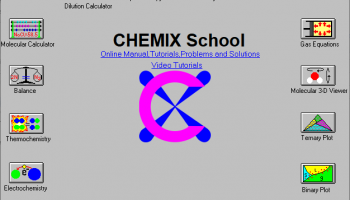
CHEMIX School boasts an intuitive interface that is both visually appealing and easy to navigate. The layout is clean, with well-organized menus and icons that make it simple for users of all levels to find and utilize the various tools and features. The software’s design ensures that even those new to chemistry can quickly get up to speed, while more advanced users will appreciate the depth and breadth of its capabilities.
**Key Features**
1. **Chemical Equation Balancer**: One of the standout features of CHEMIX School is its powerful chemical equation balancer. This tool allows users to input unbalanced equations and receive balanced results instantly, making it an invaluable resource for students learning the fundamentals of chemical reactions.
2. **Molecular Drawing Tool**: The software includes a sophisticated molecular drawing tool that enables users to create and visualize complex molecular structures. This feature is particularly useful for understanding molecular geometry and bonding.
3. **Periodic Table**: CHEMIX School provides an interactive periodic table that offers detailed information about each element, including atomic number, atomic mass, electron configuration, and more. This tool is essential for quick reference and in-depth study.
4. **Chemical Database**: The extensive chemical database within CHEMIX School contains information on a wide range of compounds, including their properties, uses, and safety data. This database is a valuable resource for both academic research and practical applications.
5. **Simulation and Visualization**: The software includes various simulation tools that allow users to model chemical reactions and visualize the results. These simulations help in understanding reaction mechanisms and kinetics, providing a dynamic learning experience.
6. **Educational Resources**: CHEMIX School is packed with educational resources, including tutorials, quizzes, and exercises that reinforce learning. These resources are designed to complement classroom instruction and provide additional practice for students.
**Performance and Compatibility**
CHEMIX School is optimized for performance, ensuring that it runs smoothly on a wide range of computer systems. It is compatible with multiple operating systems, making it accessible to a broad audience. The software is regularly updated to incorporate the latest advancements in chemistry and educational technology.
**Conclusion**
In summary, CHEMIX School by Arne Standnes is a comprehensive and effective tool for anyone involved in chemistry education. Its combination of powerful features, user-friendly interface, and extensive resources make it an indispensable asset for students, educators, and professionals. Whether you are balancing equations, drawing molecular structures, or exploring the periodic table, CHEMIX School provides the tools you need to succeed in the world of chemistry.
Developed by Arne Standnes, CHEMIX School is an innovative and versatile software designed to enhance the learning experience in chemistry education. Tailored for students, educators, and professionals alike, this software offers a robust suite of tools that simplify complex chemical concepts through interactive and user-friendly features.
**User Interface and Usability**
CHEMIX School boasts an intuitive interface that is both visually appealing and easy to navigate. The layout is clean, with well-organized menus and icons that make it simple for users of all levels to find and utilize the various tools and features. The software’s design ensures that even those new to chemistry can quickly get up to speed, while more advanced users will appreciate the depth and breadth of its capabilities.
**Key Features**
1. **Chemical Equation Balancer**: One of the standout features of CHEMIX School is its powerful chemical equation balancer. This tool allows users to input unbalanced equations and receive balanced results instantly, making it an invaluable resource for students learning the fundamentals of chemical reactions.
2. **Molecular Drawing Tool**: The software includes a sophisticated molecular drawing tool that enables users to create and visualize complex molecular structures. This feature is particularly useful for understanding molecular geometry and bonding.
3. **Periodic Table**: CHEMIX School provides an interactive periodic table that offers detailed information about each element, including atomic number, atomic mass, electron configuration, and more. This tool is essential for quick reference and in-depth study.
4. **Chemical Database**: The extensive chemical database within CHEMIX School contains information on a wide range of compounds, including their properties, uses, and safety data. This database is a valuable resource for both academic research and practical applications.
5. **Simulation and Visualization**: The software includes various simulation tools that allow users to model chemical reactions and visualize the results. These simulations help in understanding reaction mechanisms and kinetics, providing a dynamic learning experience.
6. **Educational Resources**: CHEMIX School is packed with educational resources, including tutorials, quizzes, and exercises that reinforce learning. These resources are designed to complement classroom instruction and provide additional practice for students.
**Performance and Compatibility**
CHEMIX School is optimized for performance, ensuring that it runs smoothly on a wide range of computer systems. It is compatible with multiple operating systems, making it accessible to a broad audience. The software is regularly updated to incorporate the latest advancements in chemistry and educational technology.
**Conclusion**
In summary, CHEMIX School by Arne Standnes is a comprehensive and effective tool for anyone involved in chemistry education. Its combination of powerful features, user-friendly interface, and extensive resources make it an indispensable asset for students, educators, and professionals. Whether you are balancing equations, drawing molecular structures, or exploring the periodic table, CHEMIX School provides the tools you need to succeed in the world of chemistry.
OS: Windows 11, Windows 10 32/64 bit, Windows 8 32/64 bit, Windows 7 32/64 bit, Windows Vista, Windows XP 32/64 bit
Add Your Review or 64-bit Compatibility Report
Top Other 64-bit downloads


Handicap Manager for Excel 8.14
Effortlessly track and manage golf handicaps with this intuitive Excel tool.
Trialware | $19.95


Rocrail 2026-02-25 Revision

Rocrail: Open-source model railroad control software for automation and control.
Open Source

WriteMapper 4.5.0
WriteMapper: Transform mind maps into structured writing effortlessly.
Demo | $89.00

WinStars 3.0.304 (2025
Explore the cosmos with WinStars, your interactive astronomy software.
Freeware

Offline Map Maker 8.370
Create detailed offline maps from online sources with ease and precision.
Demo | $79.00


Flexify 2.1.48
Flexify: A versatile tool for seamless data manipulation and integration.
Open Source
Members area
Top 64-bit Downloads
-
Money Manager Ex
Portable x64 1.8.0
x64 freeware download -
Deeproot Plant Base X64 2.2.0
x64 shareware download -
MyTourbook 64-bit 19.6.1
x64 open source download -
JAWS 64-bit 14.0.5005
x64 trialware download -
Fitbit Connect 2.0.2.7066
x64 freeware download -
Parabator 2 1.0
x64 freeware download -
Parabator 2
"perkk"
booster mod 1.0
x64 freeware download -
Money Manager Ex x64 1.8.0
x64 freeware download -
Moneydance x64 2017.8 (1691)
x64 trialware download -
Parabator 2 -
"perk" booster
mod 1.0
x64 freeware download
Top Downloads
-
Netron 8.8.9
open source download -
Handicap Manager for
Excel 8.14
trialware download -
TARGET 3001 33.9.0.55
demo download -
Rocrail 2026-02-25 Revision
open source download -
WriteMapper 4.5.0
demo download -
FET 7.7.7
open source download -
Offline Map Maker 8.370
demo download -
Estlcam 13.003
trialware download -
flin4cell 2006-2022 11.8
shareware download -
WinStars 3.0.304 (2025
freeware download -
Panoply 5.9.0
freeware download -
Portable QCAD
Professional 3.32.6
demo download -
Flexify 2.1.48
open source download -
VariCAD Viewer 2026 1.01
freeware download -
Free Kundli Software 1.2.0.1
freeware download