
ChilkatZip - X 64-bit Download
Popular x64 Tags
- winzip x64 download
- arj x64 download
- winrar x64 download
- utility x64 download
- 7 zip x64 download
- unzip x64 download
- rpm x64 download
- convert x64 download
- zip file x64 download
- ace x64 download
- zip x64 download
- bz2 x64 download
- encrypt x64 download
- backup x64 download
- extract x64 download
- rar x64 download
- file x64 download
- free x64 download
- tar x64 download
- cab x64 download
- compression x64 download
- split x64 download
- archive x64 download
- archiver x64 download
- compress x64 download
- zip repair x64 download
- zips x64 download
- shrink x64 download
- corrupted zip files x64 download
- zipping x64 download
ChilkatZip 14.5.0
Sponsored links:

Chilkat Software, Inc.

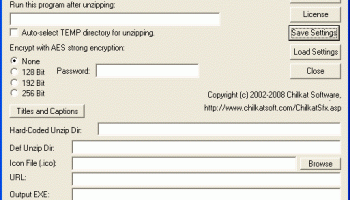
"ZIP 2 Secure EXE" is a utility program that creates self-extracting EXE files for Windows 95,98,Me,NT4,2000,XP,Vista,Server 2003,Server 2008, etc... Self-extracting EXE files are executable programs (EXEs) that contain a ZIP file and the software necessary to unzip the contents. Users can unzip the contents of a self-extracting EXE simply by running it like any other program. No other software is needed.
"ZIP 2 Secure EXE" provides features that may not be found in other self-extractors:
1. Up to 256-bit Strong AES Encryption. Safely encrypts the contents of your ZIP file with 128, 192, or 256-bit AES Encryption. To unzip, a user must provide the same password that was used when creating the self-extracting EXE. AES encryption is much stronger than standard ZIP encryption, which is regarded by security experts as being unsecure. How strong is 128-bit AES encryption?
2. Streaming Technology. Chilkat's streaming compression and encryption technology allows it to create an EXE from any size ZIP file under 4GB. The streaming compression and decryption technology ensures that it will be possible to unzip the archive on your end-user's computer, even if that computer has very little memory.
3. Progress Indicators. A progress bar is displayed during the unzip process so your end-user can decide whether there is time to get a cup of coffee while his computer is unzipping an especially large ZIP file.
4. Run from DOS in a Batch File. Pass the Zip filename by itself on the command line to create an EXE with no user interaction. Customization features may be passed on the command line.
5. Run a Setup EXE after Unzipping When creating the EXE, you may choose to designate a Setup EXE to be run after unzipping. Command line arguments may also be pre-specified to be passed to the Setup EXE.
6. Embed a Custom Icon Icon (.ico) files may be embedded in the self-extracting EXE.
7. Customize Title and Caption Text The title bar and progress caption may be customized.
8. Pre-set Unzip DirectoryIt is possible to create an EXE that extracts to a pre-determined hard-coded absolute directory path, or a temp directory that is automatically chosen at extract time.
9. International Filenames International (Asian, Eastern European, Greek, Middle Eastern, etc.) filenames are supported with the -cp command line option.
10. DOS Environment Variables See this Chilkat blog post for information about using DOS environment variables on the DOS command line.
"ZIP 2 Secure EXE" provides features that may not be found in other self-extractors:
1. Up to 256-bit Strong AES Encryption. Safely encrypts the contents of your ZIP file with 128, 192, or 256-bit AES Encryption. To unzip, a user must provide the same password that was used when creating the self-extracting EXE. AES encryption is much stronger than standard ZIP encryption, which is regarded by security experts as being unsecure. How strong is 128-bit AES encryption?
2. Streaming Technology. Chilkat's streaming compression and encryption technology allows it to create an EXE from any size ZIP file under 4GB. The streaming compression and decryption technology ensures that it will be possible to unzip the archive on your end-user's computer, even if that computer has very little memory.
3. Progress Indicators. A progress bar is displayed during the unzip process so your end-user can decide whether there is time to get a cup of coffee while his computer is unzipping an especially large ZIP file.
4. Run from DOS in a Batch File. Pass the Zip filename by itself on the command line to create an EXE with no user interaction. Customization features may be passed on the command line.
5. Run a Setup EXE after Unzipping When creating the EXE, you may choose to designate a Setup EXE to be run after unzipping. Command line arguments may also be pre-specified to be passed to the Setup EXE.
6. Embed a Custom Icon Icon (.ico) files may be embedded in the self-extracting EXE.
7. Customize Title and Caption Text The title bar and progress caption may be customized.
8. Pre-set Unzip DirectoryIt is possible to create an EXE that extracts to a pre-determined hard-coded absolute directory path, or a temp directory that is automatically chosen at extract time.
9. International Filenames International (Asian, Eastern European, Greek, Middle Eastern, etc.) filenames are supported with the -cp command line option.
10. DOS Environment Variables See this Chilkat blog post for information about using DOS environment variables on the DOS command line.
OS: Windows 2000, Windows 2003, Windows XP, Windows Vista, Windows Vista x64, Windows 7, Windows 7 x64, Windows 8, Windows 8 x64, Windows 10, Windows 10 x64
Add Your Review or 64-bit Compatibility Report
Top File Compression 64-bit downloads


Arix Archive 1.4 Build 1546
Arix Archive: Efficient, user-friendly document management and storage solution.
Freeware


DataNumen RAR Repair 4.0
DataNumen RAR Repair is a powerful tool to repair corrupt RAR or SFX archives.
Shareware | $49.95
tags: rar repair, repair rar, rar recovery, recover rar, fix rar, rar fix, corrupt rar, corrupted rar, damaged rar, rar corruption, rar, repair, recovery, recover, fix, archive, file, tool, utility, corrupt, corrupted, corruption, damaged, error, restore, rescue, sfx, files, data

SysInfo Archive Recovery Tool 20
Recover Corrupt ZIP, RAR, TAR, TARGz & 7z files by using Archive File Repair Too
Shareware | $59.00
PowerArchiver 2010 11.71.03
A powerful compression and decompression tool with a file browsing feature
Trialware | $19.95

Members area
Top 64-bit Downloads
-
HWiNFO64 6.28 B4200
x64 freeware download -
Windows 7 x64
x64 trialware download -
GRBackPro Server Backup
x64 11.2.0
x64 shareware download -
EasyTune6 B24.0119.1
x64 freeware download -
XtraTools Professional
x64 26.2.1
x64 shareware download -
BusDog x64 0.2
x64 freeware download -
PhotoRenamer 4.1
x64 freeware download -
Laplink DiskImage
Professional x64 10.0.71
x64 trialware download -
CIB pdf brewer 4.20.0
x64 freeware download -
Windows 10 x64 22H2
x64 trialware download
Top Downloads
-
FreeCommander XE
Portable 2026 Build 941
freeware download -
FMDiff 4.0.5
demo download -
Open Files from XLSX to
XLS 5.2
shareware download -
FURY CTRL 2.0.65.0
freeware download -
Shell Tools 2.0.1
freeware download -
Vim 9.2.0235
open source download -
AnyMP4 Data Recovery 1.5.12
shareware download -
PCtransfer 1.0.0.1033
freeware download -
Software to Data
Recovery 5.8.4.1
shareware download -
EaseUS Key Finder 4.1.6 Build 20240910
demo download -
Music Collection 3.9.7.1
freeware download -
WinFindr 1.9
shareware download -
File Compression 1.0
commercial download -
windows_exporter 0.31.5
open source download -
Caffeine 1.98
freeware download