
Code Compare Pro - X 64-bit Download
Popular x64 Tags
- windows x64 download
- tool x64 download
- software x64 download
- view x64 download
- editor x64 download
- python x64 download
- xml x64 download
- sql x64 download
- dll x64 download
- resource x64 download
- compare x64 download
- csv x64 download
- dotnet x64 download
- uml x64 download
- table x64 download
- delphi x64 download
- xls x64 download
- perl x64 download
- html x64 download
- diff x64 download
- database x64 download
- query x64 download
- convert x64 download
- sql tools x64 download
- ide x64 download
- sql tool x64 download
- activestate x64 download
- doc x64 download
- txt x64 download
- mssql x64 download
Code Compare Pro 5.5.11
Sponsored links:
license: Trialware ($89.95)
downloads: 540
size: 12.80 MB
updated: 2026-03-11
tags: Code Compare Pro, download Code Compare Pro, Code Compare Pro free download, compare code, source code comparison, compare files, compare, source code, comparison, Devart
Buy Now
Add to Basket

Devart

**Code Compare Pro by Devart: A Comprehensive Tool for Code Comparison and Merging**
Code Compare Pro, developed by Devart, is a sophisticated tool designed to streamline the process of comparing and merging code files and folders. Tailored for developers who demand precision and efficiency, this software integrates seamlessly with popular version control systems and development environments, making it an indispensable asset in any coder's toolkit.
**Key Features and Capabilities:**
1. **Advanced Comparison Algorithms:**
Code Compare Pro employs advanced algorithms to deliver precise and accurate comparisons. Whether you're dealing with simple text files or complex code structures, the software highlights differences with remarkable clarity, ensuring you never miss a change.
2. **Seamless Integration:**
The software integrates effortlessly with Visual Studio, providing a familiar interface for developers. This integration allows for a smooth workflow, enabling users to compare, edit, and merge code without leaving their development environment.
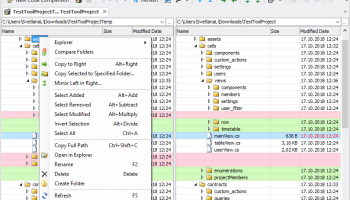
3. **Folder Comparison:**
Beyond individual files, Code Compare Pro excels in comparing entire directories. This feature is particularly useful for tracking changes across large projects, ensuring consistency and coherence in your codebase.
4. **Three-Way Merge:**
The three-way merge functionality is a standout feature, allowing users to reconcile changes from multiple sources with ease. This is particularly beneficial in collaborative environments where multiple developers contribute to the same project.
5. **Syntax Highlighting:**
To enhance readability, Code Compare Pro supports syntax highlighting for a wide range of programming languages. This feature makes it easier to identify differences in code structure and logic, reducing the risk of errors during the merge process.
6. **Customizable Interface:**
The user interface is both intuitive and highly customizable. Users can tailor the layout and appearance to suit their preferences, ensuring a comfortable and productive experience.
7. **Command Line Interface:**
For those who prefer working from the command line, Code Compare Pro offers robust CLI support. This allows for automation and integration into custom workflows, further enhancing its versatility.
8. **Cross-Platform Compatibility:**
While primarily designed for Windows, Code Compare Pro also supports cross-platform operations, making it a flexible choice for diverse development environments.
**Performance and Usability:**
Code Compare Pro is engineered for performance, handling large files and directories with ease. The software's responsiveness ensures that even the most complex comparisons are completed swiftly, minimizing downtime and keeping your development process on track.
**Support and Documentation:**
Devart provides comprehensive support and documentation for Code Compare Pro. Users have access to detailed guides, tutorials, and a responsive support team, ensuring that any issues or questions are promptly addressed.
**Conclusion:**
In the realm of code comparison and merging tools, Code Compare Pro by Devart stands out for its precision, integration capabilities, and user-friendly design. Whether you're a solo developer or part of a larger team, this software offers the features and performance needed to manage code changes effectively. With its advanced functionalities and seamless integration, Code Compare Pro is a valuable addition to any development workflow, enhancing productivity and ensuring code quality.
Code Compare Pro, developed by Devart, is a sophisticated tool designed to streamline the process of comparing and merging code files and folders. Tailored for developers who demand precision and efficiency, this software integrates seamlessly with popular version control systems and development environments, making it an indispensable asset in any coder's toolkit.
**Key Features and Capabilities:**
1. **Advanced Comparison Algorithms:**
Code Compare Pro employs advanced algorithms to deliver precise and accurate comparisons. Whether you're dealing with simple text files or complex code structures, the software highlights differences with remarkable clarity, ensuring you never miss a change.
2. **Seamless Integration:**
The software integrates effortlessly with Visual Studio, providing a familiar interface for developers. This integration allows for a smooth workflow, enabling users to compare, edit, and merge code without leaving their development environment.
3. **Folder Comparison:**
Beyond individual files, Code Compare Pro excels in comparing entire directories. This feature is particularly useful for tracking changes across large projects, ensuring consistency and coherence in your codebase.
4. **Three-Way Merge:**
The three-way merge functionality is a standout feature, allowing users to reconcile changes from multiple sources with ease. This is particularly beneficial in collaborative environments where multiple developers contribute to the same project.
5. **Syntax Highlighting:**
To enhance readability, Code Compare Pro supports syntax highlighting for a wide range of programming languages. This feature makes it easier to identify differences in code structure and logic, reducing the risk of errors during the merge process.
6. **Customizable Interface:**
The user interface is both intuitive and highly customizable. Users can tailor the layout and appearance to suit their preferences, ensuring a comfortable and productive experience.
7. **Command Line Interface:**
For those who prefer working from the command line, Code Compare Pro offers robust CLI support. This allows for automation and integration into custom workflows, further enhancing its versatility.
8. **Cross-Platform Compatibility:**
While primarily designed for Windows, Code Compare Pro also supports cross-platform operations, making it a flexible choice for diverse development environments.
**Performance and Usability:**
Code Compare Pro is engineered for performance, handling large files and directories with ease. The software's responsiveness ensures that even the most complex comparisons are completed swiftly, minimizing downtime and keeping your development process on track.
**Support and Documentation:**
Devart provides comprehensive support and documentation for Code Compare Pro. Users have access to detailed guides, tutorials, and a responsive support team, ensuring that any issues or questions are promptly addressed.
**Conclusion:**
In the realm of code comparison and merging tools, Code Compare Pro by Devart stands out for its precision, integration capabilities, and user-friendly design. Whether you're a solo developer or part of a larger team, this software offers the features and performance needed to manage code changes effectively. With its advanced functionalities and seamless integration, Code Compare Pro is a valuable addition to any development workflow, enhancing productivity and ensuring code quality.
Homepage: Code Compare Pro
OS: Windows 11, Windows 10 32/64 bit, Windows 8 32/64 bit, Windows 7 32/64 bit
Add Your Review or 64-bit Compatibility Report
Top Other 64-bit downloads


JProfiler 16.0.0
JProfiler is a powerful Java profiler for performance tuning and memory analysis.
Trialware | $549.00

Android Studio 2025.3.2 Panda 2
Android Studio: Powerful IDE for Android app development with robust tools.
Freeware


Flyff 2.4.9
Vagrant simplifies environment setup for developers with portable, reproducible workflows.
Open Source

Members area
Top 64-bit Downloads
-
PDF Viewer SDK ActiveX
x64 8.5
x64 shareware download -
Software Ideas Modeler
Portable x64 14.55
x64 freeware download -
dotNet Sniffer 64-bit
x64 2.0
x64 freeware download -
DotNetBrowser 3.5.0
x64 commercial download -
HPC Pack 2008 R2 SDK x64 3.3.3950 SP3
x64 freeware download -
Microsoft Speech SDK 11
x64 freeware download -
HDFView x64 3.3.2
x64 freeware download -
PyScripter x64 4.3.4
x64 open source download -
exe4j x64 9.0
x64 demo download -
Dart Editor 2.19.6
x64 open source download
Top Downloads
-
NASM 2.16.01
open source download -
WebData 10.2.4.0
shareware download -
Delphi 12.0
shareware download -
Library .NET 19.8.8201
trialware download -
PHP 8.5.4
open source download -
OpenWire 8.0.0.156
freeware download -
.NET Logging Library 2.20
shareware download -
jPDFImages 2021R1
demo download -
Document .Net 2026.3.5
demo download -
Swapy 0.5.4
open source download -
UtilsLib 7.2
demo download -
Python 3.14.3
open source download -
eWorld 0.9.3 Beta
freeware download -
.NET SFTP Library 6.13
shareware download -
Fiddler 5.0.20242.10753 Clas
trialware download