
Cool Timer - X 64-bit Download
Popular x64 Tags
- countdown x64 download
- alarm x64 download
- alarm clock x64 download
- tray x64 download
- free x64 download
- software x64 download
- desktop x64 download
- clock x64 download
- analog x64 download
- tray clock x64 download
- windows x64 download
- timer x64 download
- date x64 download
- taskbar clock x64 download
- time x64 download
- reminder x64 download
- freeware x64 download
- stopwatch x64 download
- mp3 x64 download
- calendar x64 download
- download x64 download
- schedule x64 download
- count x64 download
- kitchen x64 download
- watch x64 download
- taskbar x64 download
- assembly x64 download
- scheduler x64 download
- synchronization x64 download
- sinner x64 download
Cool Timer 5.3.0.0
Sponsored links:
license: Shareware
downloads: 315
size: 4.00 MB
updated: 2025-03-17
tags: customizable, timer, alarm, Cool Timer, alarm timer, Cool Timer free download, timer program, countdown, countdown timer, productivity, stopwatch, user-friendly, download Cool Timer
Add to Basket

Harmony Hollow Software

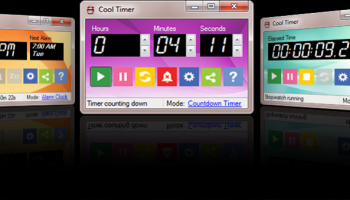
Cool Timer, developed by Harmony Hollow Software, is a versatile and user-friendly time management tool designed to cater to a wide range of timing needs. Whether you're looking to manage your daily tasks, set reminders, or simply need a reliable countdown timer, Cool Timer offers a robust solution with its intuitive interface and customizable features.
At its core, Cool Timer is a multi-functional timer that can be used as a countdown timer, alarm clock, or stopwatch. This flexibility makes it an ideal choice for both personal and professional use. The software's design emphasizes simplicity and ease of use, ensuring that even those with minimal technical expertise can navigate and utilize its features effectively.
One of the standout features of Cool Timer is its ability to set multiple timers simultaneously. This is particularly useful for users who need to juggle various tasks or projects at once. Each timer can be customized with different sounds and labels, allowing for easy identification and management. The software supports a wide range of audio formats, enabling users to personalize their alerts with their favorite tunes or sounds.
Cool Timer also offers a visual countdown feature, which is particularly beneficial for visual learners or those who prefer a more graphic representation of time. This feature displays a large, colorful countdown clock on the screen, making it easy to track the remaining time at a glance. Additionally, the software includes a unique "wake-up" mode, which gradually increases the alarm volume, ensuring a gentle and effective wake-up experience.
For those who require precise timing, Cool Timer's stopwatch function is highly accurate and easy to operate. This feature is ideal for timing activities such as workouts, cooking, or any other task that requires exact measurement of time intervals.
The software's customization options extend beyond sounds and labels. Users can also adjust the appearance of the timer interface, choosing from a variety of themes and colors to suit their personal preferences or mood. This level of personalization enhances the overall user experience, making time management not only efficient but also enjoyable.
Cool Timer is compatible with various versions of Windows, ensuring broad accessibility for users across different systems. Its lightweight design means it won't bog down your computer's performance, allowing it to run smoothly alongside other applications.
In summary, Cool Timer by Harmony Hollow Software is a comprehensive and adaptable time management tool that excels in functionality and user-friendliness. Its ability to handle multiple timers, combined with its customizable features and intuitive design, makes it a valuable addition to anyone's digital toolkit. Whether you're managing a busy schedule, timing a workout, or simply need a reliable alarm, Cool Timer stands out as a dependable and efficient choice.
At its core, Cool Timer is a multi-functional timer that can be used as a countdown timer, alarm clock, or stopwatch. This flexibility makes it an ideal choice for both personal and professional use. The software's design emphasizes simplicity and ease of use, ensuring that even those with minimal technical expertise can navigate and utilize its features effectively.
One of the standout features of Cool Timer is its ability to set multiple timers simultaneously. This is particularly useful for users who need to juggle various tasks or projects at once. Each timer can be customized with different sounds and labels, allowing for easy identification and management. The software supports a wide range of audio formats, enabling users to personalize their alerts with their favorite tunes or sounds.
Cool Timer also offers a visual countdown feature, which is particularly beneficial for visual learners or those who prefer a more graphic representation of time. This feature displays a large, colorful countdown clock on the screen, making it easy to track the remaining time at a glance. Additionally, the software includes a unique "wake-up" mode, which gradually increases the alarm volume, ensuring a gentle and effective wake-up experience.
For those who require precise timing, Cool Timer's stopwatch function is highly accurate and easy to operate. This feature is ideal for timing activities such as workouts, cooking, or any other task that requires exact measurement of time intervals.
The software's customization options extend beyond sounds and labels. Users can also adjust the appearance of the timer interface, choosing from a variety of themes and colors to suit their personal preferences or mood. This level of personalization enhances the overall user experience, making time management not only efficient but also enjoyable.
Cool Timer is compatible with various versions of Windows, ensuring broad accessibility for users across different systems. Its lightweight design means it won't bog down your computer's performance, allowing it to run smoothly alongside other applications.
In summary, Cool Timer by Harmony Hollow Software is a comprehensive and adaptable time management tool that excels in functionality and user-friendliness. Its ability to handle multiple timers, combined with its customizable features and intuitive design, makes it a valuable addition to anyone's digital toolkit. Whether you're managing a busy schedule, timing a workout, or simply need a reliable alarm, Cool Timer stands out as a dependable and efficient choice.
OS: Windows 11, Windows 10 32/64 bit
Add Your Review or 64-bit Compatibility Report
Top Clocks & Alarms 64-bit downloads


Hot Alarm Clock 6.4.4.1
Versatile alarm clock software with customizable features and soothing sounds.
Trialware | $29.95

Toggl Track for Chrome 4.11.10

Toggl Track for Chrome: Effortless time tracking and productivity boost.
Trialware | $9.00

AtomicClock 3.5.9.0
Accurate timekeeping app with customizable features and sleek design.
Adware | $5.99

EarthTime 6.32.0
Visualize time zones and world clocks with stunning maps and features.
Trialware | $20.00
tags: EarthTime, download EarthTime, EarthTime free download, time zone, earth time, city time, earth, time, zone, city

DesktopDigitalClock 6.23
DesktopDigitalClock: A customizable, lightweight digital clock for your desktop.
Freeware

DesktopCal 3.16.203.6639
Effortlessly organize your schedule with this intuitive desktop calendar tool.
Freeware

Analogue Vista Clock 1.35
Analogue Vista Clock is an outstanding quality alarm clock for your desktop.
Shareware | $14.95
Members area
Top 64-bit Downloads
-
Persclock 2.0
x64 freeware download -
bbLean (x64bit) 1.17.1
x64 freeware download -
VSLogonScreenCustomizer
64-bit 1.15.3.297
x64 freeware download -
magayo World Time
Weather (64-bit) 1.0.2.1
x64 freeware download -
WindowBlinds 11.0.2.1
x64 trialware download -
Vanga Rengi Mangaro 1.2.7.875
x64 trialware download -
WMP12 - BLUE Theme X64
x64 freeware download -
Pixelscope 8
x64 freeware download -
Save.me x64 2.4.0
x64 freeware download -
Synergy 64bit 1.8.8
x64 open source download
Top Downloads
-
Bonzi Buddy 1.7.0
freeware download -
Cloks and Time 2.0
demo download -
uWidgets 0.6.0 Beta
open source download -
CoordiPoint 1.0
freeware download -
MouseScribe 1.4
trialware download -
Persclock 2.0
freeware download -
f.lux 4.104
freeware download -
Limages 2.0
shareware download -
XWidget 1.9.22
freeware download -
Desktops 2.01
freeware download -
AtomicClock 3.5.9.0
adware download -
Hot Alarm Clock 6.4.4.1
trialware download -
Toggl Track for Chrome 4.11.10
trialware download -
Icon Library 2.0
freeware download -
PictureRiver 1.7.4.2
shareware download