
Desktops - X 64-bit Download
Popular x64 Tags
- free x64 download
- weather x64 download
- windows x64 download
- desktop x64 download
- news reader x64 download
- screen x64 download
- internet x64 download
- tray x64 download
- video x64 download
- monitor x64 download
- notes x64 download
- screen mate x64 download
- screen saver x64 download
- audio x64 download
- sports x64 download
- rss x64 download
- virtual girls x64 download
- dashboard x64 download
- virtual girl x64 download
- search x64 download
- desktop girls x64 download
- football x64 download
- college football x64 download
- deskmates x64 download
- virtua girl x64 download
- communicator x64 download
- college basketball x64 download
- olymipics x64 download
- usa x64 download
- athletics x64 download
Desktops 2.01
Sponsored links:

Microsoft

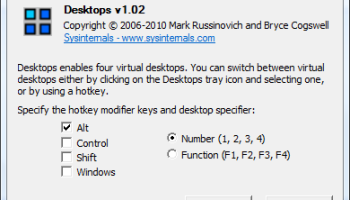
Desktops allows you to organize your applications on up to four virtual desktops. Read email on one, browse the web on the second, and do work in your productivity software on the third, without the clutter of the windows you’re not using. After you configure hotkeys for switching desktops, you can create and switch desktops either by clicking on the tray icon to open a desktop preview and switching window, or by using the hotkeys.
Unlike other virtual desktop utilities that implement their desktops by showing the windows that are active on a desktop and hiding the rest, Sysinternals Desktops uses a Windows desktop object for each desktop. Application windows are bound to a desktop object when they are created, so Windows maintains the connection between windows and desktops and knows which ones to show when you switch a desktop. That making Sysinternals Desktops very lightweight and free from bugs that the other approach is prone to where their view of active windows becomes inconsistent with the visible windows.
Desktops reliance on Windows desktop objects means that it cannot provide some of the functionality of other virtual desktop utilities, however. For example, Windows doesn't provide a way to move a window from one desktop object to another, and because a separate Explorer process must run on each desktop to provide a taskbar and start menu, most tray applications are only visible on the first desktop. Further, there is no way to delete a desktop object, so Desktops does not provide a way to close a desktop, because that would result in orphaned windows and processes. The recommended way to exit Desktops is therefore to logoff.
Unlike other virtual desktop utilities that implement their desktops by showing the windows that are active on a desktop and hiding the rest, Sysinternals Desktops uses a Windows desktop object for each desktop. Application windows are bound to a desktop object when they are created, so Windows maintains the connection between windows and desktops and knows which ones to show when you switch a desktop. That making Sysinternals Desktops very lightweight and free from bugs that the other approach is prone to where their view of active windows becomes inconsistent with the visible windows.
Desktops reliance on Windows desktop objects means that it cannot provide some of the functionality of other virtual desktop utilities, however. For example, Windows doesn't provide a way to move a window from one desktop object to another, and because a separate Explorer process must run on each desktop to provide a taskbar and start menu, most tray applications are only visible on the first desktop. Further, there is no way to delete a desktop object, so Desktops does not provide a way to close a desktop, because that would result in orphaned windows and processes. The recommended way to exit Desktops is therefore to logoff.
OS: Windows 7, Windows 7 x64, Windows 8, Windows 8 x64, Windows 10, Windows 10 x64
Add Your Review or 64-bit Compatibility Report
Top Other 64-bit downloads


Limages 2.0
Limages is a mediaplayer & slideshow program that works directly on your desktop
Shareware | $10.00
tags: slideshow, desktop, windows, tiles, widget, mediaplayer, sound volume, audio, video, DVD, player, transparency, Images, scrolled, automatically, wallpaper, style, change, photo, view, fullscreen, multiwindow


uWidgets 0.6.0 Beta
uWidgets: A versatile toolkit for creating customizable UI components.
Open Source


EarthView 7.14.0
Stunning dynamic wallpapers showcasing Earth’s beauty in real-time.
Trialware | $25.00


LightBulb 2.7
LightBulb: Adjust screen color temperature to reduce eye strain and improve sleep.
Open Source
Members area
Top 64-bit Downloads
-
Persclock 2.0
x64 freeware download -
bbLean (x64bit) 1.17.1
x64 freeware download -
Pixelscope 8
x64 freeware download -
Save.me x64 2.4.0
x64 freeware download -
TrayCD x64 1.2
x64 open source download -
KillKeys x64 1.2
x64 open source download -
VSLogonScreenCustomizer
64-bit 1.15.3.297
x64 freeware download -
magayo World Time
Weather (64-bit) 1.0.2.1
x64 freeware download -
Vanga Rengi Mangaro 1.2.7.875
x64 trialware download -
WMP12 - BLUE Theme X64
x64 freeware download
Top Downloads
-
Bonzi Buddy 1.7.0
freeware download -
Cloks and Time 2.0
demo download -
MouseScribe 1.4
trialware download -
CoordiPoint 1.0
freeware download -
uWidgets 0.6.0 Beta
open source download -
Limages 2.0
shareware download -
Persclock 2.0
freeware download -
IconPackager 10.03
trialware download -
f.lux 4.104
freeware download -
Sim Aquarium FREE! 3.7.55
freeware download -
PictureRiver 1.7.4.2
shareware download -
EarthTime 6.32.1
trialware download -
iPadian 10.1
freeware download -
Desktops 2.01
freeware download -
DesktopCal 3.16.203.6639
freeware download