
Crimson Editor - X 64-bit Download
Popular x64 Tags
- office x64 download
- microsoft x64 download
- importing x64 download
- exporting x64 download
- acrobat x64 download
- xls x64 download
- printer x64 download
- pdf x64 download
- pdf converter x64 download
- software x64 download
- word x64 download
- outlook x64 download
- excel x64 download
- powerpoint x64 download
- tool x64 download
- ppt x64 download
- adobe x64 download
- convert x64 download
- spreadsheet x64 download
- text x64 download
- create x64 download
- doc x64 download
- printing x64 download
- files x64 download
- add in x64 download
- open x64 download
- document x64 download
- data x64 download
- export x64 download
- saving x64 download
Crimson Editor 3.72 R286M
Sponsored links:

Ingyu Kang

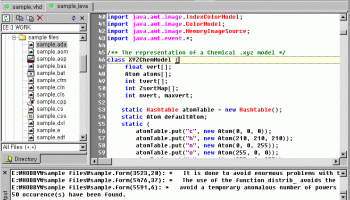
Crimson Editor is a professional source code editor for Windows.
This program is not only fast in loading time, but also small in size (so small that it can be copied in one floppy disk).
While it can serve as a good replacement for Notepad, it also offers many powerful features for programming languages such as HTML, C/C++, Perl and Java.
Edit multiple documents
- switch between documents using file selection tab.
- Ctrl+Tab brings the last accessed document to topmost.
- support window splitter to see different parts of a document.
Syntax highlighting
- configurable via custom syntax files.
- preconfigured for more than 100 computer languages.
Multi-level undo / redo
- all editing actions are recorded from the opening of a file.
- any document always can be undone to it's initial contents.
- unlimited undo and redo buffers.
Project management
- manage group of related files into one project.
- remote files also can be included in a project.
Directory tree view window
- click to open documents.
- filter to display only selected file class.
Find & Replace
- replace specified text one by one, or as a whole.
- support regular expression.
Column mode editing
- copy and paste rectangular selections.
- switch between column mode and line mode. (Alt+C)
Natural word wrapping
- word wrapping does not affect syntax highlighting.
- configurable wrapping indentation. (easer to understand the syntax)
Spell checker
- around 100000 words were added in the dictionary.
- users can register new words in their own dictionary. (InstallDir/user.dic)
User tools and macros
- execute external programs with proper arguments.
- compile, execute and test your code.
- ease your fingers with key stroke recording. (record & replay)
Edit remote files directly using built-in FTP client
- open, edit, and save documents in remote FTP servers.
- save account information (encoded) for automatic logon.
Print & Print preview
- configurable page header and footer.
- print with line numbers.
- print with syntax highlighting. (used in color printer)
- true type font selection for printer.
Other useful features
support Unicode & UTF-8 encoding, drag & drop text editing,
single instance / multiple instances, ability to detect changed files,
bookmark & go to, highlight active line, highlight matching pairs,
multi-byte support with integrated IME (for eastern languages),
auto indent, wheel mouse support, copy & paste, line numbers,
configurable line spacing, option to save files in Unix format,
This program is not only fast in loading time, but also small in size (so small that it can be copied in one floppy disk).
While it can serve as a good replacement for Notepad, it also offers many powerful features for programming languages such as HTML, C/C++, Perl and Java.
Edit multiple documents
- switch between documents using file selection tab.
- Ctrl+Tab brings the last accessed document to topmost.
- support window splitter to see different parts of a document.
Syntax highlighting
- configurable via custom syntax files.
- preconfigured for more than 100 computer languages.
Multi-level undo / redo
- all editing actions are recorded from the opening of a file.
- any document always can be undone to it's initial contents.
- unlimited undo and redo buffers.
Project management
- manage group of related files into one project.
- remote files also can be included in a project.
Directory tree view window
- click to open documents.
- filter to display only selected file class.
Find & Replace
- replace specified text one by one, or as a whole.
- support regular expression.
Column mode editing
- copy and paste rectangular selections.
- switch between column mode and line mode. (Alt+C)
Natural word wrapping
- word wrapping does not affect syntax highlighting.
- configurable wrapping indentation. (easer to understand the syntax)
Spell checker
- around 100000 words were added in the dictionary.
- users can register new words in their own dictionary. (InstallDir/user.dic)
User tools and macros
- execute external programs with proper arguments.
- compile, execute and test your code.
- ease your fingers with key stroke recording. (record & replay)
Edit remote files directly using built-in FTP client
- open, edit, and save documents in remote FTP servers.
- save account information (encoded) for automatic logon.
Print & Print preview
- configurable page header and footer.
- print with line numbers.
- print with syntax highlighting. (used in color printer)
- true type font selection for printer.
Other useful features
support Unicode & UTF-8 encoding, drag & drop text editing,
single instance / multiple instances, ability to detect changed files,
bookmark & go to, highlight active line, highlight matching pairs,
multi-byte support with integrated IME (for eastern languages),
auto indent, wheel mouse support, copy & paste, line numbers,
configurable line spacing, option to save files in Unix format,
OS: Windows XP, Windows Vista, Windows Vista x64, Windows 7, Windows 7 x64, Windows 8, Windows 8 x64, Windows 10, Windows 10 x64
Add Your Review or 64-bit Compatibility Report
Top Office Suites & Tools 64-bit downloads


Quite Imposing Plus 6.0d
Effortlessly create and manage complex impositions for PDF documents.
Demo | $949.00

Seavus Project Viewer 19.0
Free to experience the best viewer for Micrsoft Project. Try our Project Viewer
Trialware | $29.50


SilentNotes 8.7.1
SilentNotes: Secure, offline note-taking app with encryption and cross-device sync.
Open Source


CZ Excel Converter 1.9.4.6366
CZ V: A powerful synth emulation with rich sounds and intuitive controls.
Demo | $149.00


callas pdfaPilot 14.2.400
Powerful tool for creating, validating, and optimizing PDF/A documents.
Trialware

mini PDF to TXT OCR Converter 3.2
PDF to TXT OCR Converter is a best OCR Converter
Shareware | $59.95
Members area
Top 64-bit Downloads
-
mbFXWords 2.80
x64 freeware download -
FontAgent Pro 10.0.15.0
x64 trialware download -
Microsoft Office 2016
x64 2405 B17628.20164
x64 trialware download -
Print to PDF Toolkit Pro 3.0
x64 shareware download -
Microsoft Office 2010
Service Pack x64 SP2
x64 freeware download -
PDFill PDF and Image
Writer x64 15.0 Build 2
x64 freeware download -
CSV2IIF Portable 5.0.060
x64 demo download -
Foxit Reader 2023.3
x64 freeware download -
Hl7Spy 24.1.227
x64 trialware download -
ABBYY FineReader
Professional 16.0.13
x64 trialware download
Top Downloads
-
Quite Imposing Plus 6.0d
demo download -
Total CSV Converter 4.0
shareware download -
Active Barcode and QR
code Generator 1.24.8.15
freeware download -
Seavus Project Viewer 19.0
trialware download -
Miro for Windows 0.11.110
shareware download -
Odoo 19.0.20260327
demo download -
Flipping Book Writer 2.6
shareware download -
mbFXWords 2.80
freeware download -
SmarThru 4.04
freeware download -
SilentNotes 8.7.1
open source download -
LawTrust 5.1.1
shareware download -
HelpDesk 11.19.9557.25020
trialware download -
DeskWork Standard 4.0.2827
trialware download -
LiquiBase 5.0.2
trialware download -
Smart Phone Recorder 3.6.5
demo download