
Cue Player Premium Plus - X 64-bit Download
Popular x64 Tags
- mp3 player x64 download
- video x64 download
- karaoke x64 download
- software x64 download
- player x64 download
- media x64 download
- dj mix x64 download
- online radio x64 download
- ogg x64 download
- play x64 download
- internet x64 download
- dj player x64 download
- wma x64 download
- streaming x64 download
- jukebox x64 download
- wav x64 download
- free x64 download
- midi x64 download
- audio x64 download
- sound x64 download
- mp3 x64 download
- multimedia x64 download
- mixing x64 download
- broadcast x64 download
- shareware x64 download
- dvd x64 download
- radio x64 download
- music x64 download
- playlist x64 download
- mix x64 download
Cue Player Premium Plus 3.12.6
Sponsored links:

Baxel Data Systems

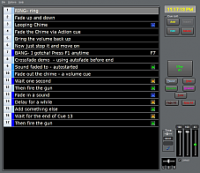
Cue Player Premium Plus - adds video players to Cue Player Premium. With additional video cards installed in the main computer, two projectors can be controlled. With network connectivity, additional computers, with their video interfaces, can be added. The Help file is available that shows the added features. Get the enhanced sample.cue file. Get the latest beta version to check out new features.
The Premium Plus version has the following features:
The Plus is Video!
Images and/or movie clips can be faded in or out while playing or paused.
Images can be crossfaded from one to another.
Images can be .bmp, .png, .jpg, .gif, .tif
Movies can be .avi, .mpg, .wmv, .mov, .mp4, .mpv depending on your installed codecs.
The number pad can be used to select and play sounds. Useful at sporting events to play "Jock Jams".
The cue text font is selectable.
Power (on/off) signals to an external controller can happen at cue start or stop. See the links below for compatable controllers.
Cue text color and cue background color are settable by cue.
An Auto Fade can be selected to fade the cue a settable number of seconds before its end.
Beyond stereo, if a 5.1 (or greater) sound card is available, speaker selection is possible by cue.
The sound card used to play the cue can be selected cue by cue.
There are now three classes of cue. The normal and background cues work as before, and a new class ? independent has been added. As its name would indicate, an independent cue can play anytime and several can play at once. Power control is not available for these cues.
A Function key can be assigned to play a cue. Doing so will make the cue independent and playing the cue will not reposition your location in the cue list.
A cue can be a volume change cue for a previously playing cue.
A cue can be a time delay cue between playing and next to play cues.
The Master, or sound card, volume level can be set at Cue Player start to be either what it was when you last used the program, or what is was when the last numbered cue was edited. In effect, either computer specific or cue file specific.
The starting position of a long cue can be set before or during playback. Useful in rehearsal when the Director asks for ?the last 30 seconds? of that music.
Auto Advance can be set for either the start or end of that cue. Allows several independent cues to start at once.
A playlist (*.m3u) file can be used as sound file.
A Black background selection is available.
Running time is displayed for each active cue.
Cue files can be exported as CSV files for viewing as a spreadsheet.
Playback can be controlled by MIDI commands.
Cue file relocation is supported as well as building a cue file from a directory of sounds. Useful when visiting troups bring their own sounds.
The Premium Plus version has the following features:
The Plus is Video!
Images and/or movie clips can be faded in or out while playing or paused.
Images can be crossfaded from one to another.
Images can be .bmp, .png, .jpg, .gif, .tif
Movies can be .avi, .mpg, .wmv, .mov, .mp4, .mpv depending on your installed codecs.
The number pad can be used to select and play sounds. Useful at sporting events to play "Jock Jams".
The cue text font is selectable.
Power (on/off) signals to an external controller can happen at cue start or stop. See the links below for compatable controllers.
Cue text color and cue background color are settable by cue.
An Auto Fade can be selected to fade the cue a settable number of seconds before its end.
Beyond stereo, if a 5.1 (or greater) sound card is available, speaker selection is possible by cue.
The sound card used to play the cue can be selected cue by cue.
There are now three classes of cue. The normal and background cues work as before, and a new class ? independent has been added. As its name would indicate, an independent cue can play anytime and several can play at once. Power control is not available for these cues.
A Function key can be assigned to play a cue. Doing so will make the cue independent and playing the cue will not reposition your location in the cue list.
A cue can be a volume change cue for a previously playing cue.
A cue can be a time delay cue between playing and next to play cues.
The Master, or sound card, volume level can be set at Cue Player start to be either what it was when you last used the program, or what is was when the last numbered cue was edited. In effect, either computer specific or cue file specific.
The starting position of a long cue can be set before or during playback. Useful in rehearsal when the Director asks for ?the last 30 seconds? of that music.
Auto Advance can be set for either the start or end of that cue. Allows several independent cues to start at once.
A playlist (*.m3u) file can be used as sound file.
A Black background selection is available.
Running time is displayed for each active cue.
Cue files can be exported as CSV files for viewing as a spreadsheet.
Playback can be controlled by MIDI commands.
Cue file relocation is supported as well as building a cue file from a directory of sounds. Useful when visiting troups bring their own sounds.
Homepage: Cue Player Premium Plus
OS: Windows XP, Windows Vista, Windows Vista x64, Windows 7, Windows 7 x64
Add Your Review or 64-bit Compatibility Report
Top Audio File Players 64-bit downloads


PlayIt Live 2.17.2.5046
PlayIt Live: Professional radio automation software for seamless broadcasting.
Shareware | $75.00


1X-AMP - MP3 Player Software 2026 26.1.4

1X-AMP - MP3 Player Software as a jukebox, tube amp, dolphin, or stereo system.
Shareware | $11.95


Bullseye Media Manager 4.2.1
Exaile: A versatile music player with powerful library management features.
Open Source


ProgDVB Professional 7.70.8
ProgDVB Professional: Advanced TV and radio streaming software for Windows.
Trialware | $25.00


RADIO Player Pro 2.2.24 Build 396
RADIO Player Pro: Ultimate tool for seamless internet radio streaming.
Demo | $99.00
Members area
Top 64-bit Downloads
-
Media Player Classic -
HomeCinema - 64 bit 2.3.0
x64 open source download -
VLC Media Player x64 3.0.20
x64 open source download -
MCEBuddy 2.6.3
x64 trialware download -
PotPlayer 64bit 1.7.21397
x64 freeware download -
GUITAR RIG 5 PRO 7.0.2
x64 demo download -
Voxengo Stereo Touch x64 2.17
x64 freeware download -
Voxengo Crunchessor x64 2.19
x64 demo download -
Devastor x64 2.3.2
x64 demo download -
Adobe PhotoShop CC x64 2024 25.9.1
x64 trialware download -
Blue Cat's Triple EQ x64 4.45
x64 freeware download
Top Downloads
-
FreeTube 0.23.15 Beta
open source download -
Little AlterBoy 5.4.1
trialware download -
Syrah 23.07.0.50310
trialware download -
Auremo 0.24.9
open source download -
Nero 7 Ultra Edition 7.10.1
shareware download -
ft2-clone 2.12
open source download -
Screenbox 0.18.1
open source download -
VLC Media Player x64 3.0.20
open source download -
Screenbits 9.13.1.0
trialware download -
Cyclop 1.3.7
demo download -
Melodics 5.0.139.0
demo download -
Media Player Classic -
HomeCinema - 64 bit 2.3.0
open source download -
PlayIt Live 2.17.2.5046
shareware download -
FineCut 1.0.2
demo download -
MCEBuddy 2.6.3
trialware download