
DICOM printer - X 64-bit Download
Popular x64 Tags
- office x64 download
- microsoft x64 download
- importing x64 download
- exporting x64 download
- acrobat x64 download
- xls x64 download
- printer x64 download
- pdf x64 download
- pdf converter x64 download
- software x64 download
- word x64 download
- outlook x64 download
- excel x64 download
- powerpoint x64 download
- tool x64 download
- ppt x64 download
- adobe x64 download
- convert x64 download
- spreadsheet x64 download
- text x64 download
- create x64 download
- doc x64 download
- printing x64 download
- files x64 download
- add in x64 download
- open x64 download
- document x64 download
- data x64 download
- export x64 download
- saving x64 download
DICOM printer 2.1.7.430
Sponsored links:

Flux Inc.

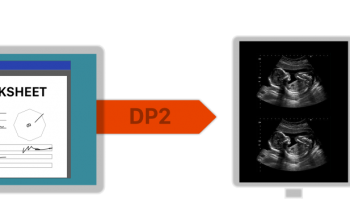
DICOM Printer permits the user to send any document that is normally printed to a PACS server for storage; this DICOM-enables most legacy devices that would normally have to be replaced.
Just print to the DICOM Printer and your document appears in a queue. The, from within the DICOM Printer, enter relevant information or perform a Worklist/Study search against your RIS to automatically retrieve patient data. Then click Send and your document is sent to your PACS or RIS.
Share the printer across a LAN to allow legacy Windows 9x/Linux/Mac devices to print directly to PACS. Each source PC or device is provided with a profile that allows the user to customise search and store information.
Recommended uses addition of DICOM capability to legacy medical devices, submission of decuments (Excel, Word) to PACS, creation of central networked workstation where DICOM print jobs are confirmed and submitted to PACS or RIS.
FEATURES:
· Functions as a virtual printer in Windows to allow PACS submission from any application that can print to a printer. If you can print it, then you can send it to PACS
· Processing of jobs can be completed at any time after they have been queued. Each image can be associated with patient information and sent to PACS within minutes right at the modality machine, or an entire day's worth of images can be processed at a separate workstation by a dedicated technologist
· Data entry is partially automated through the ability to query against Worklist, Study and/or Patient records on any DICOM compatible SCP
· The DICOM Printer can be shared across a LAN to allow most DOS, Windows 3.1/9x or Linux/Unix-based modalities to print to PACS
Just print to the DICOM Printer and your document appears in a queue. The, from within the DICOM Printer, enter relevant information or perform a Worklist/Study search against your RIS to automatically retrieve patient data. Then click Send and your document is sent to your PACS or RIS.
Share the printer across a LAN to allow legacy Windows 9x/Linux/Mac devices to print directly to PACS. Each source PC or device is provided with a profile that allows the user to customise search and store information.
Recommended uses addition of DICOM capability to legacy medical devices, submission of decuments (Excel, Word) to PACS, creation of central networked workstation where DICOM print jobs are confirmed and submitted to PACS or RIS.
FEATURES:
· Functions as a virtual printer in Windows to allow PACS submission from any application that can print to a printer. If you can print it, then you can send it to PACS
· Processing of jobs can be completed at any time after they have been queued. Each image can be associated with patient information and sent to PACS within minutes right at the modality machine, or an entire day's worth of images can be processed at a separate workstation by a dedicated technologist
· Data entry is partially automated through the ability to query against Worklist, Study and/or Patient records on any DICOM compatible SCP
· The DICOM Printer can be shared across a LAN to allow most DOS, Windows 3.1/9x or Linux/Unix-based modalities to print to PACS
OS: Windows XP, Windows Vista, Windows Vista x64, Windows 7, Windows 7 x64
Add Your Review or 64-bit Compatibility Report
Top Office Suites & Tools 64-bit downloads


Quite Imposing Plus 6.0d
Effortlessly create and manage complex impositions for PDF documents.
Demo | $949.00

Seavus Project Viewer 19.0
Free to experience the best viewer for Micrsoft Project. Try our Project Viewer
Trialware | $29.50


SilentNotes 8.7.1
SilentNotes: Secure, offline note-taking app with encryption and cross-device sync.
Open Source


CZ Excel Converter 1.9.4.6366
CZ V: A powerful synth emulation with rich sounds and intuitive controls.
Demo | $149.00


callas pdfaPilot 14.2.400
Powerful tool for creating, validating, and optimizing PDF/A documents.
Trialware

mini PDF to TXT OCR Converter 3.2
PDF to TXT OCR Converter is a best OCR Converter
Shareware | $59.95
Members area
Top 64-bit Downloads
-
mbFXWords 2.80
x64 freeware download -
FontAgent Pro 10.0.15.0
x64 trialware download -
Microsoft Office 2016
x64 2405 B17628.20164
x64 trialware download -
Print to PDF Toolkit Pro 3.0
x64 shareware download -
Microsoft Office 2010
Service Pack x64 SP2
x64 freeware download -
PDFill PDF and Image
Writer x64 15.0 Build 2
x64 freeware download -
CSV2IIF Portable 5.0.060
x64 demo download -
Foxit Reader 2023.3
x64 freeware download -
Hl7Spy 24.1.227
x64 trialware download -
ABBYY FineReader
Professional 16.0.13
x64 trialware download
Top Downloads
-
Quite Imposing Plus 6.0d
demo download -
Total CSV Converter 4.0
shareware download -
Active Barcode and QR
code Generator 1.24.8.15
freeware download -
Seavus Project Viewer 19.0
trialware download -
Miro for Windows 0.11.110
shareware download -
Odoo 19.0.20260327
demo download -
Flipping Book Writer 2.6
shareware download -
mbFXWords 2.80
freeware download -
SmarThru 4.04
freeware download -
SilentNotes 8.7.1
open source download -
LawTrust 5.1.1
shareware download -
HelpDesk 11.19.9557.25020
trialware download -
DeskWork Standard 4.0.2827
trialware download -
LiquiBase 5.0.2
trialware download -
Smart Phone Recorder 3.6.5
demo download