
Diff Checker - X 64-bit Download
Popular x64 Tags
- office x64 download
- microsoft x64 download
- importing x64 download
- exporting x64 download
- acrobat x64 download
- xls x64 download
- printer x64 download
- pdf x64 download
- pdf converter x64 download
- software x64 download
- word x64 download
- outlook x64 download
- excel x64 download
- powerpoint x64 download
- tool x64 download
- ppt x64 download
- adobe x64 download
- convert x64 download
- spreadsheet x64 download
- text x64 download
- create x64 download
- doc x64 download
- printing x64 download
- files x64 download
- add in x64 download
- open x64 download
- document x64 download
- data x64 download
- export x64 download
- saving x64 download
Diff Checker 6.8.8
Sponsored links:
license: Trialware ($15.00)
downloads: 97
size: 219.00 MB
updated: 2026-03-14
tags: Diff Checker, download Diff Checker, Diff Checker free download, Find Difference, Compare Documents, Compare Text, Diff, Checker, Check, Compare
Add to Basket

Checker Software Inc.

**Diff Checker by Checker Software Inc.: A Comprehensive Review**
Diff Checker, developed by Checker Software Inc., is a robust and intuitive tool designed to simplify the process of comparing files and folders. This desktop application stands out in the crowded field of comparison tools with its user-friendly interface, powerful features, and seamless performance.
**User Interface and Experience**
Diff Checker boasts a clean, modern interface that is both visually appealing and highly functional. The layout is intuitive, allowing users to quickly navigate through the various features without a steep learning curve. The application supports drag-and-drop functionality, making it easy to load files and folders for comparison.
**Core Features**
1. **File and Folder Comparison**: Diff Checker excels in comparing both files and directories. It highlights differences in a clear, color-coded manner, making it easy to spot changes at a glance. Whether you're comparing text files, source code, or entire directories, Diff Checker provides accurate and detailed results.
2. **Multiple Formats Support**: The software supports a wide range of file formats, including text files, PDFs, Word documents, and more. This versatility ensures that users can rely on Diff Checker for various types of comparison tasks.
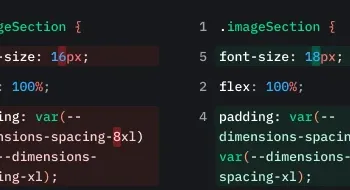
3. **Side-by-Side View**: One of the standout features of Diff Checker is its side-by-side comparison view. This feature allows users to see the differences between files or folders in parallel, making it easier to understand the changes and their context.
4. **Merge Capabilities**: Diff Checker not only identifies differences but also offers merging capabilities. Users can merge changes from one file to another directly within the application, streamlining the workflow and saving valuable time.
5. **Version Control Integration**: For developers, Diff Checker integrates seamlessly with popular version control systems like Git. This integration enhances the tool's utility in collaborative environments, where tracking changes and resolving conflicts is crucial.
6. **Cloud Sync**: The application offers cloud synchronization, allowing users to save their comparison sessions and access them from different devices. This feature is particularly useful for professionals who work across multiple platforms.
**Performance**
Diff Checker is optimized for performance, handling large files and directories with ease. The comparison process is swift, and the application remains responsive even when dealing with complex tasks. This efficiency makes it a reliable choice for both individual users and teams.
**Security**
Checker Software Inc. places a strong emphasis on security. Diff Checker ensures that your data remains private and secure, with robust encryption protocols in place. This commitment to security is reassuring, particularly for users dealing with sensitive information.
**Pricing and Availability**
Diff Checker is available as a desktop application for both Windows and macOS. The software offers a free version with basic features, while the premium version unlocks advanced functionalities such as cloud sync, version control integration, and more. The pricing is competitive, providing excellent value for the features offered.
**Conclusion**
In summary, Diff Checker by Checker Software Inc. is a powerful and versatile tool that excels in file and folder comparison. Its user-friendly interface, comprehensive feature set, and strong performance make it an indispensable tool for developers, writers, and professionals who need to track changes and ensure consistency in their work. Whether you're managing codebases, editing documents, or synchronizing directories, Diff Checker is a reliable and efficient solution that delivers on its promises.
Diff Checker, developed by Checker Software Inc., is a robust and intuitive tool designed to simplify the process of comparing files and folders. This desktop application stands out in the crowded field of comparison tools with its user-friendly interface, powerful features, and seamless performance.
**User Interface and Experience**
Diff Checker boasts a clean, modern interface that is both visually appealing and highly functional. The layout is intuitive, allowing users to quickly navigate through the various features without a steep learning curve. The application supports drag-and-drop functionality, making it easy to load files and folders for comparison.
**Core Features**
1. **File and Folder Comparison**: Diff Checker excels in comparing both files and directories. It highlights differences in a clear, color-coded manner, making it easy to spot changes at a glance. Whether you're comparing text files, source code, or entire directories, Diff Checker provides accurate and detailed results.
2. **Multiple Formats Support**: The software supports a wide range of file formats, including text files, PDFs, Word documents, and more. This versatility ensures that users can rely on Diff Checker for various types of comparison tasks.
3. **Side-by-Side View**: One of the standout features of Diff Checker is its side-by-side comparison view. This feature allows users to see the differences between files or folders in parallel, making it easier to understand the changes and their context.
4. **Merge Capabilities**: Diff Checker not only identifies differences but also offers merging capabilities. Users can merge changes from one file to another directly within the application, streamlining the workflow and saving valuable time.
5. **Version Control Integration**: For developers, Diff Checker integrates seamlessly with popular version control systems like Git. This integration enhances the tool's utility in collaborative environments, where tracking changes and resolving conflicts is crucial.
6. **Cloud Sync**: The application offers cloud synchronization, allowing users to save their comparison sessions and access them from different devices. This feature is particularly useful for professionals who work across multiple platforms.
**Performance**
Diff Checker is optimized for performance, handling large files and directories with ease. The comparison process is swift, and the application remains responsive even when dealing with complex tasks. This efficiency makes it a reliable choice for both individual users and teams.
**Security**
Checker Software Inc. places a strong emphasis on security. Diff Checker ensures that your data remains private and secure, with robust encryption protocols in place. This commitment to security is reassuring, particularly for users dealing with sensitive information.
**Pricing and Availability**
Diff Checker is available as a desktop application for both Windows and macOS. The software offers a free version with basic features, while the premium version unlocks advanced functionalities such as cloud sync, version control integration, and more. The pricing is competitive, providing excellent value for the features offered.
**Conclusion**
In summary, Diff Checker by Checker Software Inc. is a powerful and versatile tool that excels in file and folder comparison. Its user-friendly interface, comprehensive feature set, and strong performance make it an indispensable tool for developers, writers, and professionals who need to track changes and ensure consistency in their work. Whether you're managing codebases, editing documents, or synchronizing directories, Diff Checker is a reliable and efficient solution that delivers on its promises.
OS: Windows 11, Windows 10 32/64 bit
Add Your Review or 64-bit Compatibility Report
Top Office Suites & Tools 64-bit downloads


Quite Imposing Plus 6.0c
Effortlessly create and manage complex impositions for PDF documents.
Demo | $949.00


CZ Excel Converter 1.9.4.6366
CZ V: A powerful synth emulation with rich sounds and intuitive controls.
Demo | $149.00


callas pdfaPilot 14.2.400
Powerful tool for creating, validating, and optimizing PDF/A documents.
Trialware

mini PDF to TXT OCR Converter 3.2
PDF to TXT OCR Converter is a best OCR Converter
Shareware | $59.95

Venta4Net 2.7.136.392
Network solution for fax and voice mail exchange via a modem
Trialware | $249.00


Office Timeline 13.32.0

Office Timeline: Create stunning project visuals and timelines in PowerPoint.
Demo
Members area
Top 64-bit Downloads
-
mbFXWords 2.80
x64 freeware download -
FontAgent Pro 10.0.15.0
x64 trialware download -
Microsoft Office 2016
x64 2405 B17628.20164
x64 trialware download -
Print to PDF Toolkit Pro 3.0
x64 shareware download -
Microsoft Office 2010
Service Pack x64 SP2
x64 freeware download -
Zed Axis 64bit 10.0
x64 trialware download -
Microsoft OneNote 2013
x64 15.0.4641.1001
x64 freeware download -
XpressDox x64 4.2.3.0
x64 trialware download -
Adeptia Integration
Suite x64 5.3.3
x64 trialware download -
Microsoft Visio Viewer
64-bit 2013
x64 freeware download
Top Downloads
-
Active Barcode and QR
code Generator 1.24.8.15
freeware download -
Flipping Book Writer 2.6
shareware download -
Quite Imposing Plus 6.0c
demo download -
DeskWork Standard 4.0.2827
trialware download -
Forex Strategy Trader 3.6.0.0
freeware download -
SmarThru 4.04
freeware download -
Miro for Windows 0.11.110
shareware download -
mbFXWords 2.80
freeware download -
CZ Excel Converter 1.9.4.6366
demo download -
FontAgent Pro 10.0.15.0
trialware download -
Total CSV Converter 4.0
shareware download -
VersionSQL 0.20
demo download -
DbGate 7.1.2
trialware download -
LiquiBase 5.0.2
trialware download -
4EPOS POS 12.20.48
demo download