
digiKam - X 64-bit Download
Popular x64 Tags
- image x64 download
- design x64 download
- size x64 download
- color x64 download
- graphics x64 download
- gif x64 download
- panorama x64 download
- photoshop x64 download
- software x64 download
- jpeg x64 download
- photo x64 download
- utility x64 download
- plugin x64 download
- cover x64 download
- tool x64 download
- rgb x64 download
- png x64 download
- jpg x64 download
- pictures x64 download
- images x64 download
- vanderlee x64 download
- bmp x64 download
- photos x64 download
- vdl x64 download
- picture x64 download
- scanner x64 download
- screen x64 download
- video x64 download
- scan x64 download
- dust x64 download
digiKam 8.8.0
Sponsored links:
license: Open Source
downloads: 810
size: 247.00 MB
updated: 2025-10-21
tags: digiKam, download digiKam, digiKam free download, photo organizer, photo editor, image viewer, editor, organizer, viewer, EXIF
Add to Basket

digiKam Team

digiKam is a robust and versatile open-source photo management software developed by the dedicated digiKam Team. Designed to cater to both amateur photographers and seasoned professionals, digiKam offers a comprehensive suite of tools that streamline the process of organizing, editing, and sharing digital images.
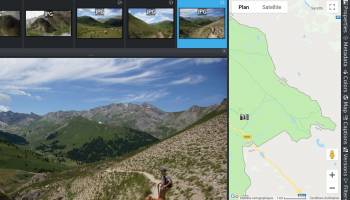
At its core, digiKam excels in photo organization. The software supports a wide array of image formats, including RAW files, making it a versatile choice for photographers who work with high-quality images. Its powerful tagging and sorting capabilities allow users to categorize their photo collections efficiently. With features like facial recognition, geotagging, and customizable metadata, digiKam ensures that users can easily locate and manage their images, no matter the size of their library.
The editing capabilities of digiKam are equally impressive. It includes a range of basic and advanced editing tools that cater to various levels of expertise. Users can perform simple adjustments like cropping and color correction, or delve into more complex edits with features such as noise reduction, lens correction, and batch processing. The integration with external editors further enhances its flexibility, allowing users to seamlessly transition between digiKam and other editing software.
One of digiKam's standout features is its non-destructive editing workflow. This allows users to experiment with different edits without permanently altering the original image, preserving the integrity of their work. The software also supports versioning, enabling users to maintain multiple iterations of an image and revert to previous versions if needed.
digiKam's user interface is intuitive and customizable, providing a comfortable experience for users of all skill levels. The software's modular design means that users can tailor the interface to suit their workflow, whether they prefer a minimalist setup or a more feature-rich environment.
Beyond its core functionalities, digiKam offers a range of additional features that enhance its utility. The software supports direct uploading to popular photo-sharing platforms, facilitating easy sharing of images with friends, family, or clients. It also includes a slideshow creator, allowing users to present their photos in a dynamic and engaging manner.
The digiKam Team is committed to continuous improvement, regularly updating the software to incorporate user feedback and the latest technological advancements. This dedication ensures that digiKam remains a cutting-edge tool in the ever-evolving landscape of digital photography.
In summary, digiKam is a comprehensive photo management solution that combines powerful organizational tools, advanced editing capabilities, and a user-friendly interface. Its open-source nature and active community support make it an attractive option for photographers seeking a reliable and adaptable software to manage their digital image collections. Whether you're a hobbyist looking to organize family photos or a professional managing a vast portfolio, digiKam offers the features and flexibility to meet your needs.
At its core, digiKam excels in photo organization. The software supports a wide array of image formats, including RAW files, making it a versatile choice for photographers who work with high-quality images. Its powerful tagging and sorting capabilities allow users to categorize their photo collections efficiently. With features like facial recognition, geotagging, and customizable metadata, digiKam ensures that users can easily locate and manage their images, no matter the size of their library.
The editing capabilities of digiKam are equally impressive. It includes a range of basic and advanced editing tools that cater to various levels of expertise. Users can perform simple adjustments like cropping and color correction, or delve into more complex edits with features such as noise reduction, lens correction, and batch processing. The integration with external editors further enhances its flexibility, allowing users to seamlessly transition between digiKam and other editing software.
One of digiKam's standout features is its non-destructive editing workflow. This allows users to experiment with different edits without permanently altering the original image, preserving the integrity of their work. The software also supports versioning, enabling users to maintain multiple iterations of an image and revert to previous versions if needed.
digiKam's user interface is intuitive and customizable, providing a comfortable experience for users of all skill levels. The software's modular design means that users can tailor the interface to suit their workflow, whether they prefer a minimalist setup or a more feature-rich environment.
Beyond its core functionalities, digiKam offers a range of additional features that enhance its utility. The software supports direct uploading to popular photo-sharing platforms, facilitating easy sharing of images with friends, family, or clients. It also includes a slideshow creator, allowing users to present their photos in a dynamic and engaging manner.
The digiKam Team is committed to continuous improvement, regularly updating the software to incorporate user feedback and the latest technological advancements. This dedication ensures that digiKam remains a cutting-edge tool in the ever-evolving landscape of digital photography.
In summary, digiKam is a comprehensive photo management solution that combines powerful organizational tools, advanced editing capabilities, and a user-friendly interface. Its open-source nature and active community support make it an attractive option for photographers seeking a reliable and adaptable software to manage their digital image collections. Whether you're a hobbyist looking to organize family photos or a professional managing a vast portfolio, digiKam offers the features and flexibility to meet your needs.
OS: Windows 11, Windows 10 32/64 bit, Windows 8 32/64 bit, Windows 7 32/64 bit
Add Your Review or 64-bit Compatibility Report
Top Other 64-bit downloads


Topaz DeNoise 6.0.1
A Photoshop plugin that can help you remove digital image noise
Trialware | $79.99


Just Color Picker 6.2
Free portable colour picker and editor for web-designers and digital artists.
Freeware

PDF Writer for Windows 2022 1.02
Server-based solution for deploying PDF creation ability across your company
Shareware | $700.00
tags: pdf, server, writer, print, printer, windows2022, win2022, printing, driver, feature, secure, password, vector, concurrent, client, virtual, server2022, windows, 2022, windows server 2022

iWisdom 0.0.0+2107~ga0785ce1
An application which helps you store small bits of wisdom, such as quotations
Open Source


Blue Cat's Protector x64 2.31
0dB stereo brickwall limiter with adjustable dynamics response
Demo | $99.00
Members area
Top 64-bit Downloads
-
cPicture (x64 bit) 4.1
x64 freeware download -
HyperCam (x64 bit) 2.29.00
x64 freeware download -
PhotoFiltre 11.6.1
x64 freeware download -
VanceAI 1.0.0.7
x64 shareware download -
Adobe Photoshop Elements 2024.3
x64 trialware download -
PDF Writer for Windows
2022 1.02
x64 shareware download -
Gimp for x64 Windows 2.10.38
x64 open source download -
ICO file format x64 2.1f1
x64 open source download -
Portable PhotoFiltre 11.6.1
x64 freeware download -
Blue Cat's Protector x64 2.31
x64 demo download
Top Downloads
-
CorelDRAW X5 2025 26.2.0.29
trialware download -
Fotosizer 3.21.0.594
freeware download -
CorelDRAW X6 16.4.0.1280
trialware download -
Scanahand 8.0.0.320
demo download -
MSU Subtitle Remover
VirtualDub plugin 3.0beta2
freeware download -
TinyPDF 3.00
freeware download -
PDF24 Creator 11.17.0
freeware download -
cPicture (x64 bit) 4.1
freeware download -
VueScan 9.8.52
demo download -
Scripthea 3.0.0
open source download -
PhotoFiltre 11.6.1
freeware download -
WinScan2PDF 9.55
freeware download -
VanceAI 1.0.0.7
shareware download -
ReaConverter Standard 8.200
demo download -
FreeFotoWorks 2026 26.0.9
freeware download