
DigiTweak - X 64-bit Download
Popular x64 Tags
- regedit x64 download
- windows tweak x64 download
- registry repair x64 download
- registry fixer x64 download
- cleaner x64 download
- fix registry errors x64 download
- windows error x64 download
- files x64 download
- xp registry cleaner x64 download
- restore x64 download
- optimize x64 download
- fix registry x64 download
- registry cleaner x64 download
- registry fix x64 download
- windows cleaner x64 download
- error x64 download
- fix x64 download
- hard disk cleaner x64 download
- pc registry cleaner x64 download
- registry tools x64 download
- errors x64 download
- clean x64 download
- registry x64 download
- registry optimizer x64 download
- windows x64 download
- repair x64 download
- free x64 download
- file x64 download
- clean registry x64 download
- system maintainance x64 download
DigiTweak 1.0.8
Sponsored links:

Koingo Software

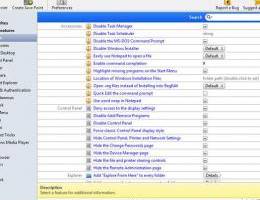
Access over 1000 hidden features available only through the Windows registry. However, now you can edit them with peace of mind and the click of a few buttons. No more digging through levels upon levels of potentially dangerous paths in RegEdit!
Lab managers and cafe owners will breeze through setting up and locking down the computers in their labs. Easily create a restore point of a variety of customized features. This restore point can then be deployed on numerous computers with a fraction of the time!
For the average user, DigiTweak provides access to a plethora of hidden features in Windows such as user-interface modifications, network tools, and hard disk information. Make Windows work the way you want to, without having to be a computer expert!
FEATURES:
Accessories
Command Prompt: Add command prompt option to every folder (Win 95/98/Me)
Command Prompt: Add command prompt option to every folder (Win NT+)
Command Prompt: Allow UNC paths at the command prompt
Command Prompt: Change the command prompt
Command Prompt: Command prompt colors
Command Prompt: Directory name autocompletion key
Command Prompt: Disable command prompt and batch files
Command Prompt: Disable single mode MS-DOS applications
Command Prompt: Disable the MS-DOS Command Prompt
Command Prompt: Enable command completion
Command Prompt: Enable command processor extensions
Command Prompt: Enable delayed environment variable expansion
Command Prompt: MS-DOS compatibility mode problems with PCI IDE controllers
Command Prompt: Number of file handles for DOS programs
Command Prompt: Quick Edit the command prompt
Command Prompt: Run startup programs in a command prompt
Command Prompt: Use high memory for DOS drivers
Dr Watson: Behavior
Dr Watson: Create crash dump file
Dr Watson: Dump all threads
Dr Watson: Dump symbols
Dr Watson: Location of dump file
Dr Watson: Log directory
Dr Watson: Log file creation method
Dr Watson: Play audio alerts
Dr Watson: Shows visual alerts
Dr Watson: Specify an alternate debugging utility
Dr Watson: Specify the number of instructions to record
Dr Watson: Wave file for sound notification
General: Add the QuickView option to all files
General: Disable Task Manager
General: Disable the Windows XP tour
General: Easily use Notepad to open a file
General: Notepad remembers page settings
General: Notepad remembers window positions
General: Specify the program to play inserted audio CDs
General: Use smooth scrolling in Telnet
General: Use word wrap in Notepad
Registry Editor: Enable Windows Registry Checker
Registry Editor: Open .reg files instead of Installing into RegEdit
Registry Editor: Prevent Regedit from saving the last location
Registry Editor: Repair the Registry Editor
Registry Editor: Specify anonymous remote access
Task Scheduler: Disable changes to task properties
Task Scheduler: Disable changes to task run command
Task Scheduler: Disable drag and drop task scheduling
Task Scheduler: Disable manual task control
Task Scheduler: Disable Task Scheduler
Task Scheduler: Enable the Scheduled Tasks icon
Task Scheduler: Log file path
Task Scheduler: Log file size
Task Scheduler: Receive notification of missed tasks
Task Scheduler: Remove advanced option from Task Scheduler wizard
Task Scheduler: Restrict task creation and deletion
Windows Installer: Allow uninstall of Windows components
Windows Installer: Disable Windows Installer
Windows Installer: Disable Windows Installer rollback
Windows Installer: Highlight missing programs on the Start Menu
Windows Installer: Location of Windows Installation Files
Windows Installer: Remote administration of Windows Installer
Windows Installer: Restrict installations from removable media
Windows Installer: Windows Installer logging mode
Lab managers and cafe owners will breeze through setting up and locking down the computers in their labs. Easily create a restore point of a variety of customized features. This restore point can then be deployed on numerous computers with a fraction of the time!
For the average user, DigiTweak provides access to a plethora of hidden features in Windows such as user-interface modifications, network tools, and hard disk information. Make Windows work the way you want to, without having to be a computer expert!
FEATURES:
Accessories
Command Prompt: Add command prompt option to every folder (Win 95/98/Me)
Command Prompt: Add command prompt option to every folder (Win NT+)
Command Prompt: Allow UNC paths at the command prompt
Command Prompt: Change the command prompt
Command Prompt: Command prompt colors
Command Prompt: Directory name autocompletion key
Command Prompt: Disable command prompt and batch files
Command Prompt: Disable single mode MS-DOS applications
Command Prompt: Disable the MS-DOS Command Prompt
Command Prompt: Enable command completion
Command Prompt: Enable command processor extensions
Command Prompt: Enable delayed environment variable expansion
Command Prompt: MS-DOS compatibility mode problems with PCI IDE controllers
Command Prompt: Number of file handles for DOS programs
Command Prompt: Quick Edit the command prompt
Command Prompt: Run startup programs in a command prompt
Command Prompt: Use high memory for DOS drivers
Dr Watson: Behavior
Dr Watson: Create crash dump file
Dr Watson: Dump all threads
Dr Watson: Dump symbols
Dr Watson: Location of dump file
Dr Watson: Log directory
Dr Watson: Log file creation method
Dr Watson: Play audio alerts
Dr Watson: Shows visual alerts
Dr Watson: Specify an alternate debugging utility
Dr Watson: Specify the number of instructions to record
Dr Watson: Wave file for sound notification
General: Add the QuickView option to all files
General: Disable Task Manager
General: Disable the Windows XP tour
General: Easily use Notepad to open a file
General: Notepad remembers page settings
General: Notepad remembers window positions
General: Specify the program to play inserted audio CDs
General: Use smooth scrolling in Telnet
General: Use word wrap in Notepad
Registry Editor: Enable Windows Registry Checker
Registry Editor: Open .reg files instead of Installing into RegEdit
Registry Editor: Prevent Regedit from saving the last location
Registry Editor: Repair the Registry Editor
Registry Editor: Specify anonymous remote access
Task Scheduler: Disable changes to task properties
Task Scheduler: Disable changes to task run command
Task Scheduler: Disable drag and drop task scheduling
Task Scheduler: Disable manual task control
Task Scheduler: Disable Task Scheduler
Task Scheduler: Enable the Scheduled Tasks icon
Task Scheduler: Log file path
Task Scheduler: Log file size
Task Scheduler: Receive notification of missed tasks
Task Scheduler: Remove advanced option from Task Scheduler wizard
Task Scheduler: Restrict task creation and deletion
Windows Installer: Allow uninstall of Windows components
Windows Installer: Disable Windows Installer
Windows Installer: Disable Windows Installer rollback
Windows Installer: Highlight missing programs on the Start Menu
Windows Installer: Location of Windows Installation Files
Windows Installer: Remote administration of Windows Installer
Windows Installer: Restrict installations from removable media
Windows Installer: Windows Installer logging mode
OS: Windows XP, Windows Vista, Windows Vista x64, Windows 7, Windows 7 x64
Add Your Review or 64-bit Compatibility Report
Top Registry Tools 64-bit downloads


WinTools.net Pro 26.3.1
Suite of tools for increasing MS Windows operating system performance.
Shareware | $34.95


WinTools.net Professional 26.3.1
Suite of tools for increasing MS Windows operating system performance.
Shareware | $34.95


WinTools.net Premium 26.3.1
Suite of tools for increasing MS Windows operating system performance.
Shareware | $39.99

Vit Registry Fix Pro 14.9.3
A powerful program for cleaning the registry of errors and outdated data
Demo | $9.95

Reg Organizer 9.91
Powerful tool for optimizing and cleaning your Windows registry efficiently.
Trialware | $25.00


Members area
Top 64-bit Downloads
-
HWiNFO64 6.28 B4200
x64 freeware download -
Windows 10 x64 22H2
x64 trialware download -
Windows 7 x64
x64 trialware download -
GRBackPro Server Backup
x64 11.2.0
x64 shareware download -
XtraTools Professional
x64 26.3.1
x64 shareware download -
EasyTune6 B24.0119.1
x64 freeware download -
DAR 2.7.14
x64 open source download -
CIB pdf brewer 4.20.0
x64 freeware download -
3DMark 2.29.8282
x64 freeware download -
Processor X32 or X64 1.5
x64 freeware download
Top Downloads
-
FreeCommander XE
Portable 2026 Build 941
freeware download -
FURY CTRL 2.0.65.0
freeware download -
FMDiff 4.0.5
demo download -
Open Files from XLSX to
XLS 5.2
shareware download -
Vim 9.2.0272
open source download -
iSunshare iBypass Genius 3.1.2.1
shareware download -
Shell Tools 2.0.1
freeware download -
HWiNFO64 6.28 B4200
freeware download -
AnyMP4 Data Recovery 1.5.12
shareware download -
Software to Data
Recovery 5.8.4.1
shareware download -
EaseUS Key Finder 4.1.6 Build 20240910
demo download -
Pitara 5.0.9583.34420
open source download -
Windows 7 Service Pack 1 7601.17514.1011
freeware download -
WriterClassic 10.8.0
open source download -
PCtransfer 1.0.0.1033
freeware download