
dwgConvert - X 64-bit Download
Popular x64 Tags
- calculator x64 download
- tool x64 download
- freeware x64 download
- free x64 download
- software x64 download
- download x64 download
- radio x64 download
- data x64 download
- ebook x64 download
- home inventory x64 download
- planner x64 download
- windows x64 download
- free numerology software x64 download
- free numerology x64 download
- reg software x64 download
- numerology software x64 download
- numerology x64 download
- auto repair help x64 download
- passwords x64 download
- chicken coop plans x64 download
- numerology reading x64 download
- blood pressure x64 download
- automobile x64 download
- github x64 download
- 3d modeling x64 download
- viewer x64 download
- automation x64 download
- open source x64 download
- auto x64 download
- open-source x64 download
dwgConvert 2024 A.11
Sponsored links:
license: Demo
downloads: 42
size: 34.30 MB
updated: 2024-11-07
tags: dwgConvert, download dwgConvert, dwgConvert free download, Convert DWG, DWG converter, AutoCAD converter, DXF2DWG, DWG2DXF, DWG2PDF, DXF2DWG
Add to Basket

Guthrie CAD/GIS Software

**dwgConvert by Guthrie CAD/GIS Software: A Comprehensive DWG/DXF Conversion Tool**
Guthrie CAD/GIS Software introduces dwgConvert, a robust and versatile tool designed to streamline the conversion of DWG and DXF files across various versions. Tailored for professionals in architecture, engineering, and design, dwgConvert stands out as an indispensable utility for anyone dealing with CAD files.
**Key Features and Functionality**
1. **Wide Range of Compatibility**: dwgConvert supports an extensive array of DWG and DXF file formats, from the earliest R2.5 to the latest releases. This ensures seamless interoperability between different versions of AutoCAD and other CAD software, eliminating compatibility issues that often plague project workflows.
2. **Batch Conversion**: One of the standout features of dwgConvert is its ability to handle batch conversions. Users can convert multiple files simultaneously, significantly enhancing productivity and saving valuable time. This feature is particularly beneficial for large-scale projects where numerous files need to be standardized to a specific format.
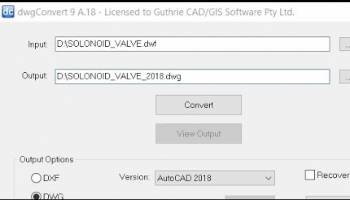
3. **User-Friendly Interface**: The software boasts an intuitive and straightforward interface, making it accessible to both seasoned professionals and newcomers. The clean layout and easy-to-navigate menus ensure that users can quickly perform conversions without a steep learning curve.
4. **Customization Options**: dwgConvert offers a range of customization options, allowing users to tailor the conversion process to their specific needs. This includes setting default output directories, choosing specific versions for conversion, and applying various filters to manage the content within the files.
5. **High-Quality Output**: Ensuring that the integrity of the original design is maintained, dwgConvert delivers high-quality output files. The software meticulously preserves all elements, including layers, line types, and annotations, ensuring that the converted files are accurate and reliable.
6. **Speed and Efficiency**: Designed with performance in mind, dwgConvert executes conversions swiftly without compromising on quality. This efficiency makes it an ideal choice for professionals who need to manage large volumes of CAD files regularly.
**Use Cases and Applications**
dwgConvert is particularly useful for firms and individuals who frequently collaborate with partners using different versions of CAD software. It is also invaluable for archival purposes, where maintaining access to older file formats is crucial. Additionally, educational institutions and training centers can benefit from its ability to provide students with files compatible with various software versions.
**Conclusion**
In the realm of CAD file management, dwgConvert by Guthrie CAD/GIS Software emerges as a powerful and reliable solution. Its extensive compatibility, batch processing capabilities, user-friendly interface, and high-quality output make it an essential tool for professionals seeking to optimize their workflow and ensure seamless file interoperability. Whether you are an architect, engineer, or designer, dwgConvert is a worthy addition to your software arsenal, promising efficiency, accuracy, and ease of use.
Guthrie CAD/GIS Software introduces dwgConvert, a robust and versatile tool designed to streamline the conversion of DWG and DXF files across various versions. Tailored for professionals in architecture, engineering, and design, dwgConvert stands out as an indispensable utility for anyone dealing with CAD files.
**Key Features and Functionality**
1. **Wide Range of Compatibility**: dwgConvert supports an extensive array of DWG and DXF file formats, from the earliest R2.5 to the latest releases. This ensures seamless interoperability between different versions of AutoCAD and other CAD software, eliminating compatibility issues that often plague project workflows.
2. **Batch Conversion**: One of the standout features of dwgConvert is its ability to handle batch conversions. Users can convert multiple files simultaneously, significantly enhancing productivity and saving valuable time. This feature is particularly beneficial for large-scale projects where numerous files need to be standardized to a specific format.
3. **User-Friendly Interface**: The software boasts an intuitive and straightforward interface, making it accessible to both seasoned professionals and newcomers. The clean layout and easy-to-navigate menus ensure that users can quickly perform conversions without a steep learning curve.
4. **Customization Options**: dwgConvert offers a range of customization options, allowing users to tailor the conversion process to their specific needs. This includes setting default output directories, choosing specific versions for conversion, and applying various filters to manage the content within the files.
5. **High-Quality Output**: Ensuring that the integrity of the original design is maintained, dwgConvert delivers high-quality output files. The software meticulously preserves all elements, including layers, line types, and annotations, ensuring that the converted files are accurate and reliable.
6. **Speed and Efficiency**: Designed with performance in mind, dwgConvert executes conversions swiftly without compromising on quality. This efficiency makes it an ideal choice for professionals who need to manage large volumes of CAD files regularly.
**Use Cases and Applications**
dwgConvert is particularly useful for firms and individuals who frequently collaborate with partners using different versions of CAD software. It is also invaluable for archival purposes, where maintaining access to older file formats is crucial. Additionally, educational institutions and training centers can benefit from its ability to provide students with files compatible with various software versions.
**Conclusion**
In the realm of CAD file management, dwgConvert by Guthrie CAD/GIS Software emerges as a powerful and reliable solution. Its extensive compatibility, batch processing capabilities, user-friendly interface, and high-quality output make it an essential tool for professionals seeking to optimize their workflow and ensure seamless file interoperability. Whether you are an architect, engineer, or designer, dwgConvert is a worthy addition to your software arsenal, promising efficiency, accuracy, and ease of use.
OS: Windows 11, Windows 10 32/64 bit, Windows Server 2012, Windows 8 32/64 bit
Add Your Review or 64-bit Compatibility Report
Top Other 64-bit downloads


Flexify 2.1.64

Flexify: A versatile tool for seamless data manipulation and integration.
Open Source


Rocrail 2026-03-15 Revision
Rocrail: Open-source model railroad control software for automation and control.
Open Source

stretchly 1.20.0
Boost productivity with Stretchly, a break reminder app for healthier work.
Open Source


WinStars 3.0.304 (2025
Explore the cosmos with WinStars, your interactive astronomy software.
Freeware

Offline Map Maker 8.381
Create detailed offline maps from online sources with ease and precision.
Demo | $79.00

Members area
Top 64-bit Downloads
-
Fitbit Connect 2.0.2.7066
x64 freeware download -
MyTourbook 64-bit 19.6.1
x64 open source download -
JAWS 64-bit 14.0.5005
x64 trialware download -
Money Manager Ex
Portable x64 1.8.0
x64 freeware download -
Moneydance x64 2017.8 (1691)
x64 trialware download -
Deeproot Plant Base X64 2.2.0
x64 shareware download -
Money Manager Ex x64 1.8.0
x64 freeware download -
Parabator 2 1.0
x64 freeware download -
Parabator 2 -
"perk" booster
mod 1.0
x64 freeware download -
Parabator 2
"perkk"
booster mod 1.0
x64 freeware download
Top Downloads
-
Netron 8.9.7
open source download -
Flexify 2.1.64
open source download -
Easy-PC 25.0.3.85
demo download -
Rocrail 2026-03-15 Revision
open source download -
stretchly 1.20.0
open source download -
fsmapper 1.6.5
open source download -
dwgConvert 2024 A.11
demo download -
Offline Map Maker 8.381
demo download -
WinStars 3.0.304 (2025
freeware download -
Anki 25.07.2
open source download -
IRIS 5.59
freeware download -
OpenComic 1.6.5
open source download -
Desktop Projector 3.4.7
freeware download -
WriteMapper 4.5.0
demo download -
CyberSky 5.1.1
shareware download