
EaseBackup - X 64-bit Download
Popular x64 Tags
- windows x64 download
- backup x64 download
- files x64 download
- data x64 download
- file backup x64 download
- file recovery x64 download
- file x64 download
- zip x64 download
- transfer x64 download
- restore x64 download
- outlook x64 download
- mail x64 download
- ftp x64 download
- office x64 download
- address x64 download
- data recovery x64 download
- backup software x64 download
- disk x64 download
- data backup x64 download
- contacts x64 download
- synchronize x64 download
- bookmarks x64 download
- storage x64 download
- save x64 download
- offsite backup x64 download
- express x64 download
- book x64 download
- outlook backup x64 download
- online backup x64 download
- remote backup x64 download
EaseBackup 8.09.R1
Sponsored links:

KieSoft


Securing the files you have on your home computer or on your workstation at the office, is a very important part of a productive and reliable working environment. According to statistics, dozens of gigabytes of data are being lost or damaged every single day.
There are thousands of possible reasons for loss of valuable information stored on your computer: accidents, virus attacks, human errors, power problems. In order to be protected from unexpected loss of important data, people backup their files. However, backup on the same hard disk does not provide the required safety - in case of disk crash all data will be lost including backup copies.
Unlike traditional backup programs, EaseBackup will maintain its own list of backed up files and every time will compare this list to all found disk files. If a Backup Set has the latest version of a file, this file won't be backed up again. This technology ensures you that all files were backed up.
It offers other advantages as well, including the ability to have multiply Backup Sets for same source files. For example: saving same files on DVD and FTP Server you will be sure that each Backup Set has all source files. That's why you can restore files from any Backup Set.
EaseBackup will backup your files, folders, registry keys and security information at any convenient time. You only need to setup the program once, and it will execute scheduled backups.
EaseBackup uses an archival method of backup that ensures backed up files are not deleted or overwritten until you specify that to happen, so they stay on your backup medium indefinitely. This is helpful if you have been working on an important document during last months and found a terrible mistake that was done a few days ago.
If you have been backing up your files every day, EaseBackup lets you to restore a good version of the file from any point of time ago. You can reduce that period by specifying how many copies of a file you want to store. This is an important benefit not found in most other backup software.
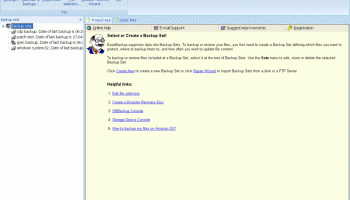
EaseBackup works with files organized in Backup Sets. You can set a number of parameters for a Backup Set: source files, backup destination, special options (compression, encryption), scheduling, etc.
The built-in powerful encryption protects your files from any outside access. External commands make a backup process flexible and powerful. Search options allow you to find and restore only necessary files!
There are thousands of possible reasons for loss of valuable information stored on your computer: accidents, virus attacks, human errors, power problems. In order to be protected from unexpected loss of important data, people backup their files. However, backup on the same hard disk does not provide the required safety - in case of disk crash all data will be lost including backup copies.
Unlike traditional backup programs, EaseBackup will maintain its own list of backed up files and every time will compare this list to all found disk files. If a Backup Set has the latest version of a file, this file won't be backed up again. This technology ensures you that all files were backed up.
It offers other advantages as well, including the ability to have multiply Backup Sets for same source files. For example: saving same files on DVD and FTP Server you will be sure that each Backup Set has all source files. That's why you can restore files from any Backup Set.
EaseBackup will backup your files, folders, registry keys and security information at any convenient time. You only need to setup the program once, and it will execute scheduled backups.
EaseBackup uses an archival method of backup that ensures backed up files are not deleted or overwritten until you specify that to happen, so they stay on your backup medium indefinitely. This is helpful if you have been working on an important document during last months and found a terrible mistake that was done a few days ago.
If you have been backing up your files every day, EaseBackup lets you to restore a good version of the file from any point of time ago. You can reduce that period by specifying how many copies of a file you want to store. This is an important benefit not found in most other backup software.
EaseBackup works with files organized in Backup Sets. You can set a number of parameters for a Backup Set: source files, backup destination, special options (compression, encryption), scheduling, etc.
The built-in powerful encryption protects your files from any outside access. External commands make a backup process flexible and powerful. Search options allow you to find and restore only necessary files!
OS: Windows 2000, Windows 2003, Windows XP, Windows Vista, Windows Vista x64, Windows 7, Windows 7 x64

Add Your Review or 64-bit Compatibility Report
Top Backup & Restore 64-bit downloads


AnyMP4 Data Recovery 1.5.12
Recover or rescue data from computer, flash media drive and other devices
Shareware | $24.50

PCtransfer 1.0.0.1033
the best free, secure and portable transfer assistant for Windows XP/Vista/7/8
Freeware

Software to Data Recovery 5.8.4.1
Download Software to Data Recovery for instant salvage of lost memorable snaps
Shareware | $79.00

EaseUS Key Finder 4.1.6 Build 20240910
Effortlessly recover lost product keys for software and operating systems.
Demo


GRBackPro Server Backup x64 11.2.0
Server Backup Software, fast data back-up for Windows Server 2022/2019/2016/2012/2008 x64
Shareware | $199.00

QuickMirror 1.71
QuickMirror provides quick updating of backups, synchronization, and mirroring.
Shareware | $25.00

Free Android Mobile Manager for Windows 1.0.4
The free software to sync android mobile's data while android connected with PC.
Freeware

Backup4all Monitor 1.2.292
Realtime and historical monitoring for Backup4all backups and other actions.
Shareware | $4.99

Wondershare Recoverit 14.0.21
Wondershare Recoverit: Reliable data recovery for lost or deleted files.
Demo | $64.99
Members area
Top 64-bit Downloads
-
HWiNFO64 6.28 B4200
x64 freeware download -
Windows 7 x64
x64 trialware download -
GRBackPro Server Backup
x64 11.2.0
x64 shareware download -
XtraTools Professional
x64 26.2.1
x64 shareware download -
EasyTune6 B24.0119.1
x64 freeware download -
BusDog x64 0.2
x64 freeware download -
PhotoRenamer 4.1
x64 freeware download -
Laplink DiskImage
Professional x64 10.0.71
x64 trialware download -
CIB pdf brewer 4.20.0
x64 freeware download -
Windows 10 x64 22H2
x64 trialware download
Top Downloads
-
FreeCommander XE
Portable 2026 Build 941
freeware download -
FMDiff 4.0.5
demo download -
Open Files from XLSX to
XLS 5.2
shareware download -
FURY CTRL 2.0.65.0
freeware download -
Shell Tools 2.0.1
freeware download -
Vim 9.2.0219
open source download -
AnyMP4 Data Recovery 1.5.12
shareware download -
PCtransfer 1.0.0.1033
freeware download -
Software to Data
Recovery 5.8.4.1
shareware download -
EaseUS Key Finder 4.1.6 Build 20240910
demo download -
Music Collection 3.9.7.1
freeware download -
WinFindr 1.8
shareware download -
File Compression 1.0
commercial download -
windows_exporter 0.31.5
open source download -
Caffeine 1.98
freeware download