
EclEmma - X 64-bit Download
Popular x64 Tags
- windows x64 download
- tool x64 download
- software x64 download
- view x64 download
- editor x64 download
- python x64 download
- xml x64 download
- sql x64 download
- dll x64 download
- resource x64 download
- compare x64 download
- csv x64 download
- dotnet x64 download
- uml x64 download
- table x64 download
- delphi x64 download
- xls x64 download
- perl x64 download
- html x64 download
- diff x64 download
- database x64 download
- query x64 download
- convert x64 download
- sql tools x64 download
- ide x64 download
- sql tool x64 download
- activestate x64 download
- doc x64 download
- txt x64 download
- mssql x64 download
EclEmma 3.1.11
Sponsored links:
license: Open Source
downloads: 439
size: 1.40 MB
updated: 2025-12-17
tags: EclEmma, download EclEmma, EclEmma free download, code covarage, Eclipse plugin, development tool, covarage, code, source code, develop
Add to Basket

Marc R. Hoffmann

EclEmma, developed by Marc R. Hoffmann, is a robust and intuitive Java code coverage tool that seamlessly integrates with the Eclipse IDE. Designed to enhance the development process, EclEmma provides developers with a comprehensive view of their code's test coverage, ensuring that every line of code is accounted for and thoroughly tested.
One of the standout features of EclEmma is its real-time feedback mechanism. As developers write and test their code, EclEmma dynamically updates coverage reports, allowing for immediate insights into which parts of the codebase are adequately tested and which are not. This feature is particularly valuable in agile development environments where rapid iteration and continuous integration are key.
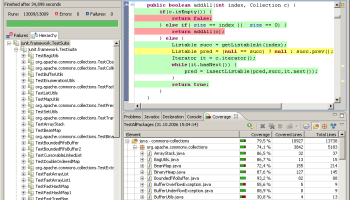
EclEmma's user interface is both sleek and functional, offering a range of visual indicators to represent coverage data. It highlights covered and uncovered lines directly within the code editor, using intuitive color-coding that makes it easy to identify areas that require more testing. This visual approach not only aids in quick comprehension but also enhances productivity by reducing the time spent navigating through complex reports.
Another significant advantage of EclEmma is its ease of use. Installation is straightforward, and its integration with Eclipse is seamless, requiring minimal configuration. This makes it an ideal choice for developers who are looking for a hassle-free solution to incorporate code coverage analysis into their workflow. Additionally, EclEmma supports a variety of coverage metrics, including line coverage, method coverage, and block coverage, providing a holistic view of code quality.
EclEmma is also highly efficient, with minimal performance overhead. This ensures that developers can run coverage analysis frequently without impacting the overall performance of their development environment. Moreover, EclEmma is open-source, which means it benefits from community contributions and continuous improvements, ensuring it remains up-to-date with the latest advancements in software development practices.
In summary, EclEmma by Marc R. Hoffmann is an indispensable tool for Java developers who prioritize code quality and test coverage. Its seamless integration with Eclipse, real-time feedback, and user-friendly interface make it a top choice for both individual developers and teams aiming to maintain high standards in their software projects. Whether you are a seasoned developer or just starting your journey in Java development, EclEmma offers the tools and insights needed to ensure your code is robust, reliable, and ready for deployment.
One of the standout features of EclEmma is its real-time feedback mechanism. As developers write and test their code, EclEmma dynamically updates coverage reports, allowing for immediate insights into which parts of the codebase are adequately tested and which are not. This feature is particularly valuable in agile development environments where rapid iteration and continuous integration are key.
EclEmma's user interface is both sleek and functional, offering a range of visual indicators to represent coverage data. It highlights covered and uncovered lines directly within the code editor, using intuitive color-coding that makes it easy to identify areas that require more testing. This visual approach not only aids in quick comprehension but also enhances productivity by reducing the time spent navigating through complex reports.
Another significant advantage of EclEmma is its ease of use. Installation is straightforward, and its integration with Eclipse is seamless, requiring minimal configuration. This makes it an ideal choice for developers who are looking for a hassle-free solution to incorporate code coverage analysis into their workflow. Additionally, EclEmma supports a variety of coverage metrics, including line coverage, method coverage, and block coverage, providing a holistic view of code quality.
EclEmma is also highly efficient, with minimal performance overhead. This ensures that developers can run coverage analysis frequently without impacting the overall performance of their development environment. Moreover, EclEmma is open-source, which means it benefits from community contributions and continuous improvements, ensuring it remains up-to-date with the latest advancements in software development practices.
In summary, EclEmma by Marc R. Hoffmann is an indispensable tool for Java developers who prioritize code quality and test coverage. Its seamless integration with Eclipse, real-time feedback, and user-friendly interface make it a top choice for both individual developers and teams aiming to maintain high standards in their software projects. Whether you are a seasoned developer or just starting your journey in Java development, EclEmma offers the tools and insights needed to ensure your code is robust, reliable, and ready for deployment.
OS: Windows 11, Windows 10 32/64 bit, Windows 8 32/64 bit, Windows 7 32/64 bit
Add Your Review or 64-bit Compatibility Report
Top Other 64-bit downloads


Android Studio 2025.3.1 Panda 1
Android Studio: Powerful IDE for Android app development with robust tools.
Freeware

Android NDK x64 Revision 26d
Lets you build performance-critical portions of your apps in native code
Freeware


JProfiler 15.0.4
JProfiler is a powerful Java profiler for performance tuning and memory analysis.
Trialware | $549.00

Docker 4.62.0

Streamline your development with Docker: portable, efficient containerization.
Shareware | $11.00


Flyff 2.4.9
Vagrant simplifies environment setup for developers with portable, reproducible workflows.
Open Source
Members area
Top 64-bit Downloads
-
Android NDK x64 Revision 26d
x64 freeware download -
PilotEdit Pro x64 20.6.0
x64 shareware download -
Scanner Pro SDK ActiveX
x64 1.0
x64 shareware download -
install4j x64 10.0.6
x64 trialware download -
dirtyJOE x64 1.7 (c529)
x64 freeware download -
MADARA for Windows x64
bit 3.0.0
x64 open source download -
Racket 64bit 8.13
x64 freeware download -
psutil for Windows Vista
(x64 bit) 5.6.5
x64 open source download -
Java Service Wrapper
Professional Edition x64 3.5.25
x64 shareware download -
OraBone x64 8.5.0
x64 freeware download
Top Downloads
-
NASM 2.16.01
open source download -
VMProtect Ultimate 2.13.2
demo download -
Devart UniDAC 11.0.0
shareware download -
Precision Language Suite 2.5
freeware download -
Android Studio 2025.3.1 Panda 1
freeware download -
Zlib 1.3.1
freeware download -
OllyDbg 2.01
freeware download -
Android NDK x64 Revision 26d
freeware download -
PyScripter Portable 4.3.4
open source download -
PHP 8.5.3
open source download -
Devart ODAC 14.0.0
shareware download -
TMS FNC UI Pack 1.0.0.0
shareware download -
.NET FTP Library 8.05
shareware download -
Help+Manual 10.1.0
shareware download -
JProfiler 15.0.4
trialware download