
Extraterm - X 64-bit Download
Popular x64 Tags
- cpu x64 download
- performance x64 download
- windows x64 download
- driver updates x64 download
- driver update x64 download
- cleaner x64 download
- defrag x64 download
- system x64 download
- drivers update x64 download
- tune x64 download
- tweak x64 download
- registry cleaner x64 download
- security x64 download
- video driver update x64 download
- optimizer x64 download
- registry x64 download
- uninstall x64 download
- speed x64 download
- boost x64 download
- faster x64 download
- system utilities x64 download
- utility x64 download
- optimize x64 download
- driver update software x64 download
- startup x64 download
- disk cleaner x64 download
- clean disk x64 download
- clean x64 download
- vista x64 download
- disk x64 download
Extraterm 0.81.3
Sponsored links:
license: Open Source
downloads: 46
size: 38.10 MB
updated: 2025-07-03
tags: Extraterm, download Extraterm, Extraterm free download, console GUI, console emulator, terminal emulator, emulator, emulate, console, terminal
Add to Basket

Simon Edwards

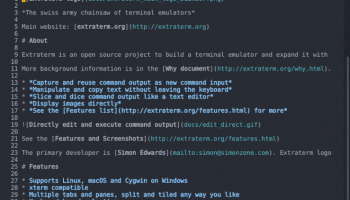
Extraterm, developed by Simon Edwards, is a versatile and innovative terminal emulator that redefines the command-line experience for developers and system administrators. This software stands out with its unique blend of traditional terminal functionalities and modern user interface enhancements, making it a powerful tool for both novice and seasoned users.
At its core, Extraterm offers a robust terminal environment that supports a wide range of shells and command-line tools. However, what truly sets it apart is its rich feature set designed to enhance productivity and streamline workflows. One of the standout features is the ability to split the terminal into multiple panes, allowing users to run and monitor several sessions simultaneously. This is particularly useful for multitasking and managing complex tasks without the need to switch between different terminal windows.
Extraterm also introduces a novel approach to command output management. Users can scroll through command outputs independently of the main terminal scrollback, making it easier to review and analyze results without losing track of ongoing processes. Additionally, the software supports inline images and rich text, enabling users to embed visual data directly within the terminal. This feature is invaluable for tasks that involve graphical outputs, such as data analysis and debugging.
Another noteworthy aspect of Extraterm is its integration with modern development tools. It supports a variety of extensions and plugins, allowing users to customize their terminal environment to suit their specific needs. Whether it's integrating with version control systems, enhancing syntax highlighting, or adding custom commands, Extraterm provides a flexible platform for extending functionality.
The user interface of Extraterm is both intuitive and visually appealing. It offers a clean and organized layout, with customizable themes that cater to different aesthetic preferences and accessibility needs. The software also includes a command palette, which provides quick access to a wide range of functions and settings, further enhancing the user experience.
Performance-wise, Extraterm is highly responsive and efficient, handling large volumes of data and complex operations with ease. It is built on a solid foundation, ensuring stability and reliability even under demanding conditions. The software is cross-platform, supporting major operating systems such as Windows, macOS, and Linux, making it a versatile choice for diverse development environments.
In summary, Extraterm by Simon Edwards is a forward-thinking terminal emulator that combines the best of traditional command-line tools with modern enhancements. Its rich feature set, extensibility, and user-friendly interface make it an excellent choice for anyone looking to elevate their terminal experience. Whether you're a developer, system administrator, or power user, Extraterm offers the tools and flexibility to boost your productivity and streamline your workflows.
At its core, Extraterm offers a robust terminal environment that supports a wide range of shells and command-line tools. However, what truly sets it apart is its rich feature set designed to enhance productivity and streamline workflows. One of the standout features is the ability to split the terminal into multiple panes, allowing users to run and monitor several sessions simultaneously. This is particularly useful for multitasking and managing complex tasks without the need to switch between different terminal windows.
Extraterm also introduces a novel approach to command output management. Users can scroll through command outputs independently of the main terminal scrollback, making it easier to review and analyze results without losing track of ongoing processes. Additionally, the software supports inline images and rich text, enabling users to embed visual data directly within the terminal. This feature is invaluable for tasks that involve graphical outputs, such as data analysis and debugging.
Another noteworthy aspect of Extraterm is its integration with modern development tools. It supports a variety of extensions and plugins, allowing users to customize their terminal environment to suit their specific needs. Whether it's integrating with version control systems, enhancing syntax highlighting, or adding custom commands, Extraterm provides a flexible platform for extending functionality.
The user interface of Extraterm is both intuitive and visually appealing. It offers a clean and organized layout, with customizable themes that cater to different aesthetic preferences and accessibility needs. The software also includes a command palette, which provides quick access to a wide range of functions and settings, further enhancing the user experience.
Performance-wise, Extraterm is highly responsive and efficient, handling large volumes of data and complex operations with ease. It is built on a solid foundation, ensuring stability and reliability even under demanding conditions. The software is cross-platform, supporting major operating systems such as Windows, macOS, and Linux, making it a versatile choice for diverse development environments.
In summary, Extraterm by Simon Edwards is a forward-thinking terminal emulator that combines the best of traditional command-line tools with modern enhancements. Its rich feature set, extensibility, and user-friendly interface make it an excellent choice for anyone looking to elevate their terminal experience. Whether you're a developer, system administrator, or power user, Extraterm offers the tools and flexibility to boost your productivity and streamline your workflows.
OS: Windows 11, Windows 10 32/64 bit
Add Your Review or 64-bit Compatibility Report
Top System Maintenance 64-bit downloads


windows_exporter 0.31.5
Lightweight tool for exporting Windows metrics to Prometheus for monitoring.
Open Source

Windows 7 Service Pack 1 7601.17514.1011
SP1 - all previously publicly released updates for Windows 7 and Server 2008 R2
Freeware

WinToUSB 10.5 Build January 2
Easily create bootable USB drives from Windows installations with WinToUSB.
Shareware | $29.95

Microsoft Edge WebView2 Runtime 146.0.3856.78

WebView2 Runtime: Embed web content in apps with Edge's rendering engine.
Freeware

XtraTools Professional x64 26.2.1
XtraTools increases productivity and makes working with MS Windows easier.
Shareware | $29.99

TopNotify 3.1.1
TopNotify: Real-time notifications and alerts for seamless communication.
Open Source

Fortect 7.3.5.0
Fortect repairs and optimizes your PC, enhancing performance effortlessly.
Trialware | $30.95


Members area
Top 64-bit Downloads
-
HWiNFO64 6.28 B4200
x64 freeware download -
Windows 7 x64
x64 trialware download -
GRBackPro Server Backup
x64 11.2.0
x64 shareware download -
Windows 10 x64 22H2
x64 trialware download -
EasyTune6 B24.0119.1
x64 freeware download -
XtraTools Professional
x64 26.2.1
x64 shareware download -
O&O MediaRecovery
64-bit 14.0.17
x64 demo download -
DAR 2.7.14
x64 open source download -
BusDog x64 0.2
x64 freeware download -
PhotoRenamer 4.1
x64 freeware download
Top Downloads
-
FreeCommander XE
Portable 2026 Build 941
freeware download -
FURY CTRL 2.0.65.0
freeware download -
FMDiff 4.0.5
demo download -
Open Files from XLSX to
XLS 5.2
shareware download -
Vim 9.2.0261
open source download -
Shell Tools 2.0.1
freeware download -
HWiNFO64 6.28 B4200
freeware download -
Pitara 5.0.9582.21949
open source download -
iSunshare iBypass Genius 3.1.2.1
shareware download -
AnyMP4 Data Recovery 1.5.12
shareware download -
PCtransfer 1.0.0.1033
freeware download -
Software to Data
Recovery 5.8.4.1
shareware download -
EaseUS Key Finder 4.1.6 Build 20240910
demo download -
Music Collection 3.9.7.2
freeware download -
WinFindr 1.9
shareware download