
Faronics Core - X 64-bit Download
Popular x64 Tags
- internet x64 download
- delete x64 download
- cookies x64 download
- password x64 download
- lock x64 download
- hide x64 download
- keylogger x64 download
- shredder x64 download
- history x64 download
- wipe x64 download
- security x64 download
- clean x64 download
- cache x64 download
- files x64 download
- protect x64 download
- data x64 download
- erase x64 download
- secure x64 download
- lost password x64 download
- software x64 download
- utility x64 download
- file x64 download
- privacy x64 download
- recovery x64 download
- forgotten password x64 download
- shred x64 download
- erase history x64 download
- remove x64 download
- registry repair programs x64 download
- evidence x64 download
Faronics Core 4.11.2100.4008
Sponsored links:

Faronics

Faronics Core is a multi-tool for IT professionals. It’s a simple remote management tool that makes it easy to centrally manage your endpoints. Equipped with enterprise-level deployment and management capabilities that can be customized for your organization, Faronics Core will save you time and money. It’s hard to believe, but Faronics Core comes with all Faronics enterprise solutions – free of charge.
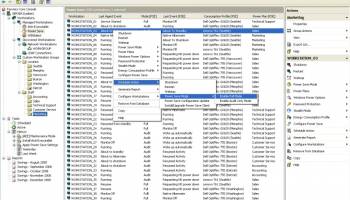
With a large number of workstations to administer, you can appreciate the simplicity of managing multiple solutions through a single pane of glass. All workstation information such as name, online status, operating system, and more is easily visible from the Core Console. For even easier management, you can create custom workgroups to organize workstations in a way that makes sense to you. Faronics Core can host multiple product loadins at the same time to help you realize the value of your Faronics software investments faster.
Features and specifications:
* Windows updates are even easier to manage with Faronics Core. Using the MS WSUS™ you can pull updates for your endpoints and automate them with the handy scheduling function. For efficiency, you can also wake-up endpoints locally to grab the critical security patches and install them directly. Managing laptops? We’ve got you covered. The Active Task feature ensures IT tasks and configuration changes are applied even when not connected to the network. Once laptops come online, the changes are applied within two hours.
* Install with confidence across your entire organization. Using Faronics Core you can easily perform software deployments with a few clicks of a mouse. Or you can schedule them to occur automatically after hours. Simply set in and forget it. Plus, you’re not limited to only managing Faronics solutions. You can also install third party products, update Windows and execute your own custom configuration scripts.
* Faronics Deep Freeze integration allows you to make configuration changes to your Faronics software even while workstations are Frozen with Faronics Core. It also integrates with other Faronics software solutions so that you can manage them all from a single pane of glass, including Faronics Anti-Virus, Faronics Anti-Executable, Faronics Power Save, Faronics WINSelect, and Faronics System Profiler.
New Features:
* Support for Windows 8.
* Support for Windows Server 2012.
* Important information alerts for Faronics products visible through the Core Console. Optionally, all alerts can be sent to any email address via SMTP.
* Access to additional workstation information. IT Administrator can tell what Server operating system is on the workstation, the workstation type, what user id currently logged in and the workstation’s last login date.
* New workstation window that displays history of tasks that ran and are being run on the workstation
* Attach a custom note to a workstation for both searching purposes and displaying pertinent information
* Administrators can now change Faronics Core Agent passwords on many workstations.
* Remote Launch can now deliver Visual Basic and PowerShell scripts to workstations.
* Remote Launch can now run scripting files (VBS, PS1 and BAT) on Frozen workstations.
* Faronics Core is now available in Portuguese (Brazilian)
With a large number of workstations to administer, you can appreciate the simplicity of managing multiple solutions through a single pane of glass. All workstation information such as name, online status, operating system, and more is easily visible from the Core Console. For even easier management, you can create custom workgroups to organize workstations in a way that makes sense to you. Faronics Core can host multiple product loadins at the same time to help you realize the value of your Faronics software investments faster.
Features and specifications:
* Windows updates are even easier to manage with Faronics Core. Using the MS WSUS™ you can pull updates for your endpoints and automate them with the handy scheduling function. For efficiency, you can also wake-up endpoints locally to grab the critical security patches and install them directly. Managing laptops? We’ve got you covered. The Active Task feature ensures IT tasks and configuration changes are applied even when not connected to the network. Once laptops come online, the changes are applied within two hours.
* Install with confidence across your entire organization. Using Faronics Core you can easily perform software deployments with a few clicks of a mouse. Or you can schedule them to occur automatically after hours. Simply set in and forget it. Plus, you’re not limited to only managing Faronics solutions. You can also install third party products, update Windows and execute your own custom configuration scripts.
* Faronics Deep Freeze integration allows you to make configuration changes to your Faronics software even while workstations are Frozen with Faronics Core. It also integrates with other Faronics software solutions so that you can manage them all from a single pane of glass, including Faronics Anti-Virus, Faronics Anti-Executable, Faronics Power Save, Faronics WINSelect, and Faronics System Profiler.
New Features:
* Support for Windows 8.
* Support for Windows Server 2012.
* Important information alerts for Faronics products visible through the Core Console. Optionally, all alerts can be sent to any email address via SMTP.
* Access to additional workstation information. IT Administrator can tell what Server operating system is on the workstation, the workstation type, what user id currently logged in and the workstation’s last login date.
* New workstation window that displays history of tasks that ran and are being run on the workstation
* Attach a custom note to a workstation for both searching purposes and displaying pertinent information
* Administrators can now change Faronics Core Agent passwords on many workstations.
* Remote Launch can now deliver Visual Basic and PowerShell scripts to workstations.
* Remote Launch can now run scripting files (VBS, PS1 and BAT) on Frozen workstations.
* Faronics Core is now available in Portuguese (Brazilian)
OS: Windows XP, Windows Vista, Windows Vista x64, Windows 7, Windows 7 x64, Windows 8, Windows 8 x64, Windows 10, Windows 10 x64
Add Your Review or 64-bit Compatibility Report
Top Other 64-bit downloads


Windows Defender Definition Updates March 30, 2026

Essential security updates for Windows Defender.
Freeware


2FAGuard 1.7.2
Secure your accounts effortlessly with 2FAGuard's intuitive two-factor authentication.
Open Source

IPVanish 4.3.9.1
Secure and fast VPN service with user-friendly interface and robust features.
Shareware


Process Magic 2.0
Command-line Tool to Hide any Windows Process or Launch New Process in Invisible
Freeware
Members area
Top 64-bit Downloads
-
OpenVPN x64 2.6.11
x64 open source download -
VSCryptoHash 64-bit 2.5.3.509
x64 freeware download -
Prevent Restore 119.00
x64 freeware download -
Secret Disk 321.00
x64 freeware download -
O&O SafeErase Server
x64 18.4.611
x64 trialware download -
Wipe 2603.00
x64 freeware download -
Microsoft Standalone
System Sweeper (x64 bit) 1.0.856.0 Beta
x64 freeware download -
Hash Suite 4.0
x64 shareware download -
Romaco Timeout x64 3.1.4.0
x64 freeware download -
Trend Micro Internet
Security Pro 2010 (x64
bit)
x64 trialware download
Top Downloads
-
OpenVPN x64 2.6.11
open source download -
Aiseesoft Android
Unlocker 1.1.16
shareware download -
CmosPwd 5.0
freeware download -
ClamWin Portable 0.103.2.1
open source download -
NordVPN 7.56.2.0
demo download -
SymlexVPN 3.1.7
shareware download -
Video Padlock 1.20
demo download -
Portable SafeInCloud 24.14.1
freeware download -
OSV-Scanner 2.3.5
open source download -
WebPost Tools 1.0.0.412
freeware download -
CRYPTO! Build 9695
freeware download -
GhostVolt 1.3.3.0
demo download -
abylon KEYSAFE 23.60.1
shareware download -
Windows Defender
Definition Updates March 30, 2026
freeware download -
Portmaster 2.1.12
open source download