
Fastfetch - X 64-bit Download
Popular x64 Tags
- cpu x64 download
- performance x64 download
- windows x64 download
- driver updates x64 download
- driver update x64 download
- cleaner x64 download
- defrag x64 download
- system x64 download
- drivers update x64 download
- tune x64 download
- tweak x64 download
- registry cleaner x64 download
- security x64 download
- video driver update x64 download
- optimizer x64 download
- registry x64 download
- uninstall x64 download
- speed x64 download
- boost x64 download
- faster x64 download
- system utilities x64 download
- utility x64 download
- optimize x64 download
- driver update software x64 download
- startup x64 download
- disk cleaner x64 download
- clean disk x64 download
- clean x64 download
- vista x64 download
- disk x64 download
Fastfetch 2.60.0
Sponsored links:
license: Open Source
downloads: 64
size: 4.50 MB
updated: 2026-03-07
tags: Fastfetch, download Fastfetch, Fastfetch free download, System Information, Neofetch Tool, Command Line Specs, system, information, specs, Neofetch
Add to Basket

Linus Dierheimer

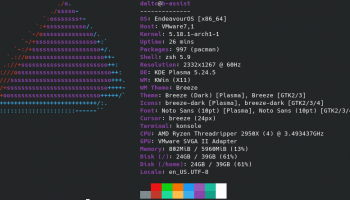
Fastfetch, developed by Linus Dierheimer, is a high-performance, feature-rich system information tool designed for Linux enthusiasts and professionals alike. This software stands out as a modern, efficient alternative to the popular Neofetch, offering a streamlined and highly customizable experience for users who need detailed insights into their system's specifications.
At its core, Fastfetch excels in delivering rapid and accurate system information. It leverages optimized code and parallel processing to ensure that data retrieval is not only swift but also minimally invasive on system resources. This makes it an ideal choice for users who require real-time system diagnostics without compromising performance.
One of the most compelling features of Fastfetch is its extensive customization options. Users can tailor the output to their specific needs, choosing from a wide array of modules that display information such as CPU details, GPU specifications, memory usage, disk space, and more. The software supports a variety of output formats, including plain text, JSON, and XML, making it versatile for different use cases, from simple terminal displays to integration with other tools and scripts.
Fastfetch also boasts a sleek, modern aesthetic. The default configuration presents information in a clean, organized manner, with support for ASCII art logos of various Linux distributions, adding a touch of personalization and flair to the system information display. This visual appeal, combined with its functional prowess, makes Fastfetch a favorite among users who appreciate both form and function.
Moreover, Fastfetch is designed with extensibility in mind. The software is open-source, allowing developers to contribute to its ongoing improvement and adapt it to their unique requirements. This community-driven approach ensures that Fastfetch remains at the cutting edge of system information tools, continually evolving to meet the needs of its user base.
In summary, Fastfetch by Linus Dierheimer is a robust, efficient, and highly customizable system information tool that caters to the needs of Linux users who demand both speed and precision. Its combination of rapid data retrieval, extensive customization options, and modern visual presentation makes it a standout choice for anyone looking to gain deeper insights into their system's performance and specifications. Whether you're a seasoned sysadmin, a developer, or a casual user, Fastfetch offers a powerful solution to keep you informed about your Linux environment.
At its core, Fastfetch excels in delivering rapid and accurate system information. It leverages optimized code and parallel processing to ensure that data retrieval is not only swift but also minimally invasive on system resources. This makes it an ideal choice for users who require real-time system diagnostics without compromising performance.
One of the most compelling features of Fastfetch is its extensive customization options. Users can tailor the output to their specific needs, choosing from a wide array of modules that display information such as CPU details, GPU specifications, memory usage, disk space, and more. The software supports a variety of output formats, including plain text, JSON, and XML, making it versatile for different use cases, from simple terminal displays to integration with other tools and scripts.
Fastfetch also boasts a sleek, modern aesthetic. The default configuration presents information in a clean, organized manner, with support for ASCII art logos of various Linux distributions, adding a touch of personalization and flair to the system information display. This visual appeal, combined with its functional prowess, makes Fastfetch a favorite among users who appreciate both form and function.
Moreover, Fastfetch is designed with extensibility in mind. The software is open-source, allowing developers to contribute to its ongoing improvement and adapt it to their unique requirements. This community-driven approach ensures that Fastfetch remains at the cutting edge of system information tools, continually evolving to meet the needs of its user base.
In summary, Fastfetch by Linus Dierheimer is a robust, efficient, and highly customizable system information tool that caters to the needs of Linux users who demand both speed and precision. Its combination of rapid data retrieval, extensive customization options, and modern visual presentation makes it a standout choice for anyone looking to gain deeper insights into their system's performance and specifications. Whether you're a seasoned sysadmin, a developer, or a casual user, Fastfetch offers a powerful solution to keep you informed about your Linux environment.
OS: Windows Server 2025, Windows 11, Windows Server 2022, Windows Server 2019, Windows Server 2016, Windows 10 32/64 bit, Windows Server 2012, Windows 8 32/64 bit, Windows 7 32/64 bit
Add Your Review or 64-bit Compatibility Report
Top System Maintenance 64-bit downloads


WinToUSB 10.5 Build January 2
Easily create bootable USB drives from Windows installations with WinToUSB.
Shareware | $29.95


Windows 7 Service Pack 1 7601.17514.1011
SP1 - all previously publicly released updates for Windows 7 and Server 2008 R2
Freeware


XtraTools Professional x64 26.2.1
XtraTools increases productivity and makes working with MS Windows easier.
Shareware | $29.99

FanControl v262

FanControl: Advanced PC fan management for optimal cooling and performance.
Open Source

SoftPerfect Cache Relocator 1.8
Effortlessly manage and relocate your browser cache for optimal performance.
Freeware

TopNotify 3.1.1
TopNotify: Real-time notifications and alerts for seamless communication.
Open Source

Absolute Uninstaller 6.0.1.20
Effortlessly remove unwanted programs and clean up your system with ease.
Freeware
Members area
Top 64-bit Downloads
-
EasyTune6 B24.0119.1
x64 freeware download -
HWMonitor (64-bit) 1.53
x64 freeware download -
7z SFX Builder x64 2.1
x64 freeware download -
PhotoRenamer 4.1
x64 freeware download -
XtraTools Professional
x64 26.2.1
x64 shareware download -
Windows 7 x64
x64 trialware download -
Disk Pulse Pro x64 16.1.28
x64 trialware download -
HWiNFO64 6.28 B4200
x64 freeware download -
PKZIP 64-bit 14.40.0028
x64 trialware download -
CIB pdf brewer 4.20.0
x64 freeware download
Top Downloads
-
Open Files from XLSX to
XLS 5.2
shareware download -
AnyMP4 Data Recovery 1.5.12
shareware download -
EaseUS Key Finder 4.1.6 Build 20240910
demo download -
Office 365 Backup 3.0
shareware download -
DRevitalize 4.10
demo download -
Cursor 0.45.12
demo download -
WriterClassic 10.8.0
open source download -
Caffeine 1.98
freeware download -
FMDiff 4.0.5
demo download -
SyncBreeze 17.8.26
freeware download -
GoodSync 12.9.26
freeware download -
Pitara 4.0.9565.41082
open source download -
AnyMP4 DVD Creator 7.3.28
trialware download -
Nomad.NET 3.2.0.2890
freeware download -
WinFR 5.60 S Build 2031
trialware download