
Finale NotePad - X 64-bit Download
Popular x64 Tags
- ipod x64 download
- video x64 download
- avi x64 download
- software x64 download
- internet tv x64 download
- music organizer x64 download
- music x64 download
- audio x64 download
- codecs x64 download
- wma x64 download
- zip x64 download
- mpeg x64 download
- mp3 x64 download
- itunes x64 download
- organize music files x64 download
- file x64 download
- music file organizer x64 download
- fft x64 download
- organize x64 download
- music organizer download x64 download
- organizer x64 download
- music organizer software x64 download
- mp3 organizer x64 download
- tag x64 download
- files x64 download
- lite x64 download
- ogg x64 download
- album x64 download
- rename x64 download
- sort x64 download
Finale NotePad 2012.r1
Sponsored links:

Coda Music Technology

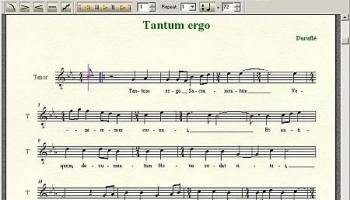
Finale NotePad is a wonderful music notation software for beginning musicians. Finale NotePad is a professional and avdvanced application designed to enable you to compose your own music. Find out how fun and easy it is to transform musical ideas into beautifully printed music.
Finale NotePad is your introduction to the world of music notation software! Find out how fun and easy it is to transform musical ideas into beautifully printed music by downloading NotePad 2011 today.
FEATURES:
Entering Notes :
· Enter notes with your computer keyboard and/or mouse and hear their pitches. Click notes onto the staff or enter notes with the numeric pad and keys ‘A’ ‘B’ ‘C’ ‘D’ ‘E’ ‘F’ and ‘G.’ Drag notes up and down to find the pitches you want.
· Input notes in step time using your MIDI keyboard (or any other MIDI device). Use your MIDI keyboard in combination with your computer keyboard and mouse to enter notes and chords.
· Import Format 1 MIDI files.
· Import Finale NotePad and other Finale family notation files (Finale, Finale PrintMusic, and Finale SongWriter).
· Import MusicXML 2.0 files – Unlike MIDI files, MusicXML allows you to transfer the sounds and graphical elements in your file to other applications including older versions of NotePad.
Adding Markings, Lyrics, and More:
· Enter a lyric verse and NotePad automatically spaces the lyrics under the notes with publisher-quality precision. Lyrics instantly appear exactly as they’ll print out.
Percussion Notation:
· Easy to enter - Simply drag the cursor over the staff and on-screen feedback indicates whether you’re about to enter a snare, bass drum, or other percussion instrument - and displays the appropriate notehead.
· Automatic playback configuration - your snare will playback with a snare sound - and so forth - without any manual intervention.
Guitar and Bass Tablature:
· Easily create and edit Guitar and Electric Bass tablature (standard tuning only)
Dynamics and Tempo Markings:
· Adding dynamics and tempo markings is quick and easy, and all items look great, are automatically positioned, and change playback appropriately. You can move them by dragging them anywhere in your score. You can also quickly change existing dynamics and tempo markings while retaining positioning. Just double-click the expression handle and select another expression from the selection grid.
Hearing Your Music:
· Human Playback and over 128 sounds
· The Human Playback feature will play your music as you would want it to be performed, even if you enter notes with your computer keyboard or mouse.
Sharing Your Music:
· Print professional-quality sheet music.
· Export MIDI or MusicXML files. Unlike MIDI files, MusicXML allows you to transfer the sounds and graphical elements in your file to other applications including older versions of Finale or Finale NotePad.
· Share your NotePad files with anyone who downloads the free Finale Reader to view, print, and play your music.
Finale NotePad is your introduction to the world of music notation software! Find out how fun and easy it is to transform musical ideas into beautifully printed music by downloading NotePad 2011 today.
FEATURES:
Entering Notes :
· Enter notes with your computer keyboard and/or mouse and hear their pitches. Click notes onto the staff or enter notes with the numeric pad and keys ‘A’ ‘B’ ‘C’ ‘D’ ‘E’ ‘F’ and ‘G.’ Drag notes up and down to find the pitches you want.
· Input notes in step time using your MIDI keyboard (or any other MIDI device). Use your MIDI keyboard in combination with your computer keyboard and mouse to enter notes and chords.
· Import Format 1 MIDI files.
· Import Finale NotePad and other Finale family notation files (Finale, Finale PrintMusic, and Finale SongWriter).
· Import MusicXML 2.0 files – Unlike MIDI files, MusicXML allows you to transfer the sounds and graphical elements in your file to other applications including older versions of NotePad.
Adding Markings, Lyrics, and More:
· Enter a lyric verse and NotePad automatically spaces the lyrics under the notes with publisher-quality precision. Lyrics instantly appear exactly as they’ll print out.
Percussion Notation:
· Easy to enter - Simply drag the cursor over the staff and on-screen feedback indicates whether you’re about to enter a snare, bass drum, or other percussion instrument - and displays the appropriate notehead.
· Automatic playback configuration - your snare will playback with a snare sound - and so forth - without any manual intervention.
Guitar and Bass Tablature:
· Easily create and edit Guitar and Electric Bass tablature (standard tuning only)
Dynamics and Tempo Markings:
· Adding dynamics and tempo markings is quick and easy, and all items look great, are automatically positioned, and change playback appropriately. You can move them by dragging them anywhere in your score. You can also quickly change existing dynamics and tempo markings while retaining positioning. Just double-click the expression handle and select another expression from the selection grid.
Hearing Your Music:
· Human Playback and over 128 sounds
· The Human Playback feature will play your music as you would want it to be performed, even if you enter notes with your computer keyboard or mouse.
Sharing Your Music:
· Print professional-quality sheet music.
· Export MIDI or MusicXML files. Unlike MIDI files, MusicXML allows you to transfer the sounds and graphical elements in your file to other applications including older versions of Finale or Finale NotePad.
· Share your NotePad files with anyone who downloads the free Finale Reader to view, print, and play your music.
OS: Windows XP, Windows Vista, Windows Vista x64, Windows 7, Windows 7 x64, Windows 8, Windows 8 x64, Windows 10, Windows 10 x64
Add Your Review or 64-bit Compatibility Report
Top Other 64-bit downloads


ft2-clone 2.12
A versatile clone of the classic FastTracker 2 for modern music creation.
Open Source


DSP Filters 1.18.9
Powerful audio plug-ins for mixing and mastering with innovative features.
Demo | $100.00


iTools 4.5.1.9
iTools: A versatile tool for managing iOS devices with ease and efficiency.
Shareware
tags: iTools, sync iPod, iTools free download, iPhone organizer, Thinksky, iPhone, tools, iOS, iPad, iPad manager, download iTools, software, iPod, management

OnionMedia 1.2.24.0
OnionMedia: Streamline your media management with ease and efficiency.
Open Source
Members area
Top 64-bit Downloads
-
Media Player Classic -
HomeCinema - 64 bit 2.3.0
x64 open source download -
VLC Media Player x64 3.0.20
x64 open source download -
MCEBuddy 2.6.3
x64 trialware download -
GUITAR RIG 5 PRO 7.0.2
x64 demo download -
Voxengo Stereo Touch x64 2.17
x64 freeware download -
PotPlayer 64bit 1.7.21397
x64 freeware download -
Voxengo Crunchessor x64 2.19
x64 demo download -
Adobe PhotoShop CC x64 2024 25.9.1
x64 trialware download -
Blue Cat's Triple EQ x64 4.45
x64 freeware download -
FabFilter Pro-L x64 2.22
x64 trialware download
Top Downloads
-
FreeTube 0.23.15 Beta
open source download -
Little AlterBoy 5.4.1
trialware download -
Auremo 0.24.9
open source download -
ft2-clone 2.12
open source download -
Nero 7 Ultra Edition 7.10.1
shareware download -
VLC Media Player x64 3.0.20
open source download -
Screenbits 9.13.1.0
trialware download -
Syrah 23.07.0.50310
trialware download -
Cyclop 1.3.7
demo download -
Melodics 5.0.139.0
demo download -
Media Player Classic -
HomeCinema - 64 bit 2.3.0
open source download -
Screenbox 0.18.0
open source download -
FineCut 1.0.2
demo download -
MCEBuddy 2.6.3
trialware download -
Audio Reader XL 2026 26.1.4
shareware download