
FMDiff Portable - X 64-bit Download
Popular x64 Tags
- freeware x64 download
- windows x64 download
- free x64 download
- web x64 download
- software x64 download
- folder x64 download
- utility x64 download
- monitor x64 download
- convert x64 download
- download x64 download
- tool x64 download
- video x64 download
- memory x64 download
- audio x64 download
- text x64 download
- password x64 download
- editor x64 download
- file x64 download
- security x64 download
- database x64 download
- image x64 download
- jpeg x64 download
- icon x64 download
- organizer x64 download
- viewer x64 download
- data x64 download
- print x64 download
- edit x64 download
- search x64 download
- pim x64 download
FMDiff Portable 4.0.5
Sponsored links:

Huslik Verlag GmbH

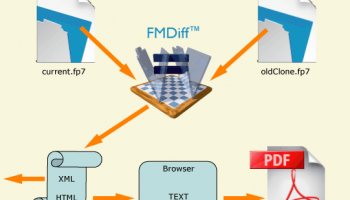
FMDiff is a standalone C++ application capable to compare FileMaker Pro files or files saved as Clone without the need of any further software.
FMDiff reads two files simultaneously and follows the file's internal structure. Whenever it discovers any deviation this will be reported. It stops when it encounters a structural error with an appropriate error message.
If your solution suddenly exhibits strange behavior, how do you find out what happened to the files? How much time would you have to invest to find out? Would it be possible at all?
With FMDiff the basic test is done within minutes. Simply compare your backup or "Good Clone" against the solution. You immediately learn whether anything has changed and where, either due to human, hardware, or software error.
FMDiff compares your current solution against a previous one and reports the differences. For the first time it is now possible to verify that the internal file structure (tables, fields, relations, etc.) is the same as at the time of delivery. This is especially important for sensitive areas like accounting or healthcare.
You are able to document the progress in development and unauthorized modifications by someone else.
You even may compare files in environments where the original configuration does not exist, like ODBC, JDBC, ESS, or devices (camera) are not connected.
FMDiff knows whether your FileMaker Pro files are still intact. While comparing it checks the file's structure to be "well-formed". The licensed version of FMDiff even performs additional tests for ascending IDs and correct block lengths. This is something that even the native FileMaker Recover command does not always straighten out, which may lead to subsequent malfunctions or crashes.
FMDiff reads two files simultaneously and follows the file's internal structure. Whenever it discovers any deviation this will be reported. It stops when it encounters a structural error with an appropriate error message.
If your solution suddenly exhibits strange behavior, how do you find out what happened to the files? How much time would you have to invest to find out? Would it be possible at all?
With FMDiff the basic test is done within minutes. Simply compare your backup or "Good Clone" against the solution. You immediately learn whether anything has changed and where, either due to human, hardware, or software error.
FMDiff compares your current solution against a previous one and reports the differences. For the first time it is now possible to verify that the internal file structure (tables, fields, relations, etc.) is the same as at the time of delivery. This is especially important for sensitive areas like accounting or healthcare.
You are able to document the progress in development and unauthorized modifications by someone else.
You even may compare files in environments where the original configuration does not exist, like ODBC, JDBC, ESS, or devices (camera) are not connected.
FMDiff knows whether your FileMaker Pro files are still intact. While comparing it checks the file's structure to be "well-formed". The licensed version of FMDiff even performs additional tests for ascending IDs and correct block lengths. This is something that even the native FileMaker Recover command does not always straighten out, which may lead to subsequent malfunctions or crashes.
OS: Windows Vista, Windows Vista x64, Windows 7, Windows 7 x64, Windows 8, Windows 8 x64, Windows 10, Windows 10 x64
Add Your Review or 64-bit Compatibility Report
Top Other 64-bit downloads


Windows 10 x64 22H2
Windows 10 x64 demonstrates new levels of flexibility, navigation & familiarity
Trialware

Thaiphoon Burner 17.4.1.2
Designed for those who are in need of getting all available information
Freeware

Caffeine 1.98
Keep your computer awake effortlessly with Caffeine, the ultimate productivity tool.
Freeware
BIOS Agent Plus 2.2019.1.31
Can automatically identify your computer's BIOS and other system info
Demo | $29.95


SoftPerfect RAM Disk 26.2
High-performance RAM disk software lets you have a disk stored in memory.
Shareware | $29.00

Windows 7 x64
Windows 7 x64 is the next release of the Windows client operating system
Trialware | $199.99

Winabler 2.0.0.2
Drag-and-drop object enabler with standard Windows® menu object capture ability
Freeware


BlueStacks 5 5.21.210.1023
A lightweight emulator developed specifically for low-spec computers
Freeware
Members area
Top 64-bit Downloads
-
Windows 10 x64 22H2
x64 trialware download -
SoftPerfect RAM Disk 26.2
x64 shareware download -
Windows 7 x64
x64 trialware download -
XtraTools Professional
x64 26.2.1
x64 shareware download -
HWMonitor (64-bit) 1.53
x64 freeware download -
Windows 8 x64 RTM Build 9200
x64 trialware download -
7-Zip (x64 bit) 24.07
x64 open source download -
Lenovo Vantage 10.2001.10.0
x64 freeware download -
AkelPad (x64 bit) 4.9.8
x64 open source download -
Ashampoo WinOptimizer
FREE 26.00.12
x64 freeware download
Top Downloads
-
FreeCommander XE 2026 Build 941
shareware download -
Windows 10 x64 22H2
trialware download -
Windows 7 Service Pack 1 7601.17514.1011
freeware download -
FreeCommander XE
Portable 2026 Build 941
freeware download -
Dr. Hardware 2026 26.0.0
shareware download -
Thaiphoon Burner 17.4.1.2
freeware download -
Caffeine 1.98
freeware download -
RecoveryRobot Memory
Card Recovery 1.3.3
shareware download -
Revo Uninstaller 2.00
freeware download -
BIOS Agent Plus 2.2019.1.31
demo download -
Qemu Simple Boot 1.3
freeware download -
Unlocker 1.9.2
freeware download -
DirPrintOK 7.52
freeware download -
TweakNow WinSecret 7.9.8 Plus
trialware download -
SoftPerfect RAM Disk 26.2
shareware download