
GCalToolkit - X 64-bit Download
Popular x64 Tags
- contacts x64 download
- time x64 download
- schedule x64 download
- appointment x64 download
- todo x64 download
- pim x64 download
- calendar x64 download
- agenda x64 download
- scheduler x64 download
- database x64 download
- address book x64 download
- planner x64 download
- outlook x64 download
- notes x64 download
- organizer x64 download
- diary x64 download
- personal information manager x64 download
- tasks x64 download
- manager x64 download
- contact manager x64 download
- software x64 download
- organize x64 download
- personal x64 download
- task x64 download
- scheduling x64 download
- note x64 download
- reminder x64 download
- alarm x64 download
- outliner x64 download
- pda x64 download
GCalToolkit 2.24
Sponsored links:
license: Demo
downloads: 445
size: 50.40 MB
updated: 2024-10-05
tags: GCalToolkit, download GCalToolkit, GCalToolkit free download, Google Calendar Manager, Google Calendar, Calendar Organizer, Google Calendar, Calendar, Google, Organizer
Add to Basket

Neil Gerstenberg

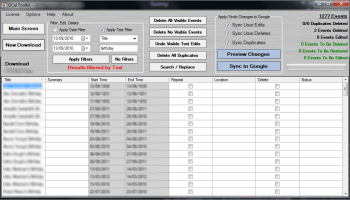
GCalToolkit, developed by Neil Gerstenberg, is an indispensable utility for anyone who relies heavily on Google Calendar for personal or professional scheduling. This robust software is designed to streamline and enhance the management of your Google Calendar, offering a suite of powerful tools that go beyond the basic functionalities provided by Google.
At its core, GCalToolkit excels in its ability to handle bulk operations with ease. Whether you need to delete, move, or copy large numbers of events, this tool simplifies what would otherwise be a laborious process. The software's intuitive interface allows users to filter events by various criteria such as date range, keywords, and calendar, making it easy to pinpoint and manage specific entries.
One of the standout features of GCalToolkit is its advanced search capabilities. Users can perform complex searches to locate events that match specific patterns or criteria, saving valuable time and effort. This is particularly useful for professionals who need to audit or review their schedules regularly.
Another noteworthy feature is the software's ability to merge multiple calendars. This is ideal for users juggling multiple Google accounts or managing both personal and professional schedules. GCalToolkit ensures that no event is overlooked by seamlessly integrating all your calendars into one cohesive view.
Data integrity and security are paramount, and GCalToolkit addresses these concerns with robust backup and restore functionalities. Users can create backups of their calendars, ensuring that their data is safe from accidental deletions or other unforeseen issues. The restore function allows for quick recovery, providing peace of mind for users who rely on their calendars for critical scheduling.
Customization is another area where GCalToolkit shines. The software offers various settings and preferences that allow users to tailor the tool to their specific needs. From adjusting the time zone to setting up automatic backups, GCalToolkit provides a high degree of flexibility.
In terms of performance, GCalToolkit is efficient and reliable. It handles large datasets with ease, ensuring that even users with extensive calendars experience smooth and responsive operation. The software is also regularly updated, reflecting Neil Gerstenberg's commitment to maintaining and improving the tool based on user feedback and evolving needs.
In summary, GCalToolkit is a comprehensive and versatile tool that significantly enhances the functionality of Google Calendar. Its powerful bulk operation capabilities, advanced search functions, calendar merging, and robust backup options make it an essential tool for anyone looking to optimize their scheduling and calendar management. Whether you're a busy professional, a project manager, or someone who simply wants more control over their calendar, GCalToolkit is a valuable addition to your digital toolkit.
At its core, GCalToolkit excels in its ability to handle bulk operations with ease. Whether you need to delete, move, or copy large numbers of events, this tool simplifies what would otherwise be a laborious process. The software's intuitive interface allows users to filter events by various criteria such as date range, keywords, and calendar, making it easy to pinpoint and manage specific entries.
One of the standout features of GCalToolkit is its advanced search capabilities. Users can perform complex searches to locate events that match specific patterns or criteria, saving valuable time and effort. This is particularly useful for professionals who need to audit or review their schedules regularly.
Another noteworthy feature is the software's ability to merge multiple calendars. This is ideal for users juggling multiple Google accounts or managing both personal and professional schedules. GCalToolkit ensures that no event is overlooked by seamlessly integrating all your calendars into one cohesive view.
Data integrity and security are paramount, and GCalToolkit addresses these concerns with robust backup and restore functionalities. Users can create backups of their calendars, ensuring that their data is safe from accidental deletions or other unforeseen issues. The restore function allows for quick recovery, providing peace of mind for users who rely on their calendars for critical scheduling.
Customization is another area where GCalToolkit shines. The software offers various settings and preferences that allow users to tailor the tool to their specific needs. From adjusting the time zone to setting up automatic backups, GCalToolkit provides a high degree of flexibility.
In terms of performance, GCalToolkit is efficient and reliable. It handles large datasets with ease, ensuring that even users with extensive calendars experience smooth and responsive operation. The software is also regularly updated, reflecting Neil Gerstenberg's commitment to maintaining and improving the tool based on user feedback and evolving needs.
In summary, GCalToolkit is a comprehensive and versatile tool that significantly enhances the functionality of Google Calendar. Its powerful bulk operation capabilities, advanced search functions, calendar merging, and robust backup options make it an essential tool for anyone looking to optimize their scheduling and calendar management. Whether you're a busy professional, a project manager, or someone who simply wants more control over their calendar, GCalToolkit is a valuable addition to your digital toolkit.
OS: Windows 11, Windows 10 32/64 bit, Windows 8 32/64 bit, Windows 7 32/64 bit
Add Your Review or 64-bit Compatibility Report
Top PIMS & Calendars 64-bit downloads


Miro for Windows 0.11.110
Collaborative online whiteboard for brainstorming and visual project planning.
Shareware | $8.00

QOwnNotes 26.3.21 Build 1294

QOwnNotes: Open-source note-taking and to-do list manager with cloud integration.
Demo

TopNotes 1.3.6.3
Topnotes. Organizes and encripts your information in a single file.
Shareware | $24.95

stagetimer.io 3.3.6
Stagetimer.io: Offline event timer for seamless stage management.
Shareware | $24.00


Taskade 4.6.14
Streamline your workflow with Taskade's collaborative task management tools.
Shareware

PersonalBrain 14.0.113.0
Visualize and organize your thoughts with TheBrain's intuitive mind mapping.
Demo | $219.00

MyInfo 4.01
New and easy-to-use personal reference-information manager
Shareware | $49.95
tags: gtd, reference, management, pim, information, info, milenix, myinfo, personal-reference, recall, find

Notes 2.3.1
Simple and intuitive note-taking app for organizing your thoughts effortlessly.
Open Source

Members area
Top 64-bit Downloads
-
mbFXWords 2.80
x64 freeware download -
FontAgent Pro 10.0.15.0
x64 trialware download -
Microsoft Office 2016
x64 2405 B17628.20164
x64 trialware download -
Print to PDF Toolkit Pro 3.0
x64 shareware download -
Microsoft Office 2010
Service Pack x64 SP2
x64 freeware download -
CSV2IIF Portable 5.0.060
x64 demo download -
Foxit Reader 2023.3
x64 freeware download -
Hl7Spy 24.1.227
x64 trialware download -
ABBYY FineReader
Professional 16.0.13
x64 trialware download -
Microsoft Office 2010
x64 14.0.6023.1000
x64 trialware download
Top Downloads
-
Quite Imposing Plus 6.0d
demo download -
Total CSV Converter 4.0
shareware download -
Active Barcode and QR
code Generator 1.24.8.15
freeware download -
Seavus Project Viewer 19.0
trialware download -
Miro for Windows 0.11.110
shareware download -
Flipping Book Writer 2.6
shareware download -
mbFXWords 2.80
freeware download -
SmarThru 4.04
freeware download -
SilentNotes 8.7.1
open source download -
LawTrust 5.1.1
shareware download -
HelpDesk 11.19.9557.25020
trialware download -
Odoo 19.0.20260326
demo download -
DeskWork Standard 4.0.2827
trialware download -
LiquiBase 5.0.2
trialware download -
CZ Excel Converter 1.9.4.6366
demo download