
GiMeSpace Power Control - X 64-bit Download
Popular x64 Tags
- cpu x64 download
- performance x64 download
- windows x64 download
- driver updates x64 download
- driver update x64 download
- cleaner x64 download
- defrag x64 download
- system x64 download
- drivers update x64 download
- tune x64 download
- tweak x64 download
- registry cleaner x64 download
- security x64 download
- video driver update x64 download
- optimizer x64 download
- registry x64 download
- uninstall x64 download
- speed x64 download
- boost x64 download
- faster x64 download
- system utilities x64 download
- utility x64 download
- optimize x64 download
- driver update software x64 download
- startup x64 download
- disk cleaner x64 download
- clean disk x64 download
- clean x64 download
- vista x64 download
- disk x64 download
GiMeSpace Power Control 1.1.1.16
Sponsored links:

GiMeSpace

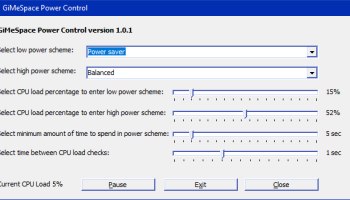
When you want to save battery life on a laptop or save energy and have a cool and quiet computer it is best to use that 'Power Saver' energy scheme. However, sometimes you want to use the full power of your computer when loading programs or performing specific CPU intensive tasks. Not even the 'Balanced' energy scheme allows you to have the best of both worlds. This program is switching automatic between low and high power energy plans depending on the load of the CPU. This way you will always save energy when no power is needed, but also make all power available once the system needs it. On the top part of the GiMeSpace Power Control window you can select the 2 power schemes you want to switch between, it can be the system default schemes or custom schemes. It is recommended to use the 'Power Saver' as the low power scheme and the 'Balanced' as the high power scheme. 'Balanced' provides more dynamic CPU frequency adjustments then the 'High Performance' scheme. Next you can adjust the CPU loads that trickers a switch between the schemes. The low setting is the percentage that will cause a switch to the low power scheme if the CPU load drops below this number. Around 10 to 20% usually works well. The high setting is the percentage that will cause a switch to the high power scheme if the CPU load goes above this number. Around 50 to 60% usually works well. Please note that once a switch to the high power scheme has been made the CPU load drops automatic because there is more CPU capacity available on a higher frequency. Then you can select the minimum time that needs to pass before a switch back is allowed. This to prevent too much switching. The last setting is the setting that tells this program how often the CPU load is checked. At 1 seconds the program will respond fast and still measure the CPU load accurately. You can also switch manually by simply clicking on the notification area icon. Right clicking on this icon brings up a menu.
OS: Win2000, Windows XP, Windows 7 x32, Windows 7 x64, Windows 8, Windows 10, WinServer, WinOther, Windows Vista, Windows Vista x64
Requirements: Windows Vista or later versions
Add Your Review or 64-bit Compatibility Report
Top System Maintenance 64-bit downloads


windows_exporter 0.31.5

Lightweight tool for exporting Windows metrics to Prometheus for monitoring.
Open Source

Windows 7 Service Pack 1 7601.17514.1011
SP1 - all previously publicly released updates for Windows 7 and Server 2008 R2
Freeware

WinToUSB 10.5 Build January 2
Easily create bootable USB drives from Windows installations with WinToUSB.
Shareware | $29.95

Microsoft Edge WebView2 Runtime 146.0.3856.78
WebView2 Runtime: Embed web content in apps with Edge's rendering engine.
Freeware

XtraTools Professional x64 26.2.1
XtraTools increases productivity and makes working with MS Windows easier.
Shareware | $29.99

TopNotify 3.1.1
TopNotify: Real-time notifications and alerts for seamless communication.
Open Source

Fortect 7.3.5.0
Fortect repairs and optimizes your PC, enhancing performance effortlessly.
Trialware | $30.95


Members area
Top 64-bit Downloads
-
HWiNFO64 6.28 B4200
x64 freeware download -
Windows 7 x64
x64 trialware download -
GRBackPro Server Backup
x64 11.2.0
x64 shareware download -
EasyTune6 B24.0119.1
x64 freeware download -
XtraTools Professional
x64 26.2.1
x64 shareware download -
BusDog x64 0.2
x64 freeware download -
PhotoRenamer 4.1
x64 freeware download -
Laplink DiskImage
Professional x64 10.0.71
x64 trialware download -
CIB pdf brewer 4.20.0
x64 freeware download -
Windows 10 x64 22H2
x64 trialware download
Top Downloads
-
FreeCommander XE
Portable 2026 Build 941
freeware download -
FMDiff 4.0.5
demo download -
Open Files from XLSX to
XLS 5.2
shareware download -
FURY CTRL 2.0.65.0
freeware download -
Shell Tools 2.0.1
freeware download -
Vim 9.2.0235
open source download -
AnyMP4 Data Recovery 1.5.12
shareware download -
PCtransfer 1.0.0.1033
freeware download -
Software to Data
Recovery 5.8.4.1
shareware download -
EaseUS Key Finder 4.1.6 Build 20240910
demo download -
Music Collection 3.9.7.2
freeware download -
WinFindr 1.9
shareware download -
File Compression 1.0
commercial download -
windows_exporter 0.31.5
open source download -
Caffeine 1.98
freeware download