
Google SketchUp Pro - X 64-bit Download
Popular x64 Tags
- photo editor x64 download
- software x64 download
- image editor x64 download
- image editing x64 download
- photos x64 download
- photoshop x64 download
- color x64 download
- design x64 download
- jpeg x64 download
- editor x64 download
- plugin x64 download
- image enhancement x64 download
- exif x64 download
- watermark x64 download
- rotate x64 download
- batch x64 download
- pictures x64 download
- graphics x64 download
- image x64 download
- digital camera x64 download
- photo x64 download
- graphic x64 download
- images x64 download
- resize x64 download
- paint x64 download
- camera x64 download
- digital x64 download
- digital imaging x64 download
- picture x64 download
- jpg x64 download
Google SketchUp Pro 2020
Sponsored links:
license: Shareware ($495.00)
downloads: 4637
size: 37.00 MB
updated: 2020-01-02
tags: complete, create, earth, email, files, google, google earth, google earth pro, google sketchup, ideas, process, select, sketchup, time, tool
Add to Basket

Google

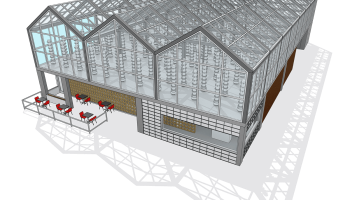
Google SketchUp is software that you can use to create, modify and share 3D models. It's easier to learn than other 3D modeling programs, which is why so many people are already using it. We designed SketchUp's simplified toolset, guided drawing system and clean look-and-feel to help you concentrate on two things: getting your work done as efficiently as possible, and having fun while you're doing it.
Who uses SketchUp Pro? Everyone.
Hundreds of thousands of professionals in (take a deep breath) architecture, construction, engineering, commercial interiors, light construction, landscape architecture, kitchen & bath design, urban planning, game design, film & stage, woodworking, and plenty of other fields use SketchUp Pro all the time, every day. It’s the all-purpose antidote to complicated, expensive CAD software.
A smarter way to think about 3D modeling
SketchUp Pro is like a pencil with superpowers. Start by drawing lines and shapes. Push and pull surfaces to turn them into 3D forms. Stretch, copy, rotate and paint to make anything you like. More advanced? Start modeling from CAD and terrain data, photographs or even hand sketches. Build models with custom behaviors and attributes. SketchUp Pro is as simple and as powerful as you want it to be.
Turn your models into drawings with LayOut
At some point in every project, you need to produce a set of drawings that shows your model: plans, sections, elevations, perspectives. LayOut in SketchUp Pro lets you add model views to pages, choose drawing scales, adjust line weights and add dimensions, callouts and graphics. Changes to your model are reflected automatically in LayOut. When it’s time, export PDFs, images and CAD files.
Get good, fast.
There’s a reason SketchUp is synonymous with friendly and forgiving 3D modeling software: we don’t sacrifice usability for the sake of functionality. With handy contextual tips, a dedicated Instructor panel for beginners, and mountains of online resources, help is always on the way. And just in case, every SketchUp Pro license includes a year of free technical support.
No software is an island
We built SketchUp Pro to slide right into your existing workflow. Ready for some alphabet soup? With importers for DXF, DWG, 3DS, DAE, KMZ, TIF, JPG, PNG and a few more, you can bring in drawings, models and images to your heart’s content. SketchUp Pro also exports all of those formats, plus PDF, OBJ, FBX, XSI, VRML, MP4, WEBM and AVI. OMG.
Slides are boring. Present from SketchUp Pro.
Scenes let you save views of your model to pull up anytime. Styles provide endless visual effects to make your work look precise, sketchy or anything in between. Section Planes slice through models for creating sectional views. Go fullscreen, walk around, add labels and export flyover animations. Present from SketchUp Pro and get your point across every single time.
Models and plugins aplenty
Need a particular chair for the room you’re designing? A lamp for your carriage house? A rhino for your zoo? You’ll find almost anything you need in SketchUp’s 3D Warehouse, the world’s biggest repository of free 3D models. And as for plugins that provide extra features and tools, our all-new Extension Warehouse is your ticket to add-on nirvana.
Don’t just design. Analyze.
SketchUp Pro can accurately predict where shadows will fall, given any time, date and location on earth. It can show you exactly what you’ll see from anywhere in your model. It will precisely calculate the area of any surface or material, or the volume of any enclosed 3D shape. It lets you add attributes to objects, and can spit out lists and reports with deliciously useful data.
Who uses SketchUp Pro? Everyone.
Hundreds of thousands of professionals in (take a deep breath) architecture, construction, engineering, commercial interiors, light construction, landscape architecture, kitchen & bath design, urban planning, game design, film & stage, woodworking, and plenty of other fields use SketchUp Pro all the time, every day. It’s the all-purpose antidote to complicated, expensive CAD software.
A smarter way to think about 3D modeling
SketchUp Pro is like a pencil with superpowers. Start by drawing lines and shapes. Push and pull surfaces to turn them into 3D forms. Stretch, copy, rotate and paint to make anything you like. More advanced? Start modeling from CAD and terrain data, photographs or even hand sketches. Build models with custom behaviors and attributes. SketchUp Pro is as simple and as powerful as you want it to be.
Turn your models into drawings with LayOut
At some point in every project, you need to produce a set of drawings that shows your model: plans, sections, elevations, perspectives. LayOut in SketchUp Pro lets you add model views to pages, choose drawing scales, adjust line weights and add dimensions, callouts and graphics. Changes to your model are reflected automatically in LayOut. When it’s time, export PDFs, images and CAD files.
Get good, fast.
There’s a reason SketchUp is synonymous with friendly and forgiving 3D modeling software: we don’t sacrifice usability for the sake of functionality. With handy contextual tips, a dedicated Instructor panel for beginners, and mountains of online resources, help is always on the way. And just in case, every SketchUp Pro license includes a year of free technical support.
No software is an island
We built SketchUp Pro to slide right into your existing workflow. Ready for some alphabet soup? With importers for DXF, DWG, 3DS, DAE, KMZ, TIF, JPG, PNG and a few more, you can bring in drawings, models and images to your heart’s content. SketchUp Pro also exports all of those formats, plus PDF, OBJ, FBX, XSI, VRML, MP4, WEBM and AVI. OMG.
Slides are boring. Present from SketchUp Pro.
Scenes let you save views of your model to pull up anytime. Styles provide endless visual effects to make your work look precise, sketchy or anything in between. Section Planes slice through models for creating sectional views. Go fullscreen, walk around, add labels and export flyover animations. Present from SketchUp Pro and get your point across every single time.
Models and plugins aplenty
Need a particular chair for the room you’re designing? A lamp for your carriage house? A rhino for your zoo? You’ll find almost anything you need in SketchUp’s 3D Warehouse, the world’s biggest repository of free 3D models. And as for plugins that provide extra features and tools, our all-new Extension Warehouse is your ticket to add-on nirvana.
Don’t just design. Analyze.
SketchUp Pro can accurately predict where shadows will fall, given any time, date and location on earth. It can show you exactly what you’ll see from anywhere in your model. It will precisely calculate the area of any surface or material, or the volume of any enclosed 3D shape. It lets you add attributes to objects, and can spit out lists and reports with deliciously useful data.
OS: Windows XP, Windows Vista, Windows Vista x64, Windows 7, Windows 7 x64, Windows 8, Windows 8 x64, Windows 10, Windows 10 x64, Mac OS X
Add Your Review or 64-bit Compatibility Report
Top Editors 64-bit downloads


CorelDRAW X5 2025 26.2.0.29
Versatile graphic design suite for vector illustration and layout creation.
Trialware | $30.75


Infix PDF Editor 7.7.0
Edit PDFs like a word processor - use tabs, spellcheck, find & replace...
Demo | $99.00

Gimp for x64 Windows 2.10.38
App for image manipulation which comes bundled with many options and tools
Open Source

SILKYPIX Developer Studio 11.1.14.0
Improve your images with this easy-to-use software utility
Trialware | $149.00

Adobe Photoshop Elements 2024.3
Powerful yet easy-to-use photo editing software for print, e-mail, and the Web
Trialware | $99.99
Members area
Top 64-bit Downloads
-
cPicture (x64 bit) 4.1
x64 freeware download -
PhotoFiltre 11.6.1
x64 freeware download -
VanceAI 1.0.0.7
x64 shareware download -
Gimp for x64 Windows 2.10.38
x64 open source download -
SILKYPIX Developer
Studio 11.1.14.0
x64 trialware download -
Adobe Photoshop Elements 2024.3
x64 trialware download -
Portable PhotoFiltre 11.6.1
x64 freeware download -
Potrace for Windows (x64
bit) 1.16
x64 open source download -
AcroPDF 6.2
x64 shareware download -
HyperCam (x64 bit) 2.29.00
x64 freeware download
Top Downloads
-
CorelDRAW X5 2025 26.2.0.29
trialware download -
Fotosizer 3.21.0.594
freeware download -
cPicture (x64 bit) 4.1
freeware download -
MSU Subtitle Remover
VirtualDub plugin 3.0beta2
freeware download -
PhotoFiltre 11.6.1
freeware download -
TinyPDF 3.00
freeware download -
Zeus 1.5
freeware download -
Scripthea 3.0.0
open source download -
Glise 1.7.1
shareware download -
JPEG to PDF Converter 1.1
freeware download -
restoreInpaint 006a2
freeware download -
VanceAI 1.0.0.7
shareware download -
AAA Logo 2022
freeware download -
Pixlr 2.1.1
freeware download -
Anim8or 1.00
freeware download