
GPU Caps Viewer - X 64-bit Download
Popular x64 Tags
- cpu x64 download
- performance x64 download
- windows x64 download
- driver updates x64 download
- driver update x64 download
- cleaner x64 download
- defrag x64 download
- system x64 download
- drivers update x64 download
- tune x64 download
- tweak x64 download
- registry cleaner x64 download
- security x64 download
- video driver update x64 download
- optimizer x64 download
- registry x64 download
- uninstall x64 download
- speed x64 download
- boost x64 download
- faster x64 download
- system utilities x64 download
- utility x64 download
- optimize x64 download
- driver update software x64 download
- startup x64 download
- disk cleaner x64 download
- clean disk x64 download
- clean x64 download
- vista x64 download
- disk x64 download
GPU Caps Viewer 1.64.2.0
Sponsored links:
license: Freeware
downloads: 1021
size: 14.30 MB
updated: 2025-05-23
tags: GPU Caps Viewer, download GPU Caps Viewer, GPU Caps Viewer free download, CPU analysis, GPU Burner, GPU Viewer, GPU, graphic card, OpenGL, VRAM
Add to Basket

Jerome Guinot

**GPU Caps Viewer: A Comprehensive Tool for Graphics Card Analysis**
GPU Caps Viewer, developed by Jerome Guinot, is a robust utility designed for users who need detailed information about their graphics cards. This software is particularly useful for gamers, developers, and tech enthusiasts who want to delve deep into the capabilities and performance metrics of their GPUs.
**User Interface and Experience**
The interface of GPU Caps Viewer is straightforward and user-friendly, making it accessible to both novice users and seasoned tech experts. The main window is neatly organized, displaying a wealth of information without overwhelming the user. Tabs are used effectively to categorize data, allowing users to navigate through different sections such as GPU information, OpenGL, Vulkan, OpenCL, and CUDA capabilities with ease.
**Key Features**
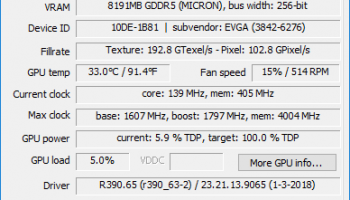
1. **Detailed GPU Information**: GPU Caps Viewer provides comprehensive details about the graphics card, including GPU name, memory size, GPU temperature, and clock speeds. This information is crucial for users who want to monitor their hardware's performance or troubleshoot issues.
2. **OpenGL and Vulkan Support**: The software offers extensive support for OpenGL and Vulkan APIs, displaying supported extensions and capabilities. This feature is particularly beneficial for developers who need to ensure compatibility and optimize their applications for different graphics cards.
3. **OpenCL and CUDA Capabilities**: For users interested in parallel computing, GPU Caps Viewer provides insights into OpenCL and CUDA capabilities. This includes the number of compute units, maximum work group size, and supported versions, enabling users to assess the computational power of their GPUs.
4. **Real-time Monitoring**: The software includes a real-time monitoring feature that tracks GPU temperature, load, and power consumption. This is essential for users who need to ensure their systems are running efficiently and to prevent overheating.
5. **Benchmarking Tools**: GPU Caps Viewer comes with built-in benchmarking tools that allow users to test the performance of their graphics cards. These tests can help users compare their hardware against other models and identify potential areas for improvement.
6. **Stability Test**: The software includes a stability test feature, which is useful for overclockers who want to ensure their GPUs remain stable under increased loads.
**Performance and Compatibility**
GPU Caps Viewer is lightweight and does not consume significant system resources, making it ideal for running alongside other applications. It is compatible with a wide range of graphics cards and supports multiple operating systems, ensuring broad accessibility for users.
**Conclusion**
In summary, GPU Caps Viewer is an invaluable tool for anyone interested in understanding and optimizing their graphics card's performance. Its comprehensive feature set, combined with a user-friendly interface, makes it a must-have utility for gamers, developers, and tech enthusiasts alike. Whether you're looking to monitor your GPU's performance, test its limits, or ensure compatibility with the latest APIs, GPU Caps Viewer provides all the tools you need in one convenient package.
GPU Caps Viewer, developed by Jerome Guinot, is a robust utility designed for users who need detailed information about their graphics cards. This software is particularly useful for gamers, developers, and tech enthusiasts who want to delve deep into the capabilities and performance metrics of their GPUs.
**User Interface and Experience**
The interface of GPU Caps Viewer is straightforward and user-friendly, making it accessible to both novice users and seasoned tech experts. The main window is neatly organized, displaying a wealth of information without overwhelming the user. Tabs are used effectively to categorize data, allowing users to navigate through different sections such as GPU information, OpenGL, Vulkan, OpenCL, and CUDA capabilities with ease.
**Key Features**
1. **Detailed GPU Information**: GPU Caps Viewer provides comprehensive details about the graphics card, including GPU name, memory size, GPU temperature, and clock speeds. This information is crucial for users who want to monitor their hardware's performance or troubleshoot issues.
2. **OpenGL and Vulkan Support**: The software offers extensive support for OpenGL and Vulkan APIs, displaying supported extensions and capabilities. This feature is particularly beneficial for developers who need to ensure compatibility and optimize their applications for different graphics cards.
3. **OpenCL and CUDA Capabilities**: For users interested in parallel computing, GPU Caps Viewer provides insights into OpenCL and CUDA capabilities. This includes the number of compute units, maximum work group size, and supported versions, enabling users to assess the computational power of their GPUs.
4. **Real-time Monitoring**: The software includes a real-time monitoring feature that tracks GPU temperature, load, and power consumption. This is essential for users who need to ensure their systems are running efficiently and to prevent overheating.
5. **Benchmarking Tools**: GPU Caps Viewer comes with built-in benchmarking tools that allow users to test the performance of their graphics cards. These tests can help users compare their hardware against other models and identify potential areas for improvement.
6. **Stability Test**: The software includes a stability test feature, which is useful for overclockers who want to ensure their GPUs remain stable under increased loads.
**Performance and Compatibility**
GPU Caps Viewer is lightweight and does not consume significant system resources, making it ideal for running alongside other applications. It is compatible with a wide range of graphics cards and supports multiple operating systems, ensuring broad accessibility for users.
**Conclusion**
In summary, GPU Caps Viewer is an invaluable tool for anyone interested in understanding and optimizing their graphics card's performance. Its comprehensive feature set, combined with a user-friendly interface, makes it a must-have utility for gamers, developers, and tech enthusiasts alike. Whether you're looking to monitor your GPU's performance, test its limits, or ensure compatibility with the latest APIs, GPU Caps Viewer provides all the tools you need in one convenient package.
OS: Windows 11, Windows 10 32/64 bit, Windows 8 32/64 bit, Windows 7 32/64 bit, Windows Vista, Windows XP 32/64 bit
Add Your Review or 64-bit Compatibility Report
Top System Maintenance 64-bit downloads


WinToUSB 10.5 Build January 2
Easily create bootable USB drives from Windows installations with WinToUSB.
Shareware | $29.95


windows_exporter 0.30.8
Lightweight tool for exporting Windows metrics to Prometheus for monitoring.
Open Source

Windows 7 Service Pack 1 7601.17514.1011
SP1 - all previously publicly released updates for Windows 7 and Server 2008 R2
Freeware


Boost 1.0.2
Boost helps you gain back control of your PC by improving performance.
Shareware | $19.95


TopNotify 3.1.1
TopNotify: Real-time notifications and alerts for seamless communication.
Open Source

Fortect 7.3.4.6
Fortect repairs and optimizes your PC, enhancing performance effortlessly.
Trialware | $30.95
Members area
Top 64-bit Downloads
-
EasyTune6 B24.0119.1
x64 freeware download -
HWiNFO64 6.28 B4200
x64 freeware download -
BusDog x64 0.2
x64 freeware download -
HWMonitor (64-bit) 1.53
x64 freeware download -
Windows 7 x64
x64 trialware download -
SoftPerfect RAM Disk 26.2
x64 shareware download -
Disk Pulse Pro x64 16.1.28
x64 trialware download -
FixWin for Win 10 10.2.2.0
x64 freeware download -
7z SFX Builder x64 2.1
x64 freeware download -
PhotoRenamer 4.1
x64 freeware download
Top Downloads
-
Open Files from XLSX to
XLS 5.2
shareware download -
File Compression 1.0
commercial download -
Shell Tools 2.0.1
freeware download -
Hotkeycontrol 8.3
shareware download -
Caffeine 1.98
freeware download -
FMDiff 4.0.5
demo download -
Nomad.NET 3.2.0.2890
freeware download -
Music Collection 3.9.6.0
freeware download -
FastKeys 6.05
demo download -
WinToUSB 10.5 Build January 2
shareware download -
FURY CTRL 2.0.65.0
freeware download -
Vim 9.2.0167
open source download -
novelWriter 2.8.2
open source download -
Thaiphoon Burner 17.4.1.2
freeware download -
GoodSync 12.9.26
freeware download