
Highlight - X 64-bit Download
Popular x64 Tags
- windows x64 download
- tool x64 download
- software x64 download
- view x64 download
- editor x64 download
- python x64 download
- xml x64 download
- sql x64 download
- dll x64 download
- resource x64 download
- compare x64 download
- dotnet x64 download
- csv x64 download
- uml x64 download
- table x64 download
- delphi x64 download
- xls x64 download
- perl x64 download
- html x64 download
- diff x64 download
- database x64 download
- query x64 download
- convert x64 download
- sql tools x64 download
- ide x64 download
- sql tool x64 download
- activestate x64 download
- doc x64 download
- txt x64 download
- mssql x64 download
Highlight 4.18
Sponsored links:
license: Open Source
downloads: 65
size: 9.20 MB
updated: 2025-11-12
tags: Highlight, download Highlight, Highlight free download, source code converter, code to HTML, highlight syntax, source code, syntax, reformat, indent
Add to Basket

André Simon

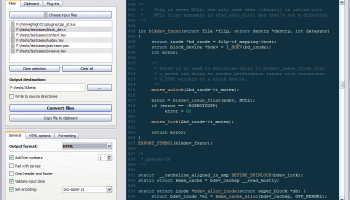
Highlight, developed by Andre Simon, is a versatile and robust software tool designed to enhance the readability and visual appeal of source code. This powerful utility transforms plain code into beautifully formatted text with syntax highlighting, making it an invaluable asset for developers, educators, and technical writers alike.
At its core, Highlight supports a wide array of programming languages, ensuring that users can work with virtually any codebase. The software's primary function is to convert source code into various formats, including HTML, XHTML, RTF, LaTeX, and TeX, among others. This flexibility allows users to seamlessly integrate highlighted code into web pages, documents, and presentations, thereby improving both the aesthetics and comprehensibility of the content.
One of Highlight's standout features is its extensive customization options. Users can choose from a plethora of predefined color schemes or create their own, tailoring the appearance of the highlighted code to suit their preferences or project requirements. Additionally, the software supports custom language definitions, enabling users to extend its capabilities to accommodate niche or proprietary programming languages.
Highlight is designed with user convenience in mind. It offers both a command-line interface and a graphical user interface, catering to different user preferences and workflows. The command-line interface is particularly useful for automating tasks and integrating Highlight into existing development pipelines, while the graphical user interface provides an intuitive, user-friendly experience for those who prefer a more visual approach.
The software also boasts a range of advanced features that further enhance its utility. These include the ability to add line numbers, handle nested code blocks, and support for various output encodings. Moreover, Highlight is equipped with a powerful configuration file system, allowing users to save and reuse their settings across multiple projects.
Performance-wise, Highlight is both fast and efficient, capable of processing large codebases with ease. Its lightweight nature ensures that it does not impose a significant burden on system resources, making it suitable for use on a wide range of hardware configurations.
In summary, Highlight by Andre Simon is a comprehensive and highly adaptable tool that excels at making source code more readable and visually appealing. Its extensive language support, customization options, and user-friendly interfaces make it a valuable addition to any developer's toolkit. Whether you're looking to enhance your documentation, create polished presentations, or simply improve the readability of your code, Highlight is a reliable and effective solution.
At its core, Highlight supports a wide array of programming languages, ensuring that users can work with virtually any codebase. The software's primary function is to convert source code into various formats, including HTML, XHTML, RTF, LaTeX, and TeX, among others. This flexibility allows users to seamlessly integrate highlighted code into web pages, documents, and presentations, thereby improving both the aesthetics and comprehensibility of the content.
One of Highlight's standout features is its extensive customization options. Users can choose from a plethora of predefined color schemes or create their own, tailoring the appearance of the highlighted code to suit their preferences or project requirements. Additionally, the software supports custom language definitions, enabling users to extend its capabilities to accommodate niche or proprietary programming languages.
Highlight is designed with user convenience in mind. It offers both a command-line interface and a graphical user interface, catering to different user preferences and workflows. The command-line interface is particularly useful for automating tasks and integrating Highlight into existing development pipelines, while the graphical user interface provides an intuitive, user-friendly experience for those who prefer a more visual approach.
The software also boasts a range of advanced features that further enhance its utility. These include the ability to add line numbers, handle nested code blocks, and support for various output encodings. Moreover, Highlight is equipped with a powerful configuration file system, allowing users to save and reuse their settings across multiple projects.
Performance-wise, Highlight is both fast and efficient, capable of processing large codebases with ease. Its lightweight nature ensures that it does not impose a significant burden on system resources, making it suitable for use on a wide range of hardware configurations.
In summary, Highlight by Andre Simon is a comprehensive and highly adaptable tool that excels at making source code more readable and visually appealing. Its extensive language support, customization options, and user-friendly interfaces make it a valuable addition to any developer's toolkit. Whether you're looking to enhance your documentation, create polished presentations, or simply improve the readability of your code, Highlight is a reliable and effective solution.
OS: Windows 11, Windows 10 32/64 bit, Windows 8 32/64 bit, Windows 7 32/64 bit, Windows Vista, Windows XP 32/64 bit
Add Your Review or 64-bit Compatibility Report
Top Other 64-bit downloads


JProfiler 16.0.0
JProfiler is a powerful Java profiler for performance tuning and memory analysis.
Trialware | $549.00

Android Studio 2025.3.2 Panda 2
Android Studio: Powerful IDE for Android app development with robust tools.
Freeware


Flyff 2.4.9
Vagrant simplifies environment setup for developers with portable, reproducible workflows.
Open Source
Members area
Top 64-bit Downloads
-
dotNet Sniffer 64-bit
x64 2.0
x64 freeware download -
DotNetBrowser 3.5.1
x64 commercial download -
Syncro SVN Client x64 10.1 B2015040812
x64 trialware download -
Dart Editor 2.19.6
x64 open source download -
PDF Viewer SDK ActiveX
x64 8.5
x64 shareware download -
Software Ideas Modeler
Portable x64 14.55
x64 freeware download -
TortoiseSVN for 64-bit
System 1.14.7.29687
x64 freeware download -
Lazarus x64 3.2
x64 freeware download -
HPC Pack 2008 R2 SDK x64 3.3.3950 SP3
x64 freeware download -
Microsoft Speech SDK 11
x64 freeware download
Top Downloads
-
NASM 2.16.01
open source download -
Library .NET 19.8.8201
trialware download -
WebData 10.2.4.0
shareware download -
jPDFImages 2021R1
demo download -
IdleX 1.11.2
freeware download -
Python 3.14.3
open source download -
Delphi 12.0
shareware download -
UtilsLib 7.2
demo download -
OpenWire 8.0.0.156
freeware download -
Swapy 0.5.4
open source download -
GeeXLab 0.32.0
freeware download -
PHP 8.5.4
open source download -
.NET Logging Library 2.20
shareware download -
Document .Net 2026.3.5
demo download -
PythonCard 0.8.2
open source download