
InstalledAppView - X 64-bit Download
Popular x64 Tags
- cpu x64 download
- performance x64 download
- windows x64 download
- driver updates x64 download
- driver update x64 download
- cleaner x64 download
- defrag x64 download
- system x64 download
- drivers update x64 download
- tune x64 download
- tweak x64 download
- registry cleaner x64 download
- security x64 download
- video driver update x64 download
- optimizer x64 download
- registry x64 download
- uninstall x64 download
- speed x64 download
- boost x64 download
- faster x64 download
- system utilities x64 download
- utility x64 download
- optimize x64 download
- driver update software x64 download
- startup x64 download
- disk cleaner x64 download
- clean disk x64 download
- clean x64 download
- vista x64 download
- disk x64 download
InstalledAppView 1.09
Sponsored links:
license: Freeware
downloads: 36
size: 72 kB
updated: 2024-09-04
tags: InstalledAppView, utility, application, software, viewer, Nir Sofer, view, uninstall program, uninstall, download InstalledAppView, registry, app information, view registry key, management, InstalledAppView free download
Add to Basket

Nir Sofer

InstalledAppView, developed by the renowned Nir Sofer, is a lightweight yet powerful utility designed to provide users with a comprehensive overview of installed applications on their Windows systems. This tool stands out for its simplicity, efficiency, and the depth of information it offers, making it an indispensable asset for both casual users and IT professionals.
At its core, InstalledAppView scans your system and compiles a detailed list of all installed applications, including those installed from the Microsoft Store and traditional desktop applications. The software excels in presenting this information in a clear, organized manner, allowing users to quickly identify and manage their installed software.
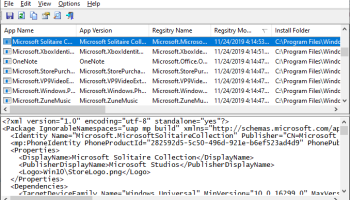
One of the standout features of InstalledAppView is its ability to display extensive details about each application. This includes the application's name, version, installation date, installation folder, and even the uninstall command. Such detailed information can be crucial for troubleshooting, system audits, or simply keeping track of what’s installed on your machine.
The user interface is minimalist and intuitive, staying true to Nir Sofer’s design philosophy. It features a straightforward, grid-based layout where each row represents an installed application and each column provides specific details about that application. Users can easily sort and filter this information, making it simple to find exactly what they’re looking for.
InstalledAppView also offers robust export options. Users can export the list of installed applications to various formats, including text files, CSV, HTML, and XML. This feature is particularly useful for creating software inventories or sharing information with colleagues.
Another notable aspect of InstalledAppView is its portability. The software doesn’t require installation and can be run directly from a USB drive, making it an excellent tool for on-the-go diagnostics and system management. This portability ensures that users can carry their essential utilities with them and use them on any compatible Windows system without leaving a footprint.
Performance-wise, InstalledAppView is highly efficient, capable of scanning and displaying installed applications swiftly without consuming significant system resources. This makes it suitable for use on both high-end and older, less powerful machines.
In summary, InstalledAppView by Nir Sofer is a meticulously crafted utility that combines simplicity with powerful functionality. Its ability to provide detailed information about installed applications, coupled with its user-friendly interface and portability, makes it a must-have tool for anyone looking to manage their Windows software effectively. Whether you’re an IT professional conducting system audits or a casual user wanting to keep track of your installed applications, InstalledAppView is an invaluable addition to your software toolkit.
At its core, InstalledAppView scans your system and compiles a detailed list of all installed applications, including those installed from the Microsoft Store and traditional desktop applications. The software excels in presenting this information in a clear, organized manner, allowing users to quickly identify and manage their installed software.
One of the standout features of InstalledAppView is its ability to display extensive details about each application. This includes the application's name, version, installation date, installation folder, and even the uninstall command. Such detailed information can be crucial for troubleshooting, system audits, or simply keeping track of what’s installed on your machine.
The user interface is minimalist and intuitive, staying true to Nir Sofer’s design philosophy. It features a straightforward, grid-based layout where each row represents an installed application and each column provides specific details about that application. Users can easily sort and filter this information, making it simple to find exactly what they’re looking for.
InstalledAppView also offers robust export options. Users can export the list of installed applications to various formats, including text files, CSV, HTML, and XML. This feature is particularly useful for creating software inventories or sharing information with colleagues.
Another notable aspect of InstalledAppView is its portability. The software doesn’t require installation and can be run directly from a USB drive, making it an excellent tool for on-the-go diagnostics and system management. This portability ensures that users can carry their essential utilities with them and use them on any compatible Windows system without leaving a footprint.
Performance-wise, InstalledAppView is highly efficient, capable of scanning and displaying installed applications swiftly without consuming significant system resources. This makes it suitable for use on both high-end and older, less powerful machines.
In summary, InstalledAppView by Nir Sofer is a meticulously crafted utility that combines simplicity with powerful functionality. Its ability to provide detailed information about installed applications, coupled with its user-friendly interface and portability, makes it a must-have tool for anyone looking to manage their Windows software effectively. Whether you’re an IT professional conducting system audits or a casual user wanting to keep track of your installed applications, InstalledAppView is an invaluable addition to your software toolkit.
OS: Windows 11, Windows 10 32/64 bit, Windows 8 32/64 bit
Add Your Review or 64-bit Compatibility Report
Top System Maintenance 64-bit downloads


windows_exporter 0.31.5
Lightweight tool for exporting Windows metrics to Prometheus for monitoring.
Open Source

Windows 7 Service Pack 1 7601.17514.1011
SP1 - all previously publicly released updates for Windows 7 and Server 2008 R2
Freeware

WinToUSB 10.5 Build January 2
Easily create bootable USB drives from Windows installations with WinToUSB.
Shareware | $29.95

Microsoft Edge WebView2 Runtime 146.0.3856.78

WebView2 Runtime: Embed web content in apps with Edge's rendering engine.
Freeware

XtraTools Professional x64 26.2.1
XtraTools increases productivity and makes working with MS Windows easier.
Shareware | $29.99

TopNotify 3.1.1
TopNotify: Real-time notifications and alerts for seamless communication.
Open Source

Fortect 7.3.5.0
Fortect repairs and optimizes your PC, enhancing performance effortlessly.
Trialware | $30.95


Members area
Top 64-bit Downloads
-
HWiNFO64 6.28 B4200
x64 freeware download -
GRBackPro Server Backup
x64 11.2.0
x64 shareware download -
Windows 7 x64
x64 trialware download -
Windows 10 x64 22H2
x64 trialware download -
EasyTune6 B24.0119.1
x64 freeware download -
XtraTools Professional
x64 26.2.1
x64 shareware download -
O&O MediaRecovery
64-bit 14.0.17
x64 demo download -
DAR 2.7.14
x64 open source download -
BusDog x64 0.2
x64 freeware download -
PhotoRenamer 4.1
x64 freeware download
Top Downloads
-
FreeCommander XE
Portable 2026 Build 941
freeware download -
FURY CTRL 2.0.65.0
freeware download -
FMDiff 4.0.5
demo download -
Open Files from XLSX to
XLS 5.2
shareware download -
Vim 9.2.0260
open source download -
Shell Tools 2.0.1
freeware download -
HWiNFO64 6.28 B4200
freeware download -
AnyMP4 Data Recovery 1.5.12
shareware download -
PCtransfer 1.0.0.1033
freeware download -
Software to Data
Recovery 5.8.4.1
shareware download -
EaseUS Key Finder 4.1.6 Build 20240910
demo download -
Pitara 5.0.9581.41149
open source download -
Music Collection 3.9.7.2
freeware download -
WinFindr 1.9
shareware download -
File Compression 1.0
commercial download